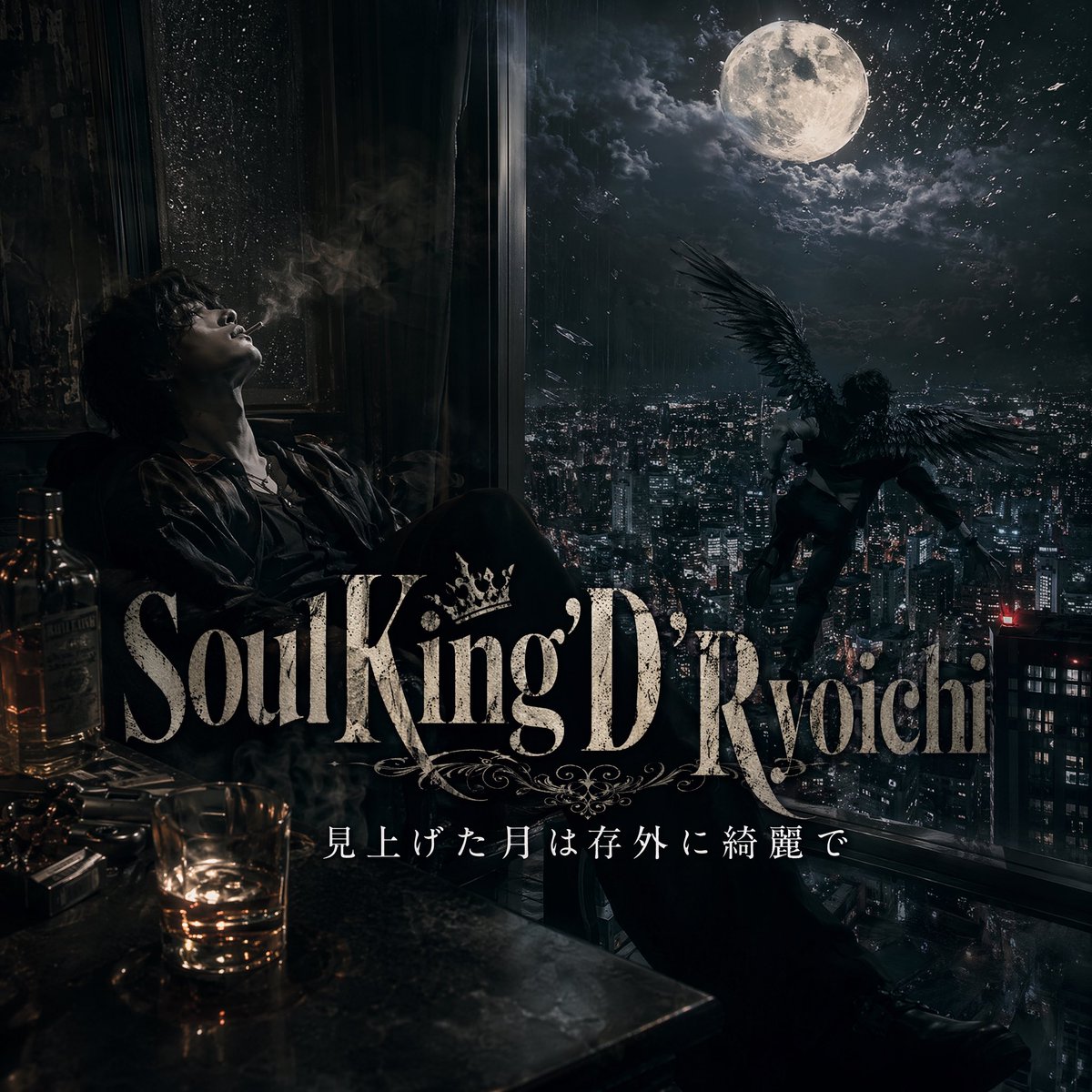
Dark Moonlit Noir Album Cover
A cinematic dark-fantasy music cover image featuring a brooding man, a moonlit city, and a winged figure, ideal for album art or lyric-based promotional visuals.
This is a GPT Image 2 prompt case for Graphic & Poster. Use the copy-ready prompt below to generate similar visuals, and review Awesome GPT Image 2 Prompts attribution plus commercial-use rights before reuse.
Free 1K preview
Generate one preview image instantly, no sign-up required.
Prompt
Copy-ready prompt
A dark, cinematic album-cover-style scene inside a high-rise room at night, viewed from a moody interior looking out over a vast modern city filled with dense skyscraper lights. On the left side, a solitary man sits slouched beside a tall rain-speckled window, Show every face clearly with natural, detailed facial features, wearing a dark suit or open-collar dress shirt with a disheveled, brooding presence. In the lower left foreground, place exactly 2 liquor bottles, 1 short tumbler glass with amber whiskey, and a cluttered tabletop reflecting low warm light. Outside the giant window on the right, a winged human figure with large black feathered wings hovers or descends over the city, silhouetted dramatically against a huge luminous full moon surrounded by torn clouds and faint sparkling particles in the sky. The palette is nearly monochrome with cold blue-black shadows and small warm amber highlights from the drink and room lights. Add layered atmospheric haze, smoke, wet glass texture, dramatic contrast, realistic photography blended with dark fantasy, luxury noir, melancholic and dangerous mood. Across the lower middle, overlay large ornate serif title typography reading {argument name="title text" default="Soul King D'Ryoichi"}, with a decorative crown and flourishes integrated into the lettering. Beneath it, add a smaller elegant Japanese subtitle line reading {argument name="subtitle text" default="見上げた月は存外に綺麗で"}. Make it look like a premium music single cover or visual for lyrics, highly detailed, polished, cinematic, centered composition, square format.Prompt variables
Editable argument placeholders found in the prompt, with their default values.
Best for
- - Graphic & Poster visual exploration
- - Image generation and reference-image edits
- - Reusable briefs that keep source attribution visible
Change these parts
- - Subject, product, character, or scene
- - Aspect ratio, camera, lighting, and background
- - Brand, text, color, and output constraints
Recommended model and settings
- - Model: gpt-image-2
- - Input mode: Text to Image
- - Aspect ratio: source
- - Commercial status: review original source
How to use this prompt
- 1. Copy the prompt and preserve its structure for the first test.
- 2. Replace the subject, context, and publishing channel.
- 3. Change one camera, lighting, or style variable per iteration.
- 4. Inspect the output, source, text, and rights before reuse.
Limitations, source, and reuse cautions
- - Generated output is an editable draft, not factual, legal, or rights evidence.
- - Review the linked source, people, brands, logos, text, and third-party media before commercial use.
More cases in this category
Prioritized by category, input mode compatibility, quality, and lower risk.





Reuse and source notes
Use this prompt safely after previewing the case.
- 1.Copy the prompt or open it directly in Dovoo with the generation button.
- 2.Adjust variables, aspect ratio, and reference images for your own use case.
- 3.Before publishing or paid usage, verify source rights, attribution requirements, and brand or likeness risks.
Can I use this prompt commercially?
Commercial-use status is allowed. Review the original source, license, brand constraints, and legal requirements before paid usage.
Where does this case come from?
This case is imported from Awesome GPT Image 2 Prompts; keep attribution visible and check the source URL before reuse.