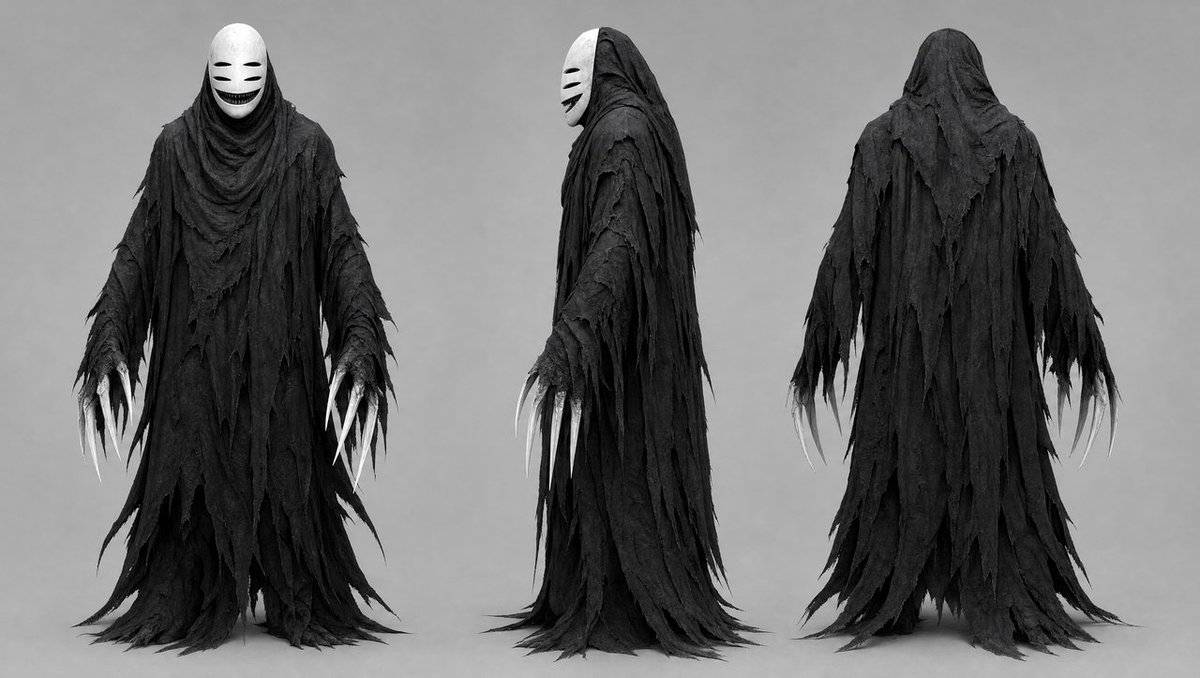
Dark Ghost Spirit Turnaround
Generates a grayscale three-view dark fantasy creature concept sheet for a ragged masked ghost spirit design.
This is a GPT Image 2 prompt case for Portrait & Character. Use the copy-ready prompt below to generate similar visuals, and review Awesome GPT Image 2 Prompts attribution plus commercial-use rights before reuse.
This prompt is designed for multiple reference images. We will open Dovoo with the prompt and the available preview image; add the remaining references in Dovoo before generating.
Free 1K preview
Generate one preview image instantly, no sign-up required.
Free text preview doesn’t preserve reference-image consistency.
Prompt
Copy-ready prompt
Goal: Create a dark fantasy character concept sheet for a ghostly faceless spirit, shown as a full-body costume/creature design turnaround.

Canvas: Wide horizontal studio concept-art canvas, approximately 16:9, grayscale monochrome, neutral light-gray background, soft even lighting, no environment, no props, no text.

Layout: Show exactly 3 full-body views of the same character, evenly spaced from left to right: 1 front view, 1 left side profile view, and 1 rear view. All three figures stand upright with arms hanging slightly away from the body, feet hidden under long trailing robes, centered vertically with their hems nearly touching the bottom edge.

Subject details: The character is {argument name="character archetype" default="a No-Face-like dark ghost spirit"}, tall and slender, fully covered in layered black tattered robes. The garment is made of many ragged, shredded strips of cloth, with torn triangular edges, frayed holes, draping folds, and long trailing hems that pool and taper near the floor. The silhouette is hooded, cloaked, and ominous, with no visible skin except pale claw-like fingers. The front and side views show a smooth white oval mask under the hood, featuring two narrow horizontal black eye slits, two short cheek marks, and a wide dark grinning mouth. The back view shows only the black hood and layered ragged cloak with no mask visible.

Hands and claws: Each visible hand has exactly 5 long curved white claws, thin and talon-like, extending from ragged black sleeves. In the front view, both hands are visible with 10 total claws; in the side view, the nearer hand is visible with 5 claws and a few partially obscured claws from the far hand; in the rear view, both hands hang at the sides with 10 total claws visible.

Material and texture: Emphasize rough cloth texture, torn gauze, distressed fabric, heavy folds, matte black layers, subtle gray highlights, and worn edges. The mask is smooth, porcelain-like, stark white, and contrasts strongly with the dark robes.

Visual style: {argument name="visual style" default="cinematic grayscale creature concept art"}, realistic costume design, high-detail horror character sheet, symmetrical studio presentation, soft shadows under the figures, sharp silhouette, eerie but elegant mood.

Constraints: Use exactly 3 views and no extra characters. Keep the image monochrome except for tonal gray shading. Do not add scenery, weapons, typography, logos, or watermarks. Maintain a clean neutral background and a professional production-design reference sheet look.
Prompt variables
Editable argument placeholders found in the prompt, with their default values.
Best for
- - Portrait & Character visual exploration
- - Image generation and reference-image edits
- - Reusable briefs that keep source attribution visible
Change these parts
- - Subject, product, character, or scene
- - Aspect ratio, camera, lighting, and background
- - Brand, text, color, and output constraints
Recommended model and settings
- - Model: gpt-image-2
- - Input mode: Multi Image to Image
- - Aspect ratio: source
- - Commercial status: review original source
How to use this prompt
- 1. Copy the prompt and preserve its structure for the first test.
- 2. Replace the subject, context, and publishing channel.
- 3. Change one camera, lighting, or style variable per iteration.
- 4. Inspect the output, source, text, and rights before reuse.
Limitations, source, and reuse cautions
- - Generated output is an editable draft, not factual, legal, or rights evidence.
- - Review the linked source, people, brands, logos, text, and third-party media before commercial use.
More cases in this category
Prioritized by category, input mode compatibility, quality, and lower risk.





Reuse and source notes
Use this prompt safely after previewing the case.
- 1.Copy the prompt or open it directly in Dovoo with the generation button.
- 2.Adjust variables, aspect ratio, and reference images for your own use case.
- 3.Before publishing or paid usage, verify source rights, attribution requirements, and brand or likeness risks.
Can I use this prompt commercially?
Commercial-use status is allowed. Review the original source, license, brand constraints, and legal requirements before paid usage.
Where does this case come from?
This case is imported from Awesome GPT Image 2 Prompts; keep attribution visible and check the source URL before reuse.