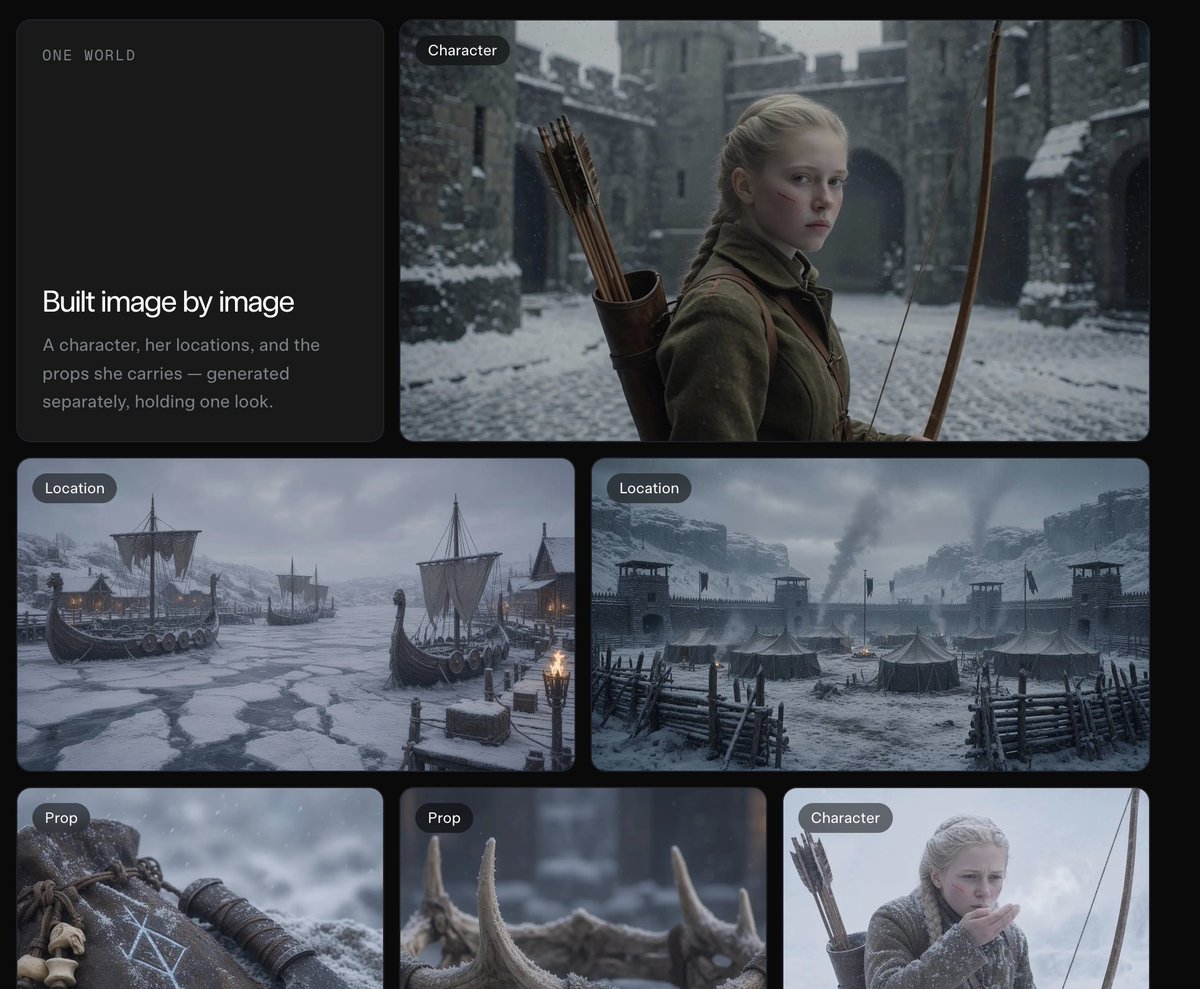
Dark Fantasy Worldbuilding Board
A cinematic grid presentation showing a consistent medieval archer character, snowy locations, and props for worldbuilding or image-generation showcases.
This is a GPT Image 2 prompt case for Illustration & Art. Use the copy-ready prompt below to generate similar visuals, and review Awesome GPT Image 2 Prompts attribution plus commercial-use rights before reuse.
Free 1K preview
Generate one preview image instantly, no sign-up required.
Prompt
Copy-ready prompt
Goal: Create a dark cinematic presentation board for a worldbuilding / image-generation workflow, showing how a consistent fantasy character, locations, and props are built image by image.

Canvas: Wide 4:3 composition on a nearly black background with rounded rectangular cards arranged in a clean grid, soft gaps, subtle shadows, and a muted premium UI feel.

Layout: Use exactly 6 visible cards. Card 1 is a tall text card on the upper left. Card 2 is a large wide character card on the upper right. Cards 3 and 4 are two medium landscape location cards across the middle row. Cards 5 and 6 are two smaller prop cards along the lower left and lower center, with a third lower-right character card partially visible/cropped at the edge if the canvas framing allows. Each image card has a small dark pill label in the top-left corner.

Text content: On the upper-left text card, include small spaced uppercase text “ONE WORLD” near the top. In the lower half, include the headline “Built image by image” and the body text “A character, her locations, and the props she carries — generated separately, holding one look.” Use clean modern sans-serif typography, white headline, muted gray body text.

Visible labeled image cards: 5 fully visible labeled image cards plus 1 text card. The labels are: 2 cards labeled “Character,” 2 cards labeled “Location,” and 2 cards labeled “Prop” if the lower-right crop is included; otherwise keep the main visible set as 1 Character, 2 Location, and 2 Prop. Do not add extra labels.

Subject details: The main character is {argument name="character description" default="a pale young blonde medieval archer girl with braided hair, serious expression, wool cloak and leather quiver of arrows"}. Place her in a snowy stone castle courtyard, holding a long wooden bow, with cold blue-gray lighting and shallow cinematic depth of field. The locations show {argument name="world setting" default="a grim Nordic medieval winter world"}: one frozen harbor with Viking-style longships trapped in ice, torchlight, mountains and snow; one fortified snowy military camp with tents, wooden palisades, watchtowers, smoke rising, and stormy clouds. The props show exactly 2 close-up items: a weathered leather pouch or wrist guard marked with pale runic symbols and small bones, and a row of antler or horn pieces in snow with blurred background.

Visual style: Photorealistic cinematic dark fantasy, desaturated blue-gray winter palette, falling snow, realistic textures, high detail, moody natural lighting, consistent medieval wardrobe and materials across all cards. Rounded card corners, elegant spacing, no bright colors.

Constraints: Keep the interface minimal and editorial, like a premium AI image-generation case study. Preserve the exact headline and body copy. Avoid logos, watermarks, charts, anime style, modern objects, or extra UI clutter.
Prompt variables
Editable argument placeholders found in the prompt, with their default values.
Best for
- - Illustration & Art visual exploration
- - Image generation and reference-image edits
- - Reusable briefs that keep source attribution visible
Change these parts
- - Subject, product, character, or scene
- - Aspect ratio, camera, lighting, and background
- - Brand, text, color, and output constraints
Recommended model and settings
- - Model: gpt-image-2
- - Input mode: Text to Image
- - Aspect ratio: source
- - Commercial status: review original source
How to use this prompt
- 1. Copy the prompt and preserve its structure for the first test.
- 2. Replace the subject, context, and publishing channel.
- 3. Change one camera, lighting, or style variable per iteration.
- 4. Inspect the output, source, text, and rights before reuse.
Limitations, source, and reuse cautions
- - Generated output is an editable draft, not factual, legal, or rights evidence.
- - Review the linked source, people, brands, logos, text, and third-party media before commercial use.
More cases in this category
Prioritized by category, input mode compatibility, quality, and lower risk.

Reuse and source notes
Use this prompt safely after previewing the case.
- 1.Copy the prompt or open it directly in Dovoo with the generation button.
- 2.Adjust variables, aspect ratio, and reference images for your own use case.
- 3.Before publishing or paid usage, verify source rights, attribution requirements, and brand or likeness risks.
Can I use this prompt commercially?
Commercial-use status is allowed. Review the original source, license, brand constraints, and legal requirements before paid usage.
Where does this case come from?
This case is imported from Awesome GPT Image 2 Prompts; keep attribution visible and check the source URL before reuse.