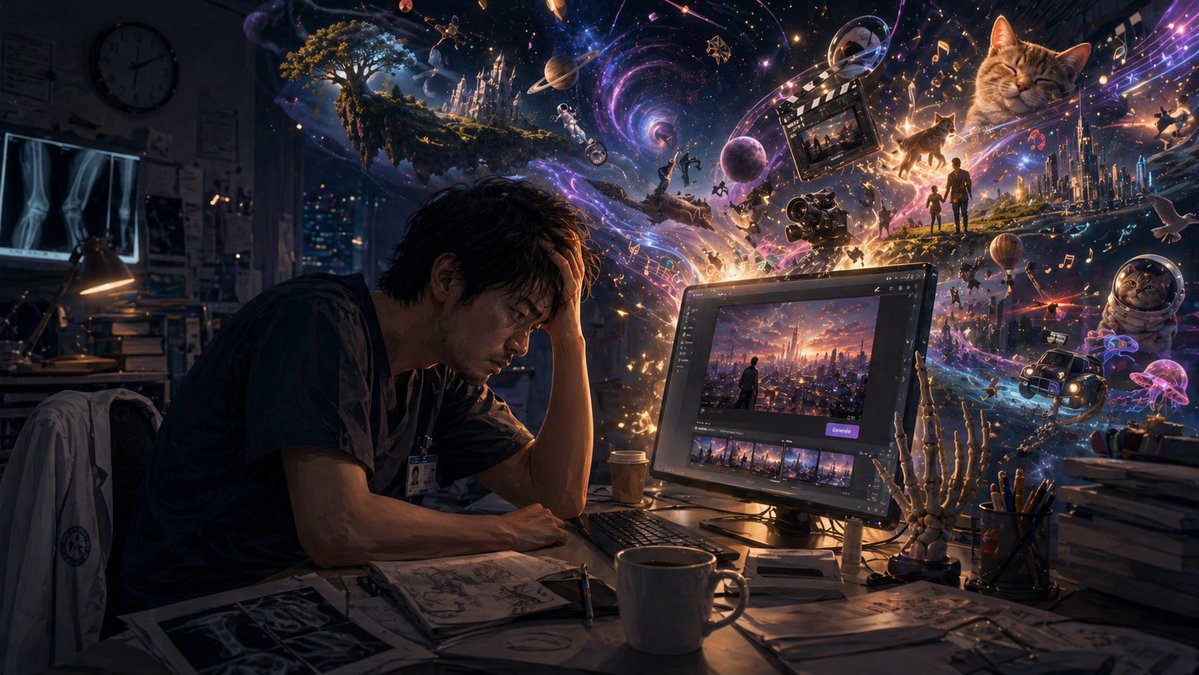
Dark Creative Overload at Night
This prompt generates a cinematic surreal scene of an exhausted creator at a desk while a storm of beautiful, dark imagination erupts from their computer, ideal for illustrating creative overwhelm or AI-inspired obsession.
This is a GPT Image 2 prompt case for Portrait & Character. Use the copy-ready prompt below to generate similar visuals, and review Awesome GPT Image 2 Prompts attribution plus commercial-use rights before reuse.
Free 1K preview
Generate one preview image instantly, no sign-up required.
Free text preview doesn’t preserve reference-image consistency.
Prompt
Copy-ready prompt
A moody cinematic digital illustration of a tired young creator sitting alone at a cluttered desk in a dark room at night, seen in three-quarter side view, leaning forward with one elbow on the desk and one hand covering part of the face in an exhausted, overwhelmed pose. Show every face clearly with natural, detailed facial features. The person wears dark casual clothes and a lanyard badge, suggesting a student, designer, or medical worker. The room feels realistic and slightly messy, with a desk lamp, papers, sketchbooks, mugs, stationery, and stacked books. On the left wall, include 2 illuminated X-ray films and a round wall clock, plus shelves and pinned notes in deep shadow. In front of the person is a glowing widescreen monitor showing an AI image generation or creative editing interface with a city-at-sunset artwork in the main preview and a row of thumbnail variations beneath it, modern dark UI, one purple action button. The monitor is the main light source, casting warm orange and cool blue highlights across the desk. Around the monitor and pouring out into the air, depict a vast surreal explosion of imagination and digital creativity: a swirling galaxy-like vortex with stars, nebula colors, spark particles, light trails, and cosmic dust in purple, blue, pink, and gold. Embed many floating dreamlike elements inside the swirl: a fantasy castle on a floating island with a tree, planets and moons, an astronaut, a film clapperboard, a video camera, musical notes, glowing silhouettes of people, a futuristic city skyline, a hot-air balloon, a car, birds, jellyfish-like luminous creatures, and multiple cats, including 1 giant sleeping orange tabby cat in the upper right and 1 cat in a space helmet near the lower right. The magical imagery should feel like thoughts escaping from the computer, beautiful but slightly dark and overwhelming, as if creativity, obsession, and emotional intensity are filling the room. Include a skeletal anatomy hand model standing beside the monitor on the right side of the desk, reinforcing an art-studio or study setting. Use dramatic low-key lighting, high contrast, intricate detail, volumetric glow, cinematic depth, and a balance of realism and fantastical surrealism. The overall mood is melancholic, imaginative, and darkly inspiring, visualizing the feeling of being consumed by ideas generated through {argument name="creative tool" default="AI image generation"}.Prompt variables
Editable argument placeholders found in the prompt, with their default values.
Best for
- - Portrait & Character visual exploration
- - Image generation and reference-image edits
- - Reusable briefs that keep source attribution visible
Change these parts
- - Subject, product, character, or scene
- - Aspect ratio, camera, lighting, and background
- - Brand, text, color, and output constraints
Recommended model and settings
- - Model: gpt-image-2
- - Input mode: Image to Image
- - Aspect ratio: source
- - Commercial status: review original source
How to use this prompt
- 1. Copy the prompt and preserve its structure for the first test.
- 2. Replace the subject, context, and publishing channel.
- 3. Change one camera, lighting, or style variable per iteration.
- 4. Inspect the output, source, text, and rights before reuse.
Limitations, source, and reuse cautions
- - Generated output is an editable draft, not factual, legal, or rights evidence.
- - Review the linked source, people, brands, logos, text, and third-party media before commercial use.
More cases in this category
Prioritized by category, input mode compatibility, quality, and lower risk.


Reuse and source notes
Use this prompt safely after previewing the case.
- 1.Copy the prompt or open it directly in Dovoo with the generation button.
- 2.Adjust variables, aspect ratio, and reference images for your own use case.
- 3.Before publishing or paid usage, verify source rights, attribution requirements, and brand or likeness risks.
Can I use this prompt commercially?
Commercial-use status is allowed. Review the original source, license, brand constraints, and legal requirements before paid usage.
Where does this case come from?
This case is imported from Awesome GPT Image 2 Prompts; keep attribution visible and check the source URL before reuse.