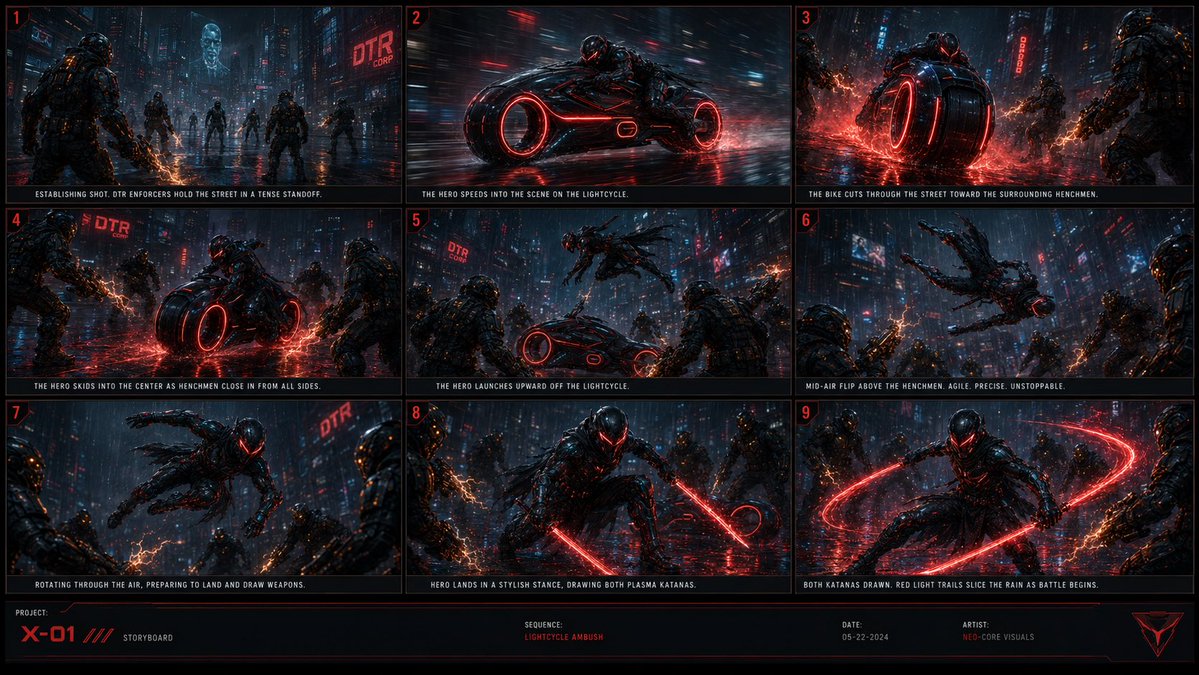
Cyberpunk Lightcycle Storyboard
Generates a 9-panel cinematic cyberpunk action storyboard sheet for a rain-soaked lightcycle ambush sequence.
This is a GPT Image 2 prompt case for Illustration & Art. Use the copy-ready prompt below to generate similar visuals, and review Awesome GPT Image 2 Prompts attribution plus commercial-use rights before reuse.
Free 1K preview
Generate one preview image instantly, no sign-up required.
Prompt
Copy-ready prompt
Goal: Create a cinematic cyberpunk action storyboard sheet for {argument name="project name" default="X-01"}, showing a black armored hero ambushed in a rain-soaked neon megacity and arriving on a red-glowing lightcycle before launching into combat.

Canvas: Wide 16:9 storyboard board, dark sci-fi presentation style, black background with thin red grid borders. Arrange exactly 9 widescreen panels in a 3-column by 3-row grid, each panel numbered in small red numerals at the top-left. Add a bottom production strip with project metadata.

Visual style: Hyper-detailed dark cyberpunk concept art, cinematic storyboard frames, wet reflective asphalt, heavy rain, blue-black city atmosphere, red neon accents, volumetric haze, motion blur, sparks, plasma arcs, chrome-black armor, high contrast lighting. The hero wears a sleek black futuristic exosuit with a glowing red visor and red energy highlights. Enemies are bulky armored enforcers with orange electrical weapons. The lightcycle is a low black futuristic motorcycle with oversized circular wheels glowing red.

Panel layout and required captions: Include exactly 9 discrete storyboard panels with these actions and captions:
1. Establishing wide shot: several DTR enforcers hold a rainy neon street in a tense standoff; distant holographic skull and red corporate sign. Caption: "ESTABLISHING SHOT. DTR ENFORCERS HOLD THE STREET IN A TENSE STANDOFF."
2. Side tracking shot: the hero speeds into the scene on the red-lit lightcycle, intense motion blur and rain streaks. Caption: "THE HERO SPEEDS INTO THE SCENE ON THE LIGHTCYCLE."
3. Rear/low angle: the bike cuts through the wet street toward surrounding henchmen, red water spray exploding from the wheel. Caption: "THE BIKE CUTS THROUGH THE STREET TOWARD THE SURROUNDING HENCHMEN."
4. Central skid shot: the hero skids the lightcycle into the middle as enemies close in from all sides, red reflections across puddles. Caption: "THE HERO SKIDS INTO THE CENTER AS HENCHMEN CLOSE IN FROM ALL SIDES."
5. Launch shot: the hero springs upward off the lightcycle while enemies watch from the foreground. Caption: "THE HERO LAUNCHES UPWARD OFF THE LIGHTCYCLE."
6. High aerial action: the hero performs a mid-air flip above the henchmen, agile silhouette against rainy skyscrapers. Caption: "MID-AIR FLIP ABOVE THE HENCHMEN. AGILE. PRECISE. UNSTOPPABLE."
7. Rotating aerial close shot: the hero twists through the air, preparing to land and draw weapons, enemies framing the sides. Caption: "ROTATING THROUGH THE AIR, PREPARING TO LAND AND DRAW WEAPONS."
8. Hero landing shot: the hero lands in a stylish crouched stance, drawing exactly 2 red plasma katanas. Caption: "HERO LANDS IN A STYLISH STANCE, DRAWING BOTH PLASMA KATANAS."
9. Battle start shot: both katanas are drawn, red circular light trails cut through the rain around the hero as enemies surround him. Caption: "BOTH KATANAS DRAWN. RED LIGHT TRAILS SLICE THE RAIN AS BATTLE BEGINS."

Visible text and branding: Use the corporate sign text {argument name="corporate sign text" default="DTR CORP"} in multiple city-background signs. In the bottom production strip include: "PROJECT:" then {argument name="project name" default="X-01"}, "STORYBOARD", "SEQUENCE:" then {argument name="sequence title" default="LIGHTCYCLE AMBUSH"}, "DATE:" then {argument name="date" default="05-22-2024"}, and "ARTIST:" then {argument name="artist credit" default="NEO-CORE VISUALS"}. Add a small angular red triangular emblem at the bottom-right.

Constraints: Keep all captions in small uppercase condensed white text beneath each panel. Maintain exactly 9 panels, exactly 2 plasma katanas in panels 8 and 9, and a cohesive red/black/blue cyberpunk palette. No extra panels, no speech bubbles, no watermark.
Prompt variables
Editable argument placeholders found in the prompt, with their default values.
Best for
- - Illustration & Art visual exploration
- - Image generation and reference-image edits
- - Reusable briefs that keep source attribution visible
Change these parts
- - Subject, product, character, or scene
- - Aspect ratio, camera, lighting, and background
- - Brand, text, color, and output constraints
Recommended model and settings
- - Model: gpt-image-2
- - Input mode: Text to Image
- - Aspect ratio: source
- - Commercial status: review original source
How to use this prompt
- 1. Copy the prompt and preserve its structure for the first test.
- 2. Replace the subject, context, and publishing channel.
- 3. Change one camera, lighting, or style variable per iteration.
- 4. Inspect the output, source, text, and rights before reuse.
Limitations, source, and reuse cautions
- - Generated output is an editable draft, not factual, legal, or rights evidence.
- - Review the linked source, people, brands, logos, text, and third-party media before commercial use.
More cases in this category
Prioritized by category, input mode compatibility, quality, and lower risk.




Reuse and source notes
Use this prompt safely after previewing the case.
- 1.Copy the prompt or open it directly in Dovoo with the generation button.
- 2.Adjust variables, aspect ratio, and reference images for your own use case.
- 3.Before publishing or paid usage, verify source rights, attribution requirements, and brand or likeness risks.
Can I use this prompt commercially?
Commercial-use status is allowed. Review the original source, license, brand constraints, and legal requirements before paid usage.
Where does this case come from?
This case is imported from Awesome GPT Image 2 Prompts; keep attribution visible and check the source URL before reuse.