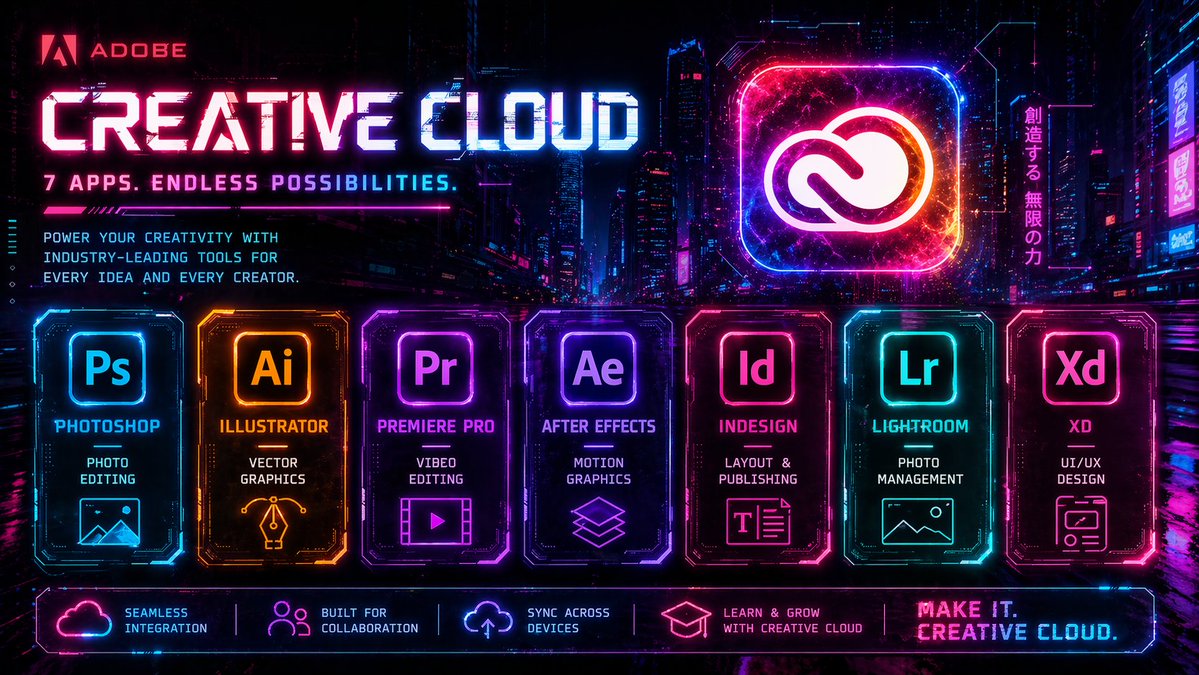
Cyberpunk Creative Cloud Ad Poster
A neon cyberpunk promotional poster for Adobe Creative Cloud, ideal for recreating bold tech advertising graphics with multiple app panels and futuristic branding.
This is a GPT Image 2 prompt case for Graphic & Poster. Use the copy-ready prompt below to generate similar visuals, and review Awesome GPT Image 2 Prompts attribution plus commercial-use rights before reuse.
Free 1K preview
Generate one preview image instantly, no sign-up required.
Free text preview doesn’t preserve reference-image consistency.
Prompt
Copy-ready prompt
Create a high-energy futuristic cyberpunk advertising poster for {argument name="brand name" default="Adobe"} {argument name="product name" default="Creative Cloud"}, in a wide 16:9 format, set against a dense neon-lit nighttime megacity with glowing skyscrapers, holographic billboards, wet reflective streets, and a dark purple-blue-black atmosphere. Use an intense synthwave palette of electric magenta, cyan, violet, hot pink, and blue, with glowing edges, digital glitches, scanlines, light streaks, particle sparks, and HUD-style interface accents. At the upper left, place the Adobe logo and the word {argument name="brand name" default="Adobe"} in red, followed by a huge bold techno headline reading {argument name="product name" default="Creative Cloud"} in luminous white and cyan with magenta glow, and beneath it a smaller tagline in all caps: {argument name="tagline" default="7 APPS. ENDLESS POSSIBILITIES."}. Below that, add a short marketing paragraph in compact futuristic type: “POWER YOUR CREATIVITY WITH INDUSTRY-LEADING TOOLS FOR EVERY IDEA AND EVERY CREATOR.” On the upper right, feature a giant glowing rounded-square app icon containing the Adobe Creative Cloud symbol, rendered like a radiant neon hologram with cosmic texture and orange-pink-blue energy inside. Next to it, add a vertical Japanese neon sign reading “創造する、無限の力”. Across the lower middle, display exactly 7 illuminated app cards in a single horizontal row, each as a distinct glowing panel with beveled sci-fi borders, internal circuitry details, and matching neon color accents. Card 1: “Ps”, label “PHOTOSHOP”, subtitle “PHOTO EDITING”, with a simple landscape/image icon, in cyan-blue. Card 2: “Ai”, label “ILLUSTRATOR”, subtitle “VECTOR GRAPHICS”, with a pen-nib/vector icon, in orange-gold. Card 3: “Pr”, label “PREMIERE PRO”, subtitle “VIDEO EDITING”, with a film frame and play button icon, in purple-magenta. Card 4: “Ae”, label “AFTER EFFECTS”, subtitle “MOTION GRAPHICS”, with stacked layered-shapes icon, in violet. Card 5: “Id”, label “INDESIGN”, subtitle “LAYOUT & PUBLISHING”, with a text-layout icon, in pink-red. Card 6: “Lr”, label “LIGHTROOM”, subtitle “PHOTO MANAGEMENT”, with a landscape/photo icon, in cyan-teal. Card 7: “Xd”, label “XD”, subtitle “UI/UX DESIGN”, with a wireframe/app-window icon, in hot pink. Along the very bottom, add a glowing horizontal footer bar with exactly 5 feature blocks separated by thin neon dividers: 1) cloud icon with “SEAMLESS INTEGRATION”, 2) people icon with “BUILT FOR COLLABORATION”, 3) sync/cloud-arrow icon with “SYNC ACROSS DEVICES”, 4) graduation cap icon with “LEARN & GROW WITH CREATIVE CLOUD”, 5) a bold closing slogan at the far right reading {argument name="closing slogan" default="MAKE IT. CREATIVE CLOUD."}. Overall style: premium cinematic tech ad, ultra-detailed, razor-sharp, symmetrical promotional layout, glossy reflections, dramatic contrast, retro-futurist game UI aesthetics, polished commercial poster design.Prompt variables
Editable argument placeholders found in the prompt, with their default values.
Best for
- - Graphic & Poster visual exploration
- - Image generation and reference-image edits
- - Reusable briefs that keep source attribution visible
Change these parts
- - Subject, product, character, or scene
- - Aspect ratio, camera, lighting, and background
- - Brand, text, color, and output constraints
Recommended model and settings
- - Model: gpt-image-2
- - Input mode: Image to Image
- - Aspect ratio: source
- - Commercial status: review original source
How to use this prompt
- 1. Copy the prompt and preserve its structure for the first test.
- 2. Replace the subject, context, and publishing channel.
- 3. Change one camera, lighting, or style variable per iteration.
- 4. Inspect the output, source, text, and rights before reuse.
Limitations, source, and reuse cautions
- - Generated output is an editable draft, not factual, legal, or rights evidence.
- - Review the linked source, people, brands, logos, text, and third-party media before commercial use.
More cases in this category
Prioritized by category, input mode compatibility, quality, and lower risk.




Reuse and source notes
Use this prompt safely after previewing the case.
- 1.Copy the prompt or open it directly in Dovoo with the generation button.
- 2.Adjust variables, aspect ratio, and reference images for your own use case.
- 3.Before publishing or paid usage, verify source rights, attribution requirements, and brand or likeness risks.
Can I use this prompt commercially?
Commercial-use status is allowed. Review the original source, license, brand constraints, and legal requirements before paid usage.
Where does this case come from?
This case is imported from Awesome GPT Image 2 Prompts; keep attribution visible and check the source URL before reuse.