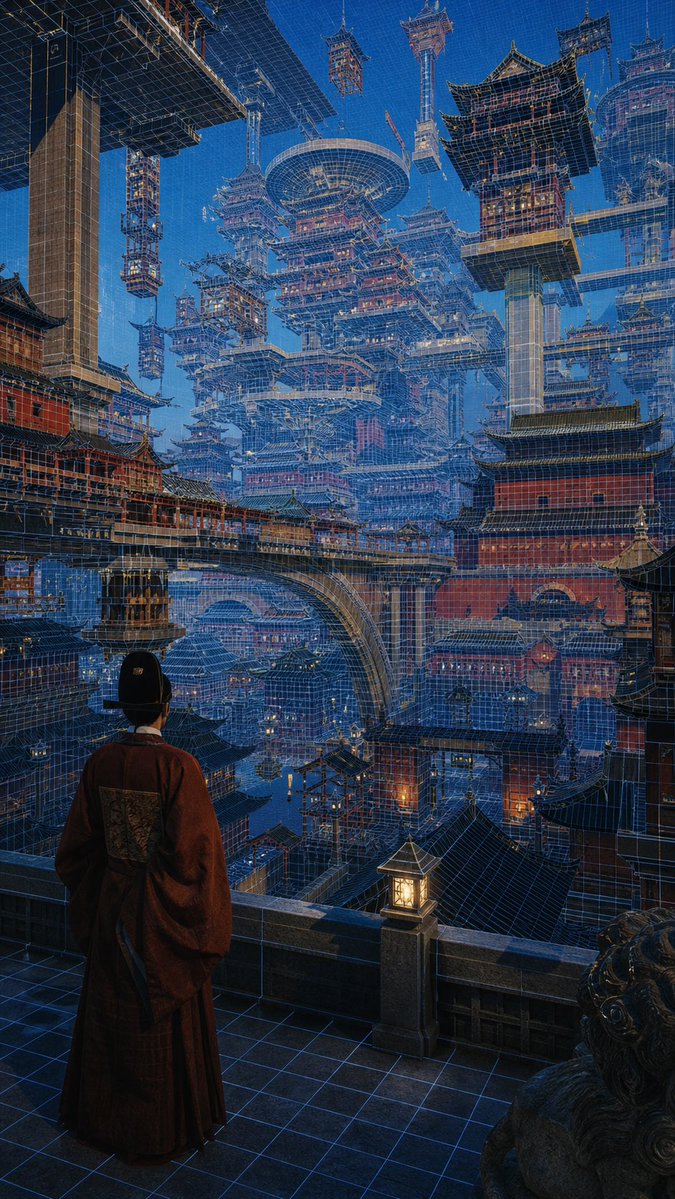
Cyber Imperial Floating Palace City
Generates a cinematic vertical fantasy cityscape blending ancient Chinese palace architecture with futuristic holographic blueprint megastructures.
This is a GPT Image 2 prompt case for Landscape & Nature. Use the copy-ready prompt below to generate similar visuals, and review Awesome GPT Image 2 Prompts attribution plus commercial-use rights before reuse.
Free 1K preview
Generate one preview image instantly, no sign-up required.
Prompt
Copy-ready prompt
Create a highly detailed vertical cinematic concept art scene of a lone {argument name="character role" default="ancient Chinese court official"} seen from behind, standing on a stone balcony at night and gazing over an immense futuristic megacity built from traditional East Asian palace architecture. The figure wears a dark red flowing robe and black official hat, framed in the lower left foreground beside a glowing square lantern and a carved stone guardian lion. The city is a vast layered maze of red palace walls, tiled pagoda roofs, bridges, towers, terraces, and suspended buildings, all interwoven with luminous blue holographic wireframe construction lines like an architectural blueprint overlay. Massive floating pagodas, cranes, scaffold-like towers, circular sky platforms, and elevated walkways fill the deep perspective, creating a surreal cyber-imperial capital that rises into a clear deep-blue evening sky. Use dramatic scale, dense architectural detail, cool blue ambient light with warm orange lantern accents, realistic painterly rendering, intricate linework, atmospheric depth, and a sense of awe and quiet contemplation. Style should combine {argument name="visual style" default="cyberpunk ancient Chinese architectural fantasy"}, ultra-detailed matte painting, cinematic lighting, sharp perspective, vertical 9:16 composition, no text, no logos.Prompt variables
Editable argument placeholders found in the prompt, with their default values.
Best for
- - Landscape & Nature visual exploration
- - Image generation and reference-image edits
- - Reusable briefs that keep source attribution visible
Change these parts
- - Subject, product, character, or scene
- - Aspect ratio, camera, lighting, and background
- - Brand, text, color, and output constraints
Recommended model and settings
- - Model: gpt-image-2
- - Input mode: Text to Image
- - Aspect ratio: source
- - Commercial status: review original source
How to use this prompt
- 1. Copy the prompt and preserve its structure for the first test.
- 2. Replace the subject, context, and publishing channel.
- 3. Change one camera, lighting, or style variable per iteration.
- 4. Inspect the output, source, text, and rights before reuse.
Limitations, source, and reuse cautions
- - Generated output is an editable draft, not factual, legal, or rights evidence.
- - Review the linked source, people, brands, logos, text, and third-party media before commercial use.
More cases in this category
Prioritized by category, input mode compatibility, quality, and lower risk.

Reuse and source notes
Use this prompt safely after previewing the case.
- 1.Copy the prompt or open it directly in Dovoo with the generation button.
- 2.Adjust variables, aspect ratio, and reference images for your own use case.
- 3.Before publishing or paid usage, verify source rights, attribution requirements, and brand or likeness risks.
Can I use this prompt commercially?
Commercial-use status is allowed. Review the original source, license, brand constraints, and legal requirements before paid usage.
Where does this case come from?
This case is imported from Awesome GPT Image 2 Prompts; keep attribution visible and check the source URL before reuse.