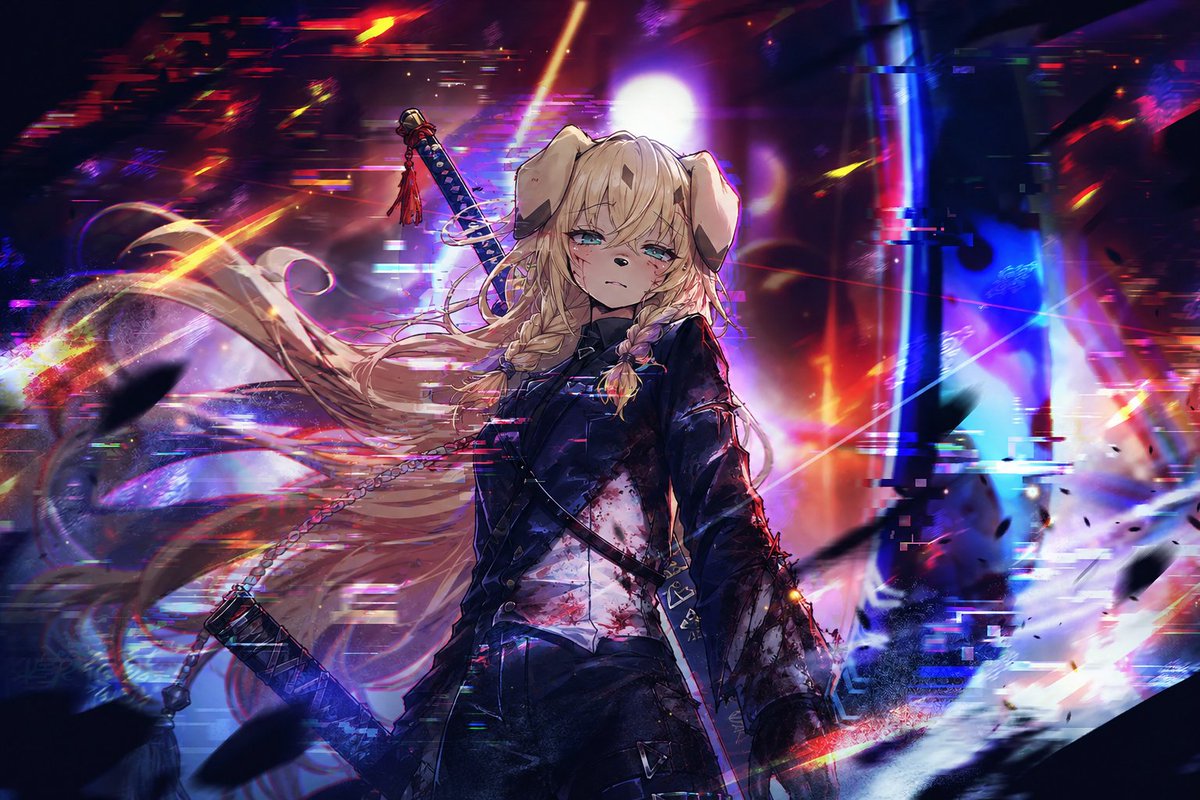
Cyberpunk Dog-Eared Swordswoman
A dramatic anime key visual of a wounded dog-eared swordswoman in a glitching neon cyberpunk battlefield.
This is a GPT Image 2 prompt case for Anime & Game. Use the copy-ready prompt below to generate similar visuals, and review Awesome GPT Image 2 Prompts attribution plus commercial-use rights before reuse.
Free 1K preview
Generate one preview image instantly, no sign-up required.
Prompt
Copy-ready prompt
Create a cinematic anime key visual of {argument name="character name" default="a young dog-eared swordswoman"} standing in the center of a chaotic neon cyberpunk battlefield. She has long flowing {argument name="hair color" default="pale blonde"} hair blown dramatically to the left, two thick braids at the front, floppy animal ears, tired aqua-blue eyes, a blank emotionless expression, and small cuts and blood smears on her face. Dress her in a dark fitted military-style jacket over a white shirt stained with blood, black tactical straps and belts, dark trousers, and a battle-worn silhouette. Show exactly two swords: one katana strapped diagonally across her back with a red tassel on the hilt, and one sheathed sword or weapon hanging low at her left side on a chain. The background is an abstract ruined futuristic city or digital void filled with intense motion blur, glitch artifacts, chromatic aberration, horizontal scanline fragments, black debris silhouettes, and explosive red, magenta, violet, blue, cyan, and orange light streaks. Place a bright white circular light behind her head like a halo, with vertical blue structures on the right and warm red chaos on the left. Use a dark high-contrast palette, dramatic rim lighting, painterly anime rendering, sharp facial detail, dynamic hair strands, cinematic depth of field, energetic composition, and a tragic apocalyptic mood. No readable text, no watermark, wide 3:2 aspect ratio.Prompt variables
Editable argument placeholders found in the prompt, with their default values.
Best for
- - Anime & Game visual exploration
- - Image generation and reference-image edits
- - Reusable briefs that keep source attribution visible
Change these parts
- - Subject, product, character, or scene
- - Aspect ratio, camera, lighting, and background
- - Brand, text, color, and output constraints
Recommended model and settings
- - Model: gpt-image-2
- - Input mode: Text to Image
- - Aspect ratio: source
- - Commercial status: review original source
How to use this prompt
- 1. Copy the prompt and preserve its structure for the first test.
- 2. Replace the subject, context, and publishing channel.
- 3. Change one camera, lighting, or style variable per iteration.
- 4. Inspect the output, source, text, and rights before reuse.
Limitations, source, and reuse cautions
- - Generated output is an editable draft, not factual, legal, or rights evidence.
- - Review the linked source, people, brands, logos, text, and third-party media before commercial use.
More cases in this category
Prioritized by category, input mode compatibility, quality, and lower risk.

Reuse and source notes
Use this prompt safely after previewing the case.
- 1.Copy the prompt or open it directly in Dovoo with the generation button.
- 2.Adjust variables, aspect ratio, and reference images for your own use case.
- 3.Before publishing or paid usage, verify source rights, attribution requirements, and brand or likeness risks.
Can I use this prompt commercially?
Commercial-use status is allowed. Review the original source, license, brand constraints, and legal requirements before paid usage.
Where does this case come from?
This case is imported from Awesome GPT Image 2 Prompts; keep attribution visible and check the source URL before reuse.