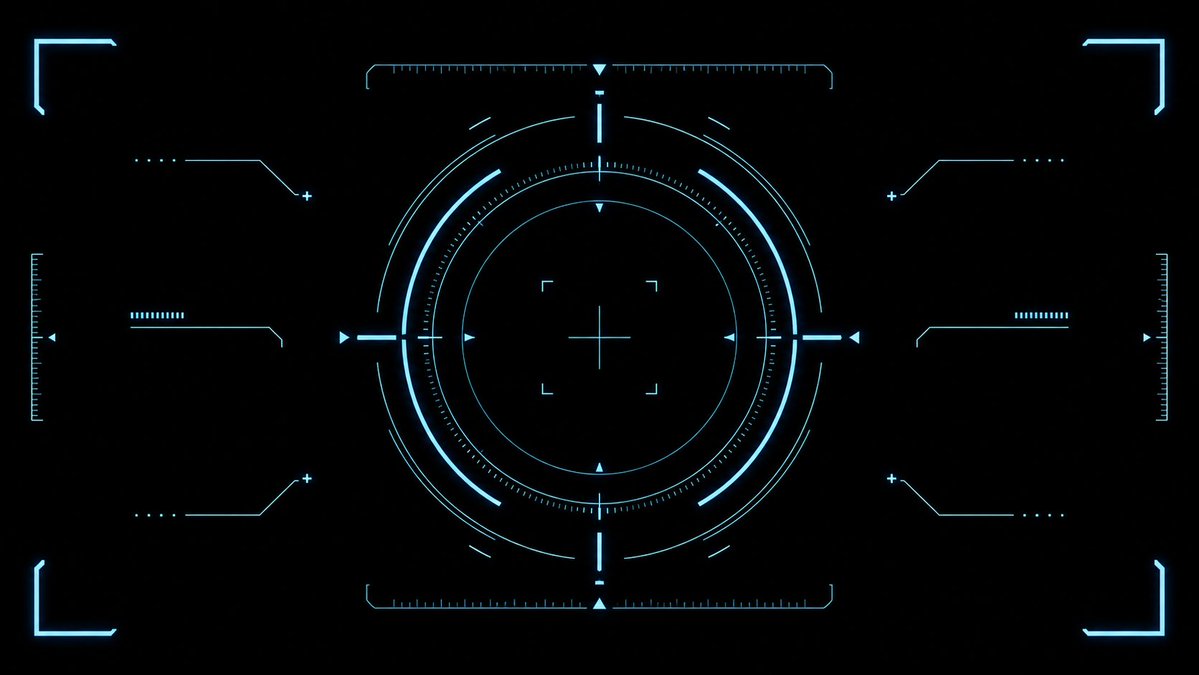
Cyan Sci-Fi HUD Reticle Overlay
Generates a clean futuristic cyan targeting HUD effect asset for game UI, video overlays, and sci-fi interface designs.
This is a GPT Image 2 prompt case for Anime & Game. Use the copy-ready prompt below to generate similar visuals, and review Awesome GPT Image 2 Prompts attribution plus commercial-use rights before reuse.
Free 1K preview
Generate one preview image instantly, no sign-up required.
Prompt
Copy-ready prompt
{
  "type": "futuristic sci-fi HUD interface effect asset",
  "format": "wide 16:9 transparent-style graphic on pure black background",
  "style": "minimal high-tech vector UI, clean cyan neon glow, thin luminous strokes, symmetrical targeting overlay, game interface / cockpit scanner aesthetic, no text, no logos, no humans",
  "color_palette": {
    "primary": "{argument name=\"glow color\" default=\"electric cyan blue\"}",
    "background": "{argument name=\"background color\" default=\"deep black\"}",
    "line_weight": "ultra-thin technical lines with soft bloom"
  },
  "composition": {
    "overall": "perfectly centered, horizontally symmetrical heads-up display reticle with large circular target in the middle and decorative interface brackets around the edges",
    "canvas": "{argument name=\"aspect ratio\" default=\"16:9 widescreen\"}",
    "central_elements": {
      "count": 10,
      "items": [
        "1 large outer circular ring made from segmented arcs",
        "1 bright inner circular ring",
        "1 dotted micro-tick circular scale surrounding the inner ring",
        "1 thin innermost circle",
        "1 central crosshair with horizontal and vertical lines",
        "4 small corner focus brackets around the crosshair",
        "4 cardinal triangular pointers at top, bottom, left, and right of the circle",
        "4 short bright radial bars at the cardinal directions",
        "multiple fine calibration ticks along the circle",
        "small broken outer orbit arcs for motion-graphic detail"
      ]
    },
    "side_elements": {
      "count": 6,
      "items": [
        "3 left-side connector-line HUD widgets: top, middle, bottom",
        "3 right-side connector-line HUD widgets: top, middle, bottom"
      ],
      "details": "each side widget uses angled circuit-like lines, small dots, plus signs, and short ruler bars, mirrored left to right"
    },
    "edge_elements": {
      "count": 8,
      "items": [
        "4 glowing corner frame brackets, one in each corner",
        "2 vertical ruler scales at the far left and far right edges",
        "2 horizontal ruler scales centered near the top and bottom of the main circle",
        "small triangular side markers near the left and right edges"
      ]
    }
  },
  "lighting": "soft neon bloom around every line, crisp dark negative space, high contrast",
  "rendering": "2D vector effect material, sharp clean geometry, anti-aliased, suitable as a transparent overlay or VFX asset",
  "negative_prompt": "no words, no numbers, no icons with meaning, no cluttered background, no gradients except glow, no realistic objects, no characters"
}
Prompt variables
Editable argument placeholders found in the prompt, with their default values.
Best for
- - Anime & Game visual exploration
- - Image generation and reference-image edits
- - Reusable briefs that keep source attribution visible
Change these parts
- - Subject, product, character, or scene
- - Aspect ratio, camera, lighting, and background
- - Brand, text, color, and output constraints
Recommended model and settings
- - Model: gpt-image-2
- - Input mode: Text to Image
- - Aspect ratio: source
- - Commercial status: review original source
How to use this prompt
- 1. Copy the prompt and preserve its structure for the first test.
- 2. Replace the subject, context, and publishing channel.
- 3. Change one camera, lighting, or style variable per iteration.
- 4. Inspect the output, source, text, and rights before reuse.
Limitations, source, and reuse cautions
- - Generated output is an editable draft, not factual, legal, or rights evidence.
- - Review the linked source, people, brands, logos, text, and third-party media before commercial use.
More cases in this category
Prioritized by category, input mode compatibility, quality, and lower risk.

Reuse and source notes
Use this prompt safely after previewing the case.
- 1.Copy the prompt or open it directly in Dovoo with the generation button.
- 2.Adjust variables, aspect ratio, and reference images for your own use case.
- 3.Before publishing or paid usage, verify source rights, attribution requirements, and brand or likeness risks.
Can I use this prompt commercially?
Commercial-use status is allowed. Review the original source, license, brand constraints, and legal requirements before paid usage.
Where does this case come from?
This case is imported from Awesome GPT Image 2 Prompts; keep attribution visible and check the source URL before reuse.