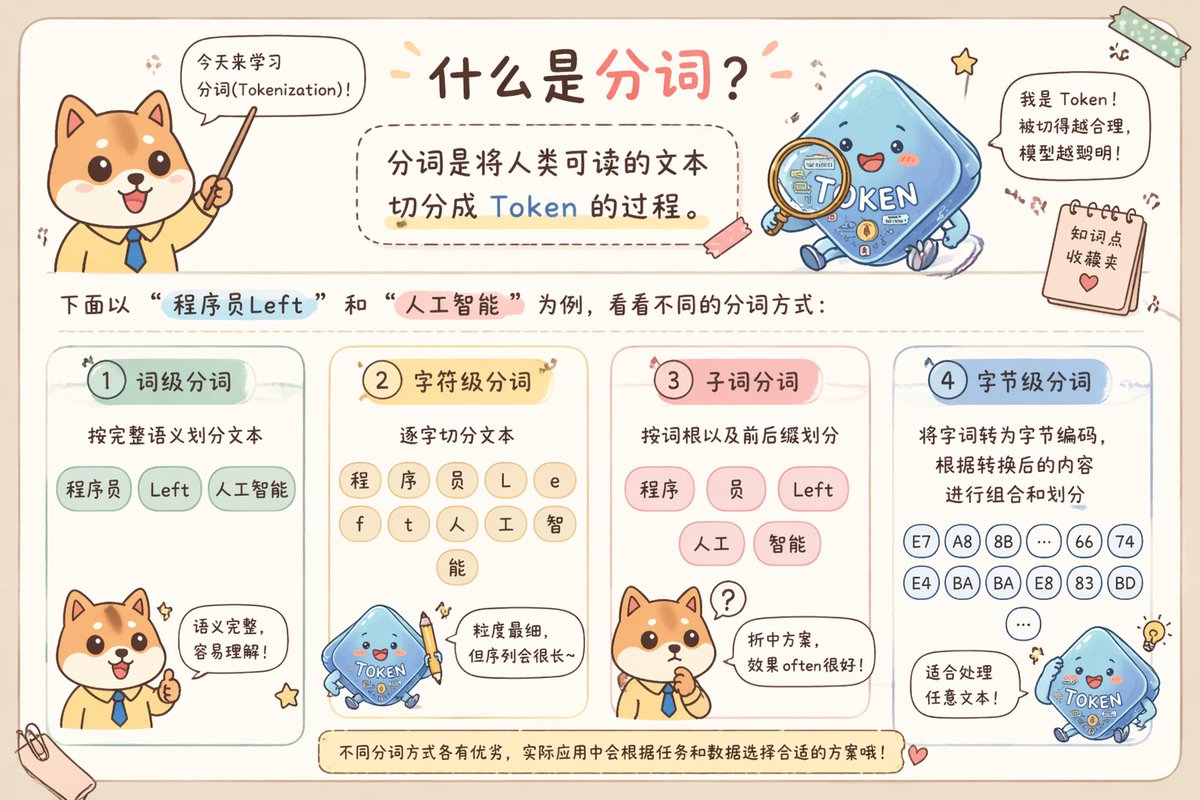
Cute Chinese Tokenization Infographic
This prompt generates a pastel hand-drawn horizontal Chinese educational infographic explaining four tokenization methods with a Shiba Inu teacher and a blue token mascot, ideal for social media science posts.
This is a GPT Image 2 prompt case for Graphic & Poster. Use the copy-ready prompt below to generate similar visuals, and review Awesome GPT Image 2 Prompts attribution plus commercial-use rights before reuse.
Free 1K preview
Generate one preview image instantly, no sign-up required.
Prompt
Copy-ready prompt
A lovely, horizontally-oriented, hand-drawn scrapbook-style Chinese science infographic with a warm beige paper background, rounded borders, macaron-colored doodles, tape stickers, and small stars, creating a classroom notebook atmosphere. The top center features a prominent handwritten Chinese title: "What is Tokenization?", with the latter half in coral pink and the rest in dark brown. In the upper left corner is a Q-version Shiba Inu teacher character wearing a light yellow shirt and a blue tie, facing forward and holding a pointer upwards, with a speech bubble saying: "Let's learn about Tokenization today!" To the upper right is a cute blue square Token mascot labeled "TOKEN", smiling with rosy cheeks and small limbs, holding a magnifying glass; next to it is a speech bubble saying: "I'm Token! The more reasonable the segmentation, the smarter the model!" Near the right edge, add a hanging sticky note that says "Knowledge Point Collection" with a heart icon. Below the title, place a rounded dashed text box containing the definition: "Tokenization is the process of breaking down human-readable text into Tokens.", with the word "Token" highlighted in blue. Add a line of explanatory text below: "Let's look at different tokenization methods using "ProgrammerLeft" and "Artificial Intelligence" as examples:", with "ProgrammerLeft" highlighted in light blue and "Artificial Intelligence" highlighted in pink. The lower half contains 4 rounded macaron-colored panels arranged from left to right, each with a badge number and title. Panel 1 is mint green, titled "1 Word-level Tokenization", with the subtitle "Divide text according to complete semantics", containing 3 Token bubbles: "Programmer", "Left", "Artificial Intelligence". At the bottom of this panel, the Shiba Inu teacher shows a thumbs up, with a speech bubble saying: "Semantically complete and easy to understand!" Panel 2 is pale yellow, titled "2 Character-level Tokenization", with the subtitle "Split text character by character", containing 9 circular Token bubbles arranged in a row: "C", "h", "e", "n", "g", "r", "a", "m", "m", "e", "r", "L", "e", "f", "t", "r", "e", "n", "g", "i", "n", "t", "e", "l", "l", "i", "g", "e", "n", "c", "e"—presented in a compact grid format as individual characters from the example. At the bottom, the blue Token mascot holds a pencil, with a speech bubble saying: "The finest granularity, but the sequence will be very long~." Panel 3 is pale pink, titled "3 Subword Tokenization", with the subtitle "Divide by root words and prefixes", containing 5 Token bubbles: "program", "member", "Left", "artificial", "intelligence". At the bottom, the Shiba Inu teacher is thinking, with a paw to his mouth and a question mark above his head, with a speech bubble saying: "A compromise solution, often works well!" Panel 4 is pale blue, titled "4 Byte-level Tokenization", with the subtitle "Convert words into byte encoding and divide based on the converted content", showing 14 small circular code bubbles: "E7", "A8", "8B", "...", "66", "74", "E4", "BA", "BA", "E8", "83", "BD", "..." arranged in multiple rows like encoded bytes. At the bottom, the smiling blue Token mascot is shown again, with a speech bubble saying: "Suitable for handling any text!", next to a tiny light bulb doodle. At the very bottom, place a rounded banner note that says: "Different tokenization methods have their own advantages. In practical applications, the appropriate method will be selected based on the task and data!" The four panels use soft macaron green, yellow, pink, and blue, combined with dark brown handwritten fonts, delicate shadows, rounded shapes, and cute expressions. The overall composition is balanced, simple, and friendly, like a beautiful social media science poster.
Best for
- - Graphic & Poster visual exploration
- - Image generation and reference-image edits
- - Reusable briefs that keep source attribution visible
Change these parts
- - Subject, product, character, or scene
- - Aspect ratio, camera, lighting, and background
- - Brand, text, color, and output constraints
Recommended model and settings
- - Model: gpt-image-2
- - Input mode: Text to Image
- - Aspect ratio: source
- - Commercial status: review original source
How to use this prompt
- 1. Copy the prompt and preserve its structure for the first test.
- 2. Replace the subject, context, and publishing channel.
- 3. Change one camera, lighting, or style variable per iteration.
- 4. Inspect the output, source, text, and rights before reuse.
Limitations, source, and reuse cautions
- - Generated output is an editable draft, not factual, legal, or rights evidence.
- - Review the linked source, people, brands, logos, text, and third-party media before commercial use.
More cases in this category
Prioritized by category, input mode compatibility, quality, and lower risk.





Reuse and source notes
Use this prompt safely after previewing the case.
- 1.Copy the prompt or open it directly in Dovoo with the generation button.
- 2.Adjust variables, aspect ratio, and reference images for your own use case.
- 3.Before publishing or paid usage, verify source rights, attribution requirements, and brand or likeness risks.
Can I use this prompt commercially?
Commercial-use status is allowed. Review the original source, license, brand constraints, and legal requirements before paid usage.
Where does this case come from?
This case is imported from Awesome GPT Image 2 Prompts; keep attribution visible and check the source URL before reuse.