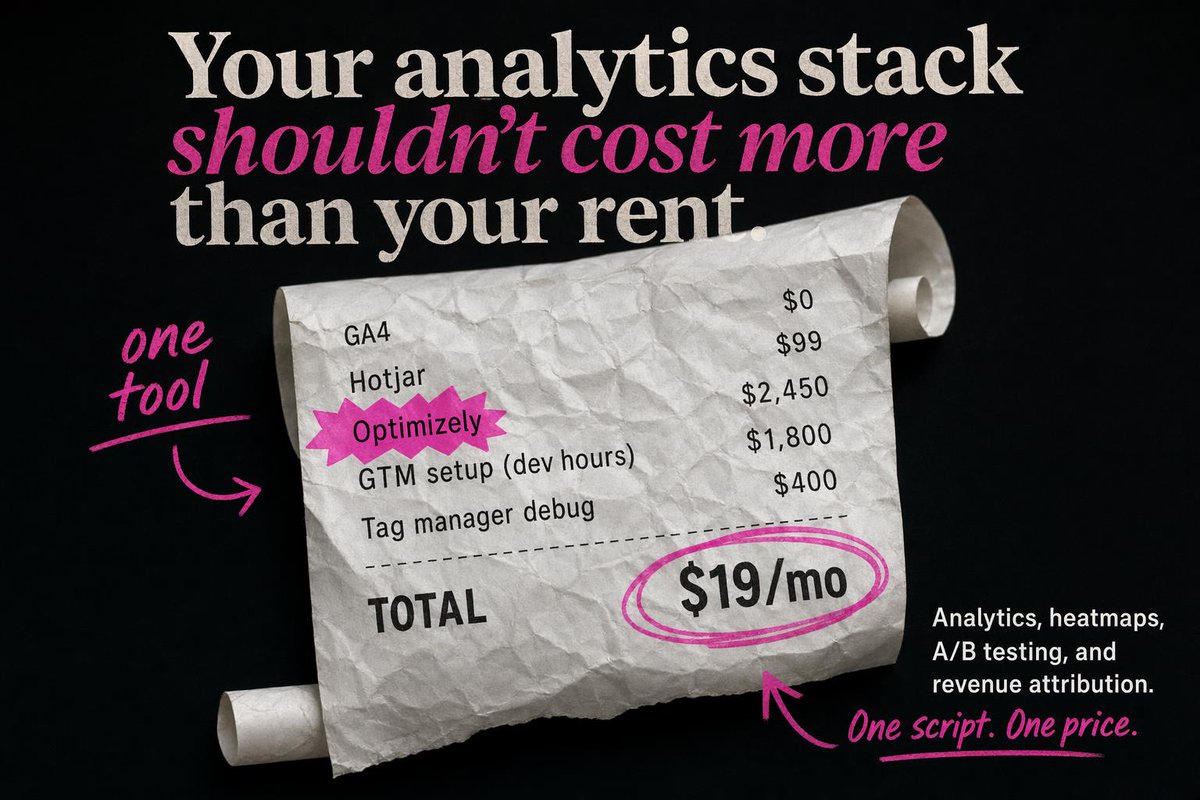
Editorial SaaS Receipt Ad
This prompt generates a high-contrast startup advertisement featuring a crumpled receipt, bold editorial typography, and pink handwritten callouts for analytics pricing campaigns.
This is a GPT Image 2 prompt case for Product & Commercial. Use the copy-ready prompt below to generate similar visuals, and review Awesome GPT Image 2 Prompts attribution plus commercial-use rights before reuse.
Free 1K preview
Generate one preview image instantly, no sign-up required.
Prompt
Copy-ready prompt
Create a bold static SaaS ad on a matte black background with a premium editorial look and highly accurate typography. At the top, place a large stacked serif headline in off-white reading: "Your analytics stack" on the first line, "shouldn’t cost more" on the second line in bright magenta italic serif, and "than your rent." on the third line in off-white serif. Center the composition around a large curled, crumpled receipt made of white thermal paper, angled slightly from upper left to lower right, with visible paper texture, soft shadows, and rolled ends on both the upper right and lower left. On the receipt, show exactly 5 line items in black monospaced or receipt-style text aligned in two columns: "GA4" with "$0", "Hotjar" with "$99", "Optimizely" with "$2,450", "GTM setup (dev hours)" with "$1,800", and "Tag manager debug" with "$400". Highlight the word "Optimizely" with a jagged magenta starburst sticker behind it. Add a dashed divider line below the items, then a bold "TOTAL" label on the lower left of the receipt. On the lower right of the receipt, place a large price reading "{argument name="monthly price" default="$19/mo"}" in heavy black type, circled with 2 hand-drawn magenta marker loops. Add 3 handwritten magenta annotation elements: on the left side, the words "{argument name="left annotation" default="one tool"}" in brush script with an underline and a curved arrow pointing to the receipt; near the bottom center, a curved magenta arrow pointing upward toward the circled price; and at the bottom right, the handwritten tagline "{argument name="tagline text" default="One script. One price."}" with an underline. In the bottom-right corner, add a small block of white sans-serif body copy, right-aligned, reading "{argument name="body copy" default="Analytics, heatmaps, A/B testing, and revenue attribution."}". Use an editorial ad-photography style with crisp text placement, clean hierarchy, high contrast, subtle paper realism, and a limited palette of black, white, and hot pink.Prompt variables
Editable argument placeholders found in the prompt, with their default values.
Best for
- - Product & Commercial visual exploration
- - Image generation and reference-image edits
- - Reusable briefs that keep source attribution visible
Change these parts
- - Subject, product, character, or scene
- - Aspect ratio, camera, lighting, and background
- - Brand, text, color, and output constraints
Recommended model and settings
- - Model: gpt-image-2
- - Input mode: Text to Image
- - Aspect ratio: source
- - Commercial status: review original source
How to use this prompt
- 1. Copy the prompt and preserve its structure for the first test.
- 2. Replace the subject, context, and publishing channel.
- 3. Change one camera, lighting, or style variable per iteration.
- 4. Inspect the output, source, text, and rights before reuse.
Limitations, source, and reuse cautions
- - Generated output is an editable draft, not factual, legal, or rights evidence.
- - Review the linked source, people, brands, logos, text, and third-party media before commercial use.
More cases in this category
Prioritized by category, input mode compatibility, quality, and lower risk.




Reuse and source notes
Use this prompt safely after previewing the case.
- 1.Copy the prompt or open it directly in Dovoo with the generation button.
- 2.Adjust variables, aspect ratio, and reference images for your own use case.
- 3.Before publishing or paid usage, verify source rights, attribution requirements, and brand or likeness risks.
Can I use this prompt commercially?
Commercial-use status is allowed. Review the original source, license, brand constraints, and legal requirements before paid usage.
Where does this case come from?
This case is imported from Awesome GPT Image 2 Prompts; keep attribution visible and check the source URL before reuse.