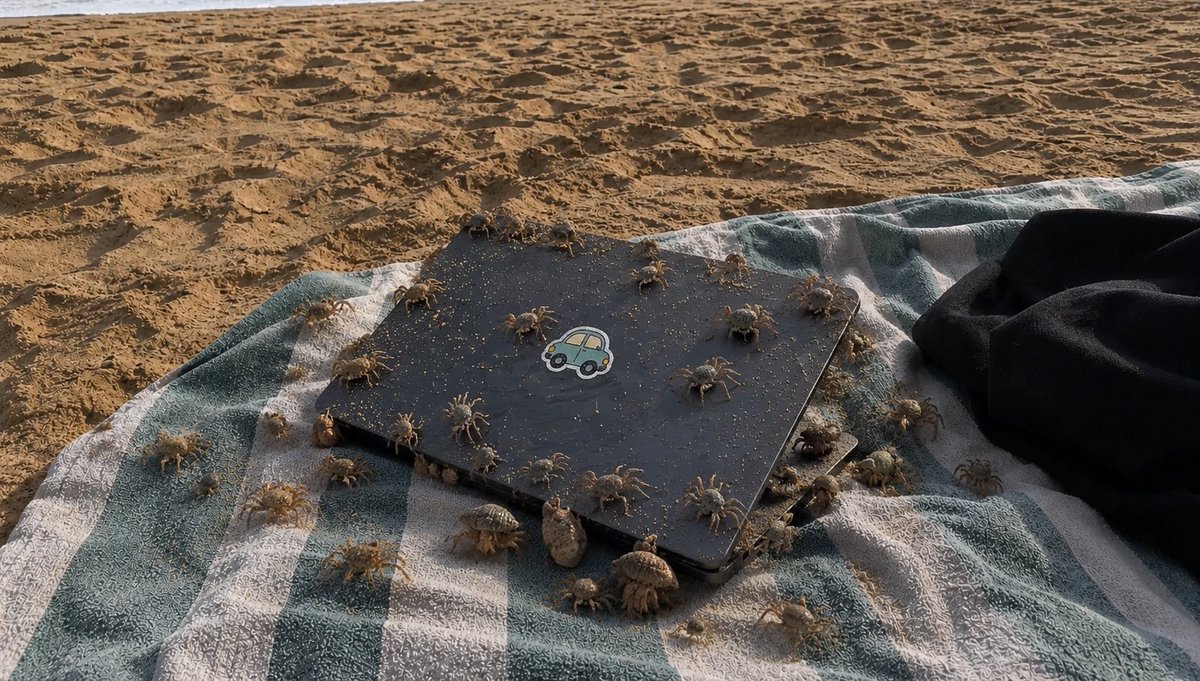
Crowded Crab Beach Laptop Scene
A realistic beach snapshot of a sand-dusted laptop on a striped towel swarming with crabs and hermit crabs, useful for unsettling nature-photo generation.
This is a GPT Image 2 prompt case for Landscape & Nature. Use the copy-ready prompt below to generate similar visuals, and review Awesome GPT Image 2 Prompts attribution plus commercial-use rights before reuse.
Free 1K preview
Generate one preview image instantly, no sign-up required.
Prompt
Copy-ready prompt
Create a realistic, slightly unsettling beach photograph in late-afternoon natural light: a blue-green and white striped towel lies on rippled golden sand, with a closed matte black laptop or tablet centered on the towel at a slight diagonal angle. The device has rounded corners, is dusted with sand grains, and has a small cute car sticker in the center of the lid. A dark black garment or towel is bunched on the right edge. Populate the scene with exactly 38 tiny beach creatures crawling over and around the device and towel: 24 pale sand crabs with long thin legs scattered across the towel, laptop lid, and nearby sand, and 14 hermit crabs with varied spiral shells clustered mostly along the lower and right edges of the device. Make the creatures numerous and busy, with some on top of the laptop, some partially under its edges, and some crossing the striped fabric. Use {argument name="creature count" default="38"} visible animals, {argument name="main object" default="closed matte black laptop with a cute car sticker"}, {argument name="beach textile" default="blue-green and white striped towel"}, {argument name="lighting" default="warm low-angle late-afternoon sunlight"}, and {argument name="mood" default="realistic, crowded, slightly creepy but natural beach snapshot"}. Shoot from a low oblique overhead angle, wide horizontal composition, shallow but not extreme depth of field, high detail in sand texture, fabric weave, shadows, crab legs, and shells. No humans, no text overlay, no watermark.Prompt variables
Editable argument placeholders found in the prompt, with their default values.
Best for
- - Landscape & Nature visual exploration
- - Image generation and reference-image edits
- - Reusable briefs that keep source attribution visible
Change these parts
- - Subject, product, character, or scene
- - Aspect ratio, camera, lighting, and background
- - Brand, text, color, and output constraints
Recommended model and settings
- - Model: gpt-image-2
- - Input mode: Text to Image
- - Aspect ratio: source
- - Commercial status: review original source
How to use this prompt
- 1. Copy the prompt and preserve its structure for the first test.
- 2. Replace the subject, context, and publishing channel.
- 3. Change one camera, lighting, or style variable per iteration.
- 4. Inspect the output, source, text, and rights before reuse.
Limitations, source, and reuse cautions
- - Generated output is an editable draft, not factual, legal, or rights evidence.
- - Review the linked source, people, brands, logos, text, and third-party media before commercial use.
More cases in this category
Prioritized by category, input mode compatibility, quality, and lower risk.

Reuse and source notes
Use this prompt safely after previewing the case.
- 1.Copy the prompt or open it directly in Dovoo with the generation button.
- 2.Adjust variables, aspect ratio, and reference images for your own use case.
- 3.Before publishing or paid usage, verify source rights, attribution requirements, and brand or likeness risks.
Can I use this prompt commercially?
Commercial-use status is allowed. Review the original source, license, brand constraints, and legal requirements before paid usage.
Where does this case come from?
This case is imported from Awesome GPT Image 2 Prompts; keep attribution visible and check the source URL before reuse.