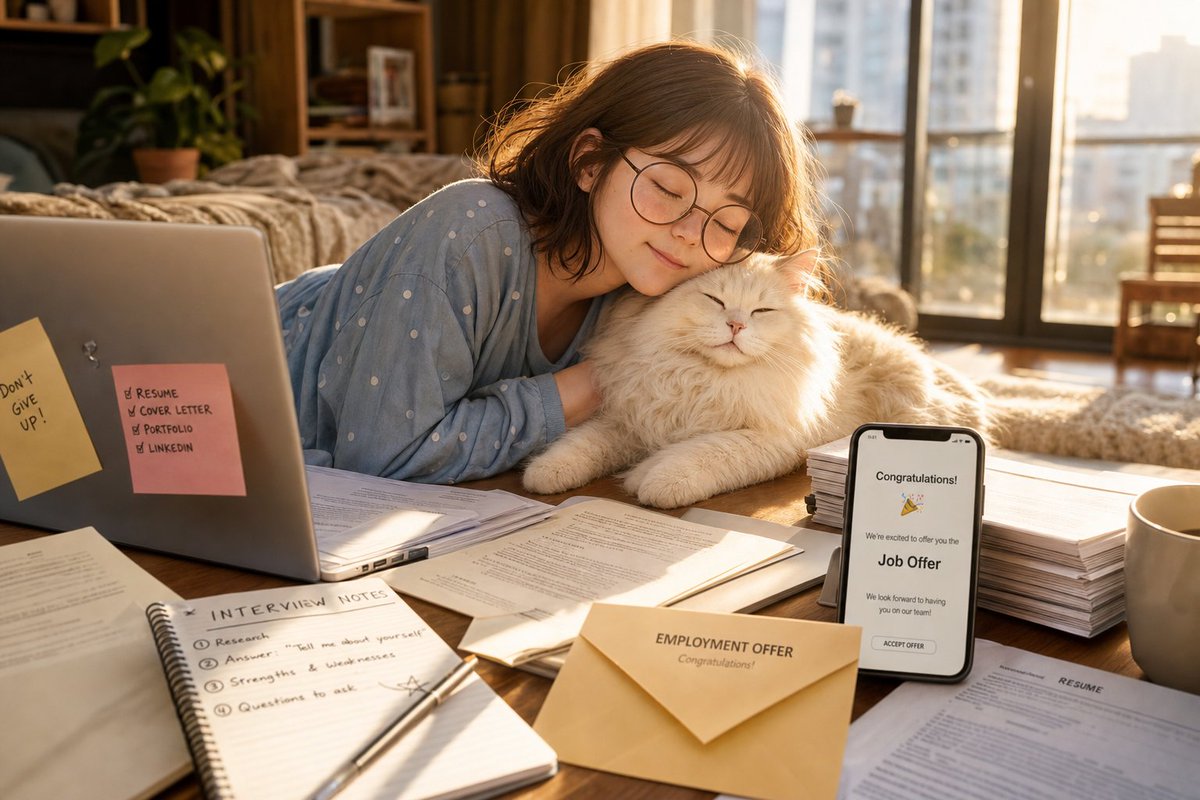
Cozy Job Offer Celebration
A photorealistic golden-hour apartment scene of a young woman cuddling her cat amid job-search materials after receiving a job offer.
This is a GPT Image 2 prompt case for Portrait & Character. Use the copy-ready prompt below to generate similar visuals, and review Awesome GPT Image 2 Prompts attribution plus commercial-use rights before reuse.
Free 1K preview
Generate one preview image instantly, no sign-up required.
Prompt
Copy-ready prompt
Create a warm, photorealistic lifestyle scene in a cozy apartment bedroom during golden hour: a young woman with {argument name="hair color" default="soft brown shoulder-length wavy hair"} and round wire-frame glasses lies on her stomach at a low wooden table, eyes closed and smiling peacefully while resting her cheek against a fluffy white long-haired cat. She wears {argument name="pajama color" default="light blue pajamas with small white polka dots"}. The room is softly backlit by large balcony windows with an out-of-focus city skyline, beige curtains, a bed with rumpled blankets, a potted plant, shelves, and warm sunbeams creating a calm hopeful mood. The tabletop is covered with job-search materials: exactly 2 sticky notes on the laptop, one yellow note reading “Don’t GIVE UP!” and one pink checklist reading “RESUME, COVER LETTER, PORTFOLIO, LINKEDIN”; an open laptop on the left; an open spiral notebook in the foreground titled “INTERVIEW NOTES” with exactly 4 numbered items: Research, Answer “Tell me about yourself”, Strengths & weaknesses, Questions to ask; loose printed application pages and a visible resume; a pen across the notebook; a beige envelope in front labeled “EMPLOYMENT OFFER” and “Congratulations!”; a smartphone standing upright showing a job offer screen with “Congratulations!”, confetti emoji, “We’re excited to offer you the Job Offer”, and an “ACCEPT OFFER” button; one tall stack of documents on the right; and one beige coffee mug. Use cinematic shallow depth of field, realistic natural textures, soft lens flare, warm amber highlights, gentle shadows, high-detail fur, clean composition, and an uplifting emotional tone. Customize the phone headline as {argument name="phone headline" default="Congratulations!"}, the envelope title as {argument name="envelope title" default="EMPLOYMENT OFFER"}, and the sticky-note motivation as {argument name="motivational note" default="Don’t GIVE UP!"}.Prompt variables
Editable argument placeholders found in the prompt, with their default values.
Best for
- - Portrait & Character visual exploration
- - Image generation and reference-image edits
- - Reusable briefs that keep source attribution visible
Change these parts
- - Subject, product, character, or scene
- - Aspect ratio, camera, lighting, and background
- - Brand, text, color, and output constraints
Recommended model and settings
- - Model: gpt-image-2
- - Input mode: Text to Image
- - Aspect ratio: source
- - Commercial status: review original source
How to use this prompt
- 1. Copy the prompt and preserve its structure for the first test.
- 2. Replace the subject, context, and publishing channel.
- 3. Change one camera, lighting, or style variable per iteration.
- 4. Inspect the output, source, text, and rights before reuse.
Limitations, source, and reuse cautions
- - Generated output is an editable draft, not factual, legal, or rights evidence.
- - Review the linked source, people, brands, logos, text, and third-party media before commercial use.
More cases in this category
Prioritized by category, input mode compatibility, quality, and lower risk.



Reuse and source notes
Use this prompt safely after previewing the case.
- 1.Copy the prompt or open it directly in Dovoo with the generation button.
- 2.Adjust variables, aspect ratio, and reference images for your own use case.
- 3.Before publishing or paid usage, verify source rights, attribution requirements, and brand or likeness risks.
Can I use this prompt commercially?
Commercial-use status is allowed. Review the original source, license, brand constraints, and legal requirements before paid usage.
Where does this case come from?
This case is imported from Awesome GPT Image 2 Prompts; keep attribution visible and check the source URL before reuse.