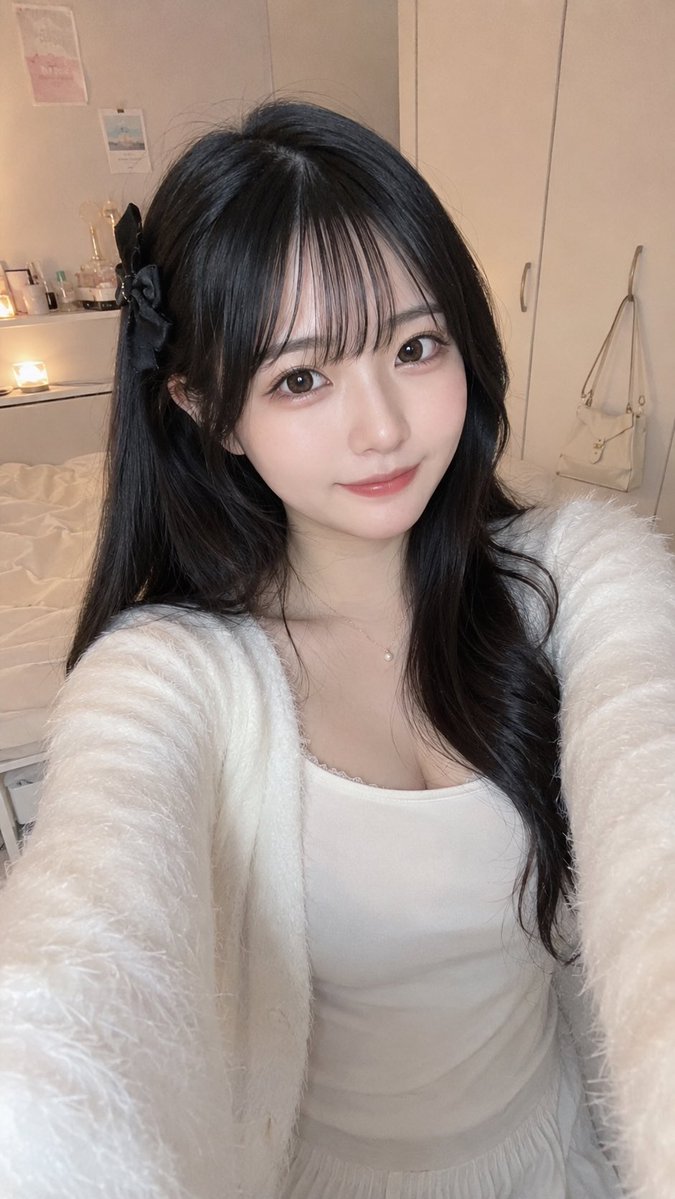
Cozy Bedroom Selfie Portrait
Generates a realistic vertical smartphone selfie of a stylish young woman in a soft bedroom setting for social-media style portrait concepts.
This is a GPT Image 2 prompt case for 人像角色. Use the copy-ready prompt below to generate similar visuals, and review Awesome GPT Image 2 Prompts attribution plus commercial-use rights before reuse.
Prompt
Copy-ready prompt
创作一张超逼真的竖屏智能手机自拍照片,展示一位可爱的年轻女性在温馨且光线柔和的卧室中,以略微向下的高角度拍摄,双臂向镜头伸展,仿佛正在自拍。她留着 {argument name="hair color" default="长而有光泽的黑色秀发"},发型为自然微卷,左侧别着一个黑色丝带蝴蝶结发夹,皮肤白皙,气质柔美;她的脸部被一个位于画面中心、呈柔和棕灰色的像素化方形隐私遮挡块遮住。她穿着一件 {argument name="outfit color" default="White"} 蕾丝边修身吊带背心,外搭一件蓬松柔软的开衫,并佩戴一条精致的珍珠吊坠项链。构图紧凑亲密,突显其上半身和手臂。背景是一个整洁且色调温暖的卧室,左侧是一张未整理的米色床铺,小架子或梳妆台上摆放着化妆品和发光的蜡烛或台灯,墙上挂着两幅淡雅的装饰画,右侧是高大的米色衣柜门,挂钩上挂着一个米色手提包。采用自然室内光线,柔和的阴影,逼真的皮肤和织物纹理,日系社交媒体自拍美学,浅景深,9:16 竖屏构图,呈现高分辨率手机摄影的真实感。Prompt variables
Editable argument placeholders found in the prompt, with their default values.
More cases in this category
Prioritized by category, input mode compatibility, quality, and lower risk.

Reuse and source notes
Use this prompt safely after previewing the case.
- 1.Copy the prompt or open it directly in Dovoo with the generation button.
- 2.Adjust variables, aspect ratio, and reference images for your own use case.
- 3.Before publishing or paid usage, verify source rights, attribution requirements, and brand or likeness risks.
Can I use this prompt commercially?
Commercial-use status is allowed. Review the original source, license, brand constraints, and legal requirements before paid usage.
Where does this case come from?
This case is imported from Awesome GPT Image 2 Prompts; keep attribution visible and check the source URL before reuse.