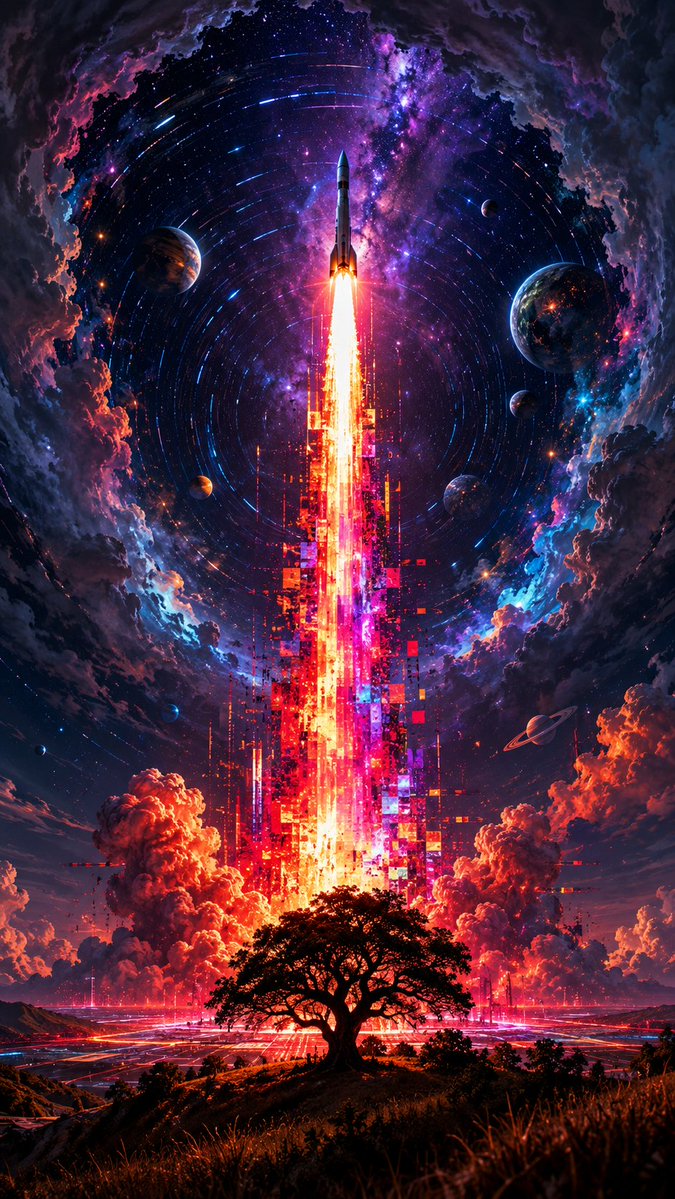
Cosmic Glitch Rocket Launch
A vertical neon sci-fi poster of a rocket launching through a cosmic portal above a lone tree, ideal for surreal space fantasy artwork.
This is a GPT Image 2 prompt case for Illustration & Art. Use the copy-ready prompt below to generate similar visuals, and review Awesome GPT Image 2 Prompts attribution plus commercial-use rights before reuse.
Free 1K preview
Generate one preview image instantly, no sign-up required.
Prompt
Copy-ready prompt
Create a vertical 9:16 cinematic sci-fi fantasy poster showing a lone black silhouette tree on a grassy hill in the foreground, centered beneath a colossal rocket launch. A slim white rocket rises straight upward from the exact center, its exhaust forming a blinding orange-white flame column that transforms into a towering cascade of glitch-like pixel blocks, vertical light bars, and fragmented digital artifacts in neon red, magenta, orange, cyan, and violet, making the launch plume look like a corrupted digital data stream. Surround the launch with huge glowing red-orange smoke clouds near the horizon and a futuristic luminous grid city or launch complex spreading across the ground. Above, create a vast circular cosmic sky framed by dark storm clouds like a portal, with spiraling star trails around the rocket, a bright purple-blue Milky Way, dense stars, and electric nebula colors. Include exactly eight visible planets or moons: one large striped planet on the upper left, one large Earth-like planet on the upper right, one small moon near the upper right, one small moon on the mid-right, one small orange planet on the lower left of the sky, one small blue planet near the lower-left edge, one tiny dark planet near the far lower-left edge, and one small ringed planet on the lower right. Use extremely high contrast, hyper-detailed digital painting, saturated neon cosmic colors, dramatic lighting, sharp central symmetry, epic scale, no text, no logo, no watermark.
Best for
- - Illustration & Art visual exploration
- - Image generation and reference-image edits
- - Reusable briefs that keep source attribution visible
Change these parts
- - Subject, product, character, or scene
- - Aspect ratio, camera, lighting, and background
- - Brand, text, color, and output constraints
Recommended model and settings
- - Model: gpt-image-2
- - Input mode: Text to Image
- - Aspect ratio: source
- - Commercial status: review original source
How to use this prompt
- 1. Copy the prompt and preserve its structure for the first test.
- 2. Replace the subject, context, and publishing channel.
- 3. Change one camera, lighting, or style variable per iteration.
- 4. Inspect the output, source, text, and rights before reuse.
Limitations, source, and reuse cautions
- - Generated output is an editable draft, not factual, legal, or rights evidence.
- - Review the linked source, people, brands, logos, text, and third-party media before commercial use.
More cases in this category
Prioritized by category, input mode compatibility, quality, and lower risk.

Reuse and source notes
Use this prompt safely after previewing the case.
- 1.Copy the prompt or open it directly in Dovoo with the generation button.
- 2.Adjust variables, aspect ratio, and reference images for your own use case.
- 3.Before publishing or paid usage, verify source rights, attribution requirements, and brand or likeness risks.
Can I use this prompt commercially?
Commercial-use status is allowed. Review the original source, license, brand constraints, and legal requirements before paid usage.
Where does this case come from?
This case is imported from Awesome GPT Image 2 Prompts; keep attribution visible and check the source URL before reuse.