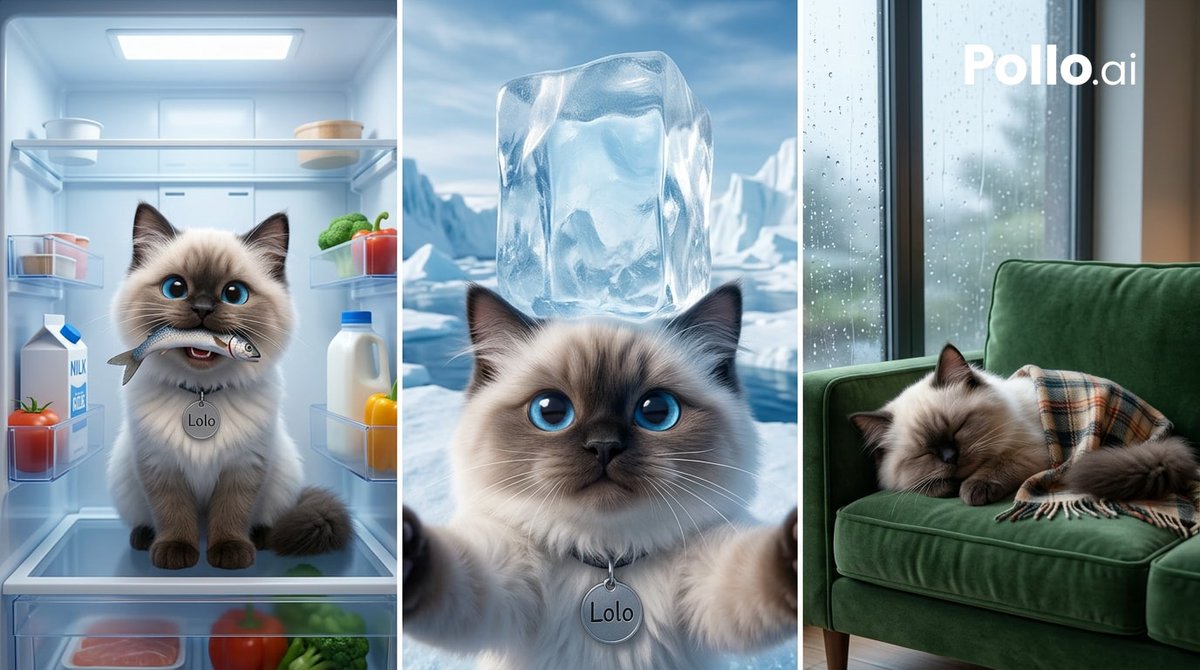
Cooling Cat Triptych
A photorealistic three-panel scene of the same cat staying cool in a fridge, the Arctic, and a rainy-room nap, useful for humorous pet heatwave visuals.
This is a GPT Image 2 prompt case for Portrait & Character. Use the copy-ready prompt below to generate similar visuals, and review Awesome GPT Image 2 Prompts attribution plus commercial-use rights before reuse.
Free 1K preview
Generate one preview image instantly, no sign-up required.
Free text preview doesn’t preserve reference-image consistency.
Prompt
Copy-ready prompt
Goal: Create a photorealistic vertical triptych showing the same fluffy colorpoint cat named {argument name="character name" default="Lolo"} using three humorous cooling strategies during a heatwave.

Canvas: Wide horizontal image in a 16:9 ratio, divided into exactly 3 equal vertical panels separated by thin white borders. Use cinematic, high-detail, realistic lighting with a cool blue color grade.

Subject details: The cat appears in all 3 panels as the same long-haired ragdoll/Siamese-style cat with cream fur, dark brown face mask, dark ears and paws, large bright blue eyes, fluffy tail, soft whiskers, and a round silver collar tag engraved with {argument name="character name" default="Lolo"}.

Panel 1, left: Inside an open refrigerator, the cat sits centered on a glass shelf facing forward, holding a small fish in its mouth. The fridge interior glows with cold blue-white light. Show exactly 8 visible food items: 1 milk carton on the left door shelf, 1 tomato near the milk carton, 1 small plastic container on an upper left shelf, 1 white bowl on the top left shelf, 1 round cheese or covered dish on the top right shelf, 1 cluster of broccoli on the right shelf, 1 red bell pepper on the right shelf, and 1 white bottle with a blue cap on the right shelf. Add faint frost, glass reflections, and chilled condensation.

Panel 2, center: A close-up selfie-like view of the same cat in an Arctic landscape, looking directly at the viewer with wide blue eyes. A large translucent ice cube sits balanced on the cat's head. Show icy water and snow-covered glaciers in the background under a bright cold sky. The cat’s two front paws appear near the lower foreground as if holding the camera. The silver tag engraved with {argument name="character name" default="Lolo"} is visible.

Panel 3, right: The same cat sleeps curled on a deep green velvet sofa beside a tall window covered in raindrops. The cat is partly covered by a plaid blanket in muted beige, brown, and orange tones. Outside the window, show a soft blurry rainy city or greenery scene. Add white text watermark {argument name="watermark text" default="Pollo.ai"} near the upper right of this panel. Cozy indoor lighting contrasts with the cool rainy exterior.

Text content: Include exactly 2 pieces of readable text: the collar tag name {argument name="character name" default="Lolo"} where visible, and the watermark {argument name="watermark text" default="Pollo.ai"}. Avoid any other legible labels except incidental fridge packaging.

Constraints: Keep the same cat identity across all 3 panels, maintain realistic fur detail and expressive blue eyes, use no cartoon styling, no extra panels, no extra animals, no hands or humans, and no distorted anatomy.
Prompt variables
Editable argument placeholders found in the prompt, with their default values.
Best for
- - Portrait & Character visual exploration
- - Image generation and reference-image edits
- - Reusable briefs that keep source attribution visible
Change these parts
- - Subject, product, character, or scene
- - Aspect ratio, camera, lighting, and background
- - Brand, text, color, and output constraints
Recommended model and settings
- - Model: gpt-image-2
- - Input mode: Image to Image
- - Aspect ratio: source
- - Commercial status: review original source
How to use this prompt
- 1. Copy the prompt and preserve its structure for the first test.
- 2. Replace the subject, context, and publishing channel.
- 3. Change one camera, lighting, or style variable per iteration.
- 4. Inspect the output, source, text, and rights before reuse.
Limitations, source, and reuse cautions
- - Generated output is an editable draft, not factual, legal, or rights evidence.
- - Review the linked source, people, brands, logos, text, and third-party media before commercial use.
More cases in this category
Prioritized by category, input mode compatibility, quality, and lower risk.



Reuse and source notes
Use this prompt safely after previewing the case.
- 1.Copy the prompt or open it directly in Dovoo with the generation button.
- 2.Adjust variables, aspect ratio, and reference images for your own use case.
- 3.Before publishing or paid usage, verify source rights, attribution requirements, and brand or likeness risks.
Can I use this prompt commercially?
Commercial-use status is allowed. Review the original source, license, brand constraints, and legal requirements before paid usage.
Where does this case come from?
This case is imported from Awesome GPT Image 2 Prompts; keep attribution visible and check the source URL before reuse.