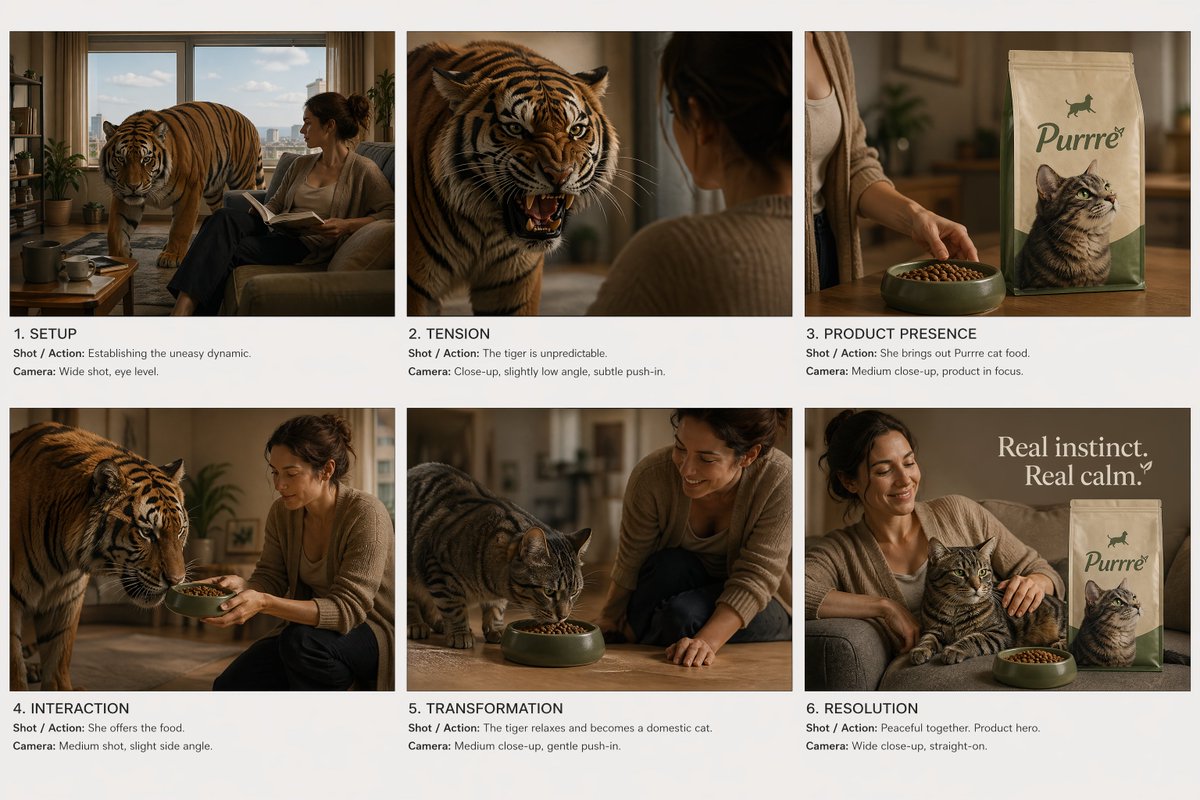
Commercial Ad Storyboard Layout
A highly structured prompt for generating a six-panel commercial storyboard layout with consistent characters and a narrative progression.
This is a GPT Image 2 prompt case for Product & Commercial. Use the copy-ready prompt below to generate similar visuals, and review Awesome GPT Image 2 Prompts attribution plus commercial-use rights before reuse.
Free 1K preview
Generate one preview image instantly, no sign-up required.
Free text preview doesn’t preserve reference-image consistency.
Prompt
Copy-ready prompt
Create a cinematic commercial storyboard sheet.\n\nLAYOUT:\n- Fixed 6-panel grid (2x3), evenly spaced\n- Clean white or neutral background\n- Each panel clearly separated, no UI, no clutter\n\nGLOBAL STYLE:\n- Cinematic realism, high-end commercial look\n- Soft controlled lighting, consistent across all panels\n- No character or environment drift\n\nSTORY ARC (strict order):\n1. Setup\n2. Tension\n3. Product reveal\n4. Product interaction\n5. Transformation (impact)\n6. Clean closing shot\n\nSCENE CONCEPT:\n{argument name="story concept" default="A woman lives in a quiet apartment with a tense, unpredictable tiger. The tiger behaves like a domestic cat but carries constant danger. When she serves the product (cat food), the tiger visibly relaxes and transforms into a calm domestic house cat."}\n\nPANEL REQUIREMENTS (for EACH panel include):\n- Cinematic frame (clear composition, subject readable)\n- Shot / Action (focused on character + product when applicable)\n- Camera (shot type, angle, movement)\n\nPRODUCT RULES:\n- Product must be sharp, readable, and well-lit in panels 3, 4, 6\n- No distortion, no redesign\n- Packaging must remain consistent\n\nVISUAL PRIORITIES:\n- Strong contrast between tension (tiger) and relief (cat)\n- Clear readability in every frame\n- No abstract or surreal distortion, grounded realism\n\nTEXT:\n- Minimal, small, professional labels only (panel number + short shot note)\n- No extra graphicsPrompt variables
Editable argument placeholders found in the prompt, with their default values.
Best for
- - Product & Commercial visual exploration
- - Image generation and reference-image edits
- - Reusable briefs that keep source attribution visible
Change these parts
- - Subject, product, character, or scene
- - Aspect ratio, camera, lighting, and background
- - Brand, text, color, and output constraints
Recommended model and settings
- - Model: gpt-image-2
- - Input mode: Image to Image
- - Aspect ratio: source
- - Commercial status: review original source
How to use this prompt
- 1. Copy the prompt and preserve its structure for the first test.
- 2. Replace the subject, context, and publishing channel.
- 3. Change one camera, lighting, or style variable per iteration.
- 4. Inspect the output, source, text, and rights before reuse.
Limitations, source, and reuse cautions
- - Generated output is an editable draft, not factual, legal, or rights evidence.
- - Review the linked source, people, brands, logos, text, and third-party media before commercial use.
More cases in this category
Prioritized by category, input mode compatibility, quality, and lower risk.

Reuse and source notes
Use this prompt safely after previewing the case.
- 1.Copy the prompt or open it directly in Dovoo with the generation button.
- 2.Adjust variables, aspect ratio, and reference images for your own use case.
- 3.Before publishing or paid usage, verify source rights, attribution requirements, and brand or likeness risks.
Can I use this prompt commercially?
Commercial-use status is allowed. Review the original source, license, brand constraints, and legal requirements before paid usage.
Where does this case come from?
This case is imported from Awesome GPT Image 2 Prompts; keep attribution visible and check the source URL before reuse.