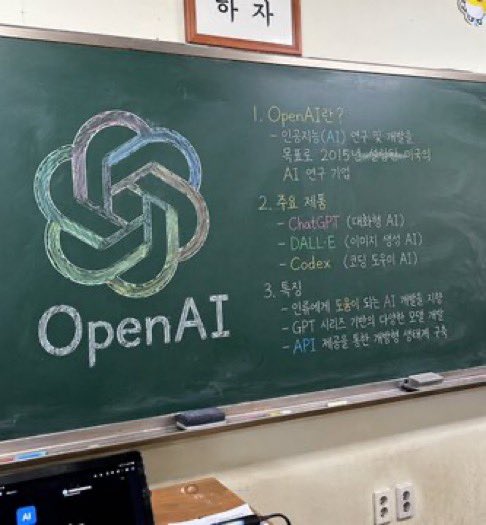
Classroom Chalkboard Lesson
Generates a photorealistic image of a classroom chalkboard featuring a colorful logo drawing and structured handwritten lesson notes.
This is a GPT Image 2 prompt case for Interior & Architecture. Use the copy-ready prompt below to generate similar visuals, and review Awesome GPT Image 2 Prompts attribution plus commercial-use rights before reuse.
Free 1K preview
Generate one preview image instantly, no sign-up required.
Prompt
Copy-ready prompt
A photorealistic, slightly angled snapshot of a green classroom chalkboard. On the left side of the board is a large, meticulously drawn chalk illustration of the {argument name="company name" default="OpenAI"} logo, rendered in blended pastel colors like green, blue, and purple, with the word "{argument name="logo text" default="OpenAI"}" written in neat white chalk beneath it. The right side of the board features handwritten text organized into exactly 3 numbered sections. Section 1 is titled "{argument name="section one title" default="1. OpenAI란?"}" followed by a brief explanatory paragraph. Section 2 is titled "{argument name="section two title" default="2. 주요 제품"}" and lists 3 bullet points including ChatGPT, DALL-E, and Codex. Section 3 is titled "{argument name="section three title" default="3. 특징"}" and contains 3 bullet points describing features. The chalkboard has a silver metal frame and a chalk ledge holding 2 rectangular erasers and scattered pieces of chalk. Below the board is an off-white wall with a double electrical outlet. In the bottom left foreground, the top edge of a dark laptop screen is partially visible, and above the chalkboard, the bottom edge of a framed sign is cut off by the frame.Prompt variables
Editable argument placeholders found in the prompt, with their default values.
Best for
- - Interior & Architecture visual exploration
- - Image generation and reference-image edits
- - Reusable briefs that keep source attribution visible
Change these parts
- - Subject, product, character, or scene
- - Aspect ratio, camera, lighting, and background
- - Brand, text, color, and output constraints
Recommended model and settings
- - Model: gpt-image-2
- - Input mode: Text to Image
- - Aspect ratio: source
- - Commercial status: review original source
How to use this prompt
- 1. Copy the prompt and preserve its structure for the first test.
- 2. Replace the subject, context, and publishing channel.
- 3. Change one camera, lighting, or style variable per iteration.
- 4. Inspect the output, source, text, and rights before reuse.
Limitations, source, and reuse cautions
- - Generated output is an editable draft, not factual, legal, or rights evidence.
- - Review the linked source, people, brands, logos, text, and third-party media before commercial use.
More cases in this category
Prioritized by category, input mode compatibility, quality, and lower risk.
Reuse and source notes
Use this prompt safely after previewing the case.
- 1.Copy the prompt or open it directly in Dovoo with the generation button.
- 2.Adjust variables, aspect ratio, and reference images for your own use case.
- 3.Before publishing or paid usage, verify source rights, attribution requirements, and brand or likeness risks.
Can I use this prompt commercially?
Commercial-use status is allowed. Review the original source, license, brand constraints, and legal requirements before paid usage.
Where does this case come from?
This case is imported from Awesome GPT Image 2 Prompts; keep attribution visible and check the source URL before reuse.