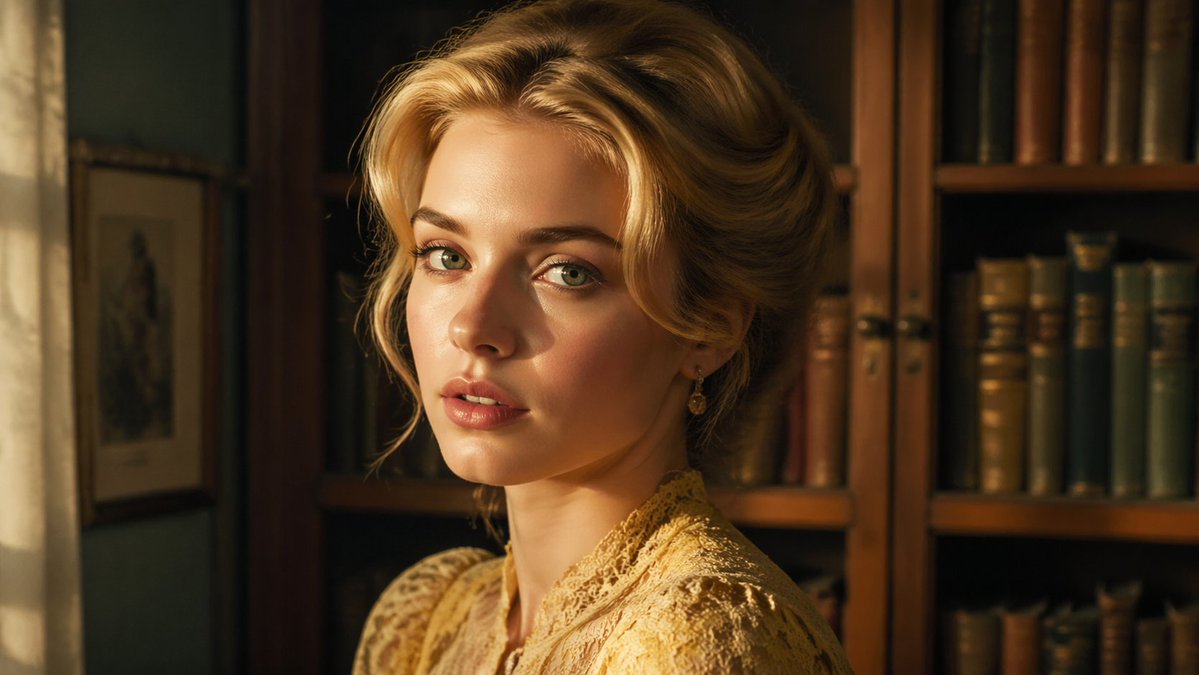
Cinematic Woman in Vintage Library
This prompt generates a warm 16:9 photorealistic period-style portrait of an elegant woman in a book-lined study, suitable for historical drama visuals or cinematic character art.
This is a GPT Image 2 prompt case for Portrait & Character. Use the copy-ready prompt below to generate similar visuals, and review Awesome GPT Image 2 Prompts attribution plus commercial-use rights before reuse.
Free 1K preview
Generate one preview image instantly, no sign-up required.
Prompt
Copy-ready prompt
A cinematic waist-up portrait of a refined woman in an old-fashioned library, turned slightly to the left and seated or standing close to the camera, with her face centered and partly in soft shadow. She has {argument name="hair color" default="golden blonde"} hair styled in an elegant Edwardian or early 20th-century updo with volume at the crown and loose curled strands framing the sides. She wears a high-necked {argument name="dress color" default="cream-gold"} lace dress with intricate floral texture and delicate trim, plus one visible dangling earring. The setting is a warm, intimate study with 2 tall wooden bookcases filled with aged books in brown, green, and muted blue tones, and on the far left a softly glowing window with a sheer curtain beside 1 framed wall picture. Use golden-hour indoor lighting, amber highlights, shallow depth of field, rich wood tones, soft filmic contrast, realistic skin and fabric detail, and a quiet historical-drama mood. Compose it in a 16:9 frame, medium close-up, photorealistic, luxurious, subtle, and painterly without looking illustrated.Prompt variables
Editable argument placeholders found in the prompt, with their default values.
Best for
- - Portrait & Character visual exploration
- - Image generation and reference-image edits
- - Reusable briefs that keep source attribution visible
Change these parts
- - Subject, product, character, or scene
- - Aspect ratio, camera, lighting, and background
- - Brand, text, color, and output constraints
Recommended model and settings
- - Model: gpt-image-2
- - Input mode: Text to Image
- - Aspect ratio: source
- - Commercial status: review original source
How to use this prompt
- 1. Copy the prompt and preserve its structure for the first test.
- 2. Replace the subject, context, and publishing channel.
- 3. Change one camera, lighting, or style variable per iteration.
- 4. Inspect the output, source, text, and rights before reuse.
Limitations, source, and reuse cautions
- - Generated output is an editable draft, not factual, legal, or rights evidence.
- - Review the linked source, people, brands, logos, text, and third-party media before commercial use.
More cases in this category
Prioritized by category, input mode compatibility, quality, and lower risk.





Reuse and source notes
Use this prompt safely after previewing the case.
- 1.Copy the prompt or open it directly in Dovoo with the generation button.
- 2.Adjust variables, aspect ratio, and reference images for your own use case.
- 3.Before publishing or paid usage, verify source rights, attribution requirements, and brand or likeness risks.
Can I use this prompt commercially?
Commercial-use status is allowed. Review the original source, license, brand constraints, and legal requirements before paid usage.
Where does this case come from?
This case is imported from Awesome GPT Image 2 Prompts; keep attribution visible and check the source URL before reuse.