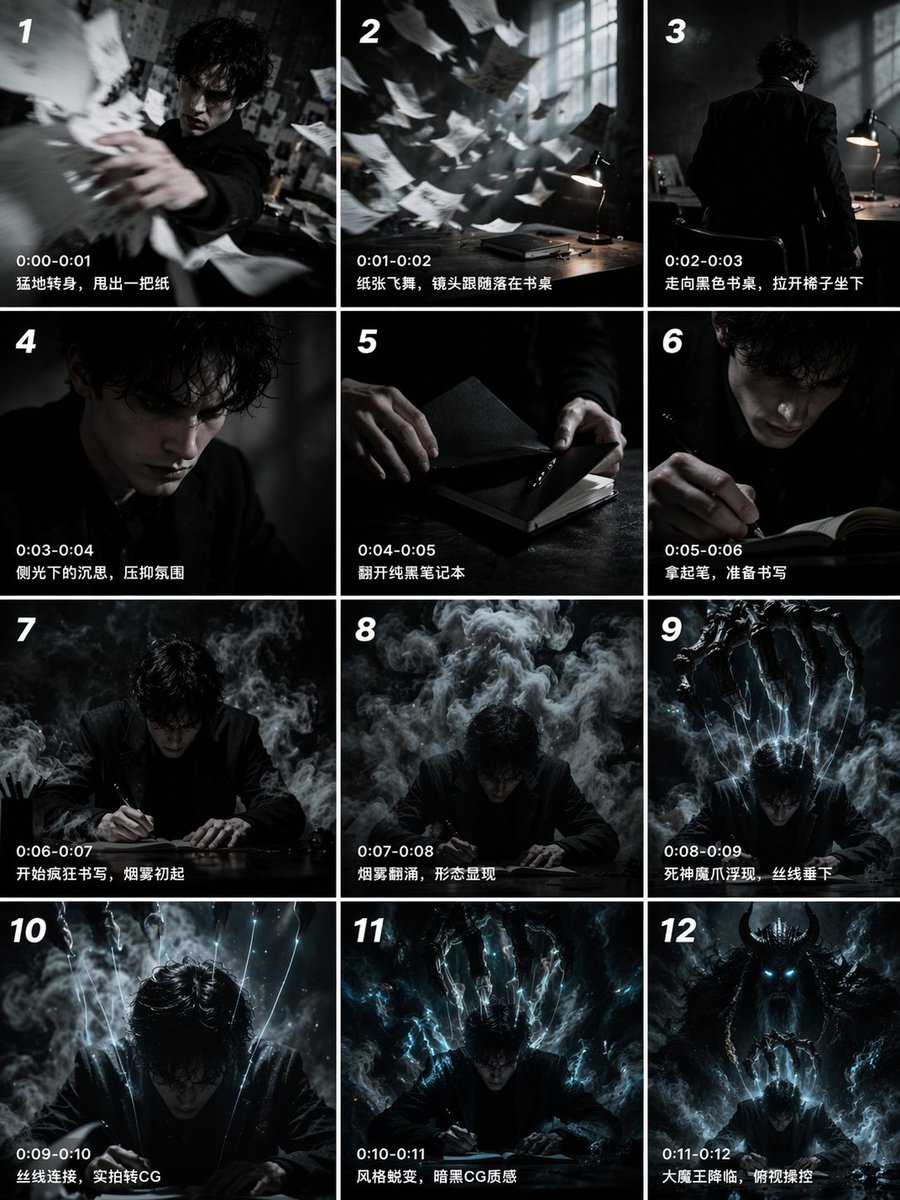
12-Panel Cinematic Storyboard Grid
Generates a 12-panel sequential storyboard with timestamps and captions, ideal for pre-visualizing short films or video generation prompts.
This is a GPT Image 2 prompt case for Illustration & Art. Use the copy-ready prompt below to generate similar visuals, and review Awesome GPT Image 2 Prompts attribution plus commercial-use rights before reuse.
Free 1K preview
Generate one preview image instantly, no sign-up required.
Prompt
Copy-ready prompt
{
  "type": "12-panel cinematic storyboard grid",
  "style": "{argument name=\"visual style\" default=\"dark cinematic transitioning to dark fantasy CG\"}",
  "character": "{argument name=\"main character\" default=\"pale young man with messy black hair in a dark suit\"}",
  "layout": {
    "columns": 3,
    "rows": 4,
    "panel_count": 12
  },
  "panels": [
    {
      "id": "1",
      "timestamp": "0:00-0:01",
      "caption": "Suddenly turning around, he threw out a piece of paper.",
      "visual": "character throwing papers at camera"
    },
    {
      "id": "2",
      "timestamp": "0:01-0:02",
      "caption": "The paper fluttered, and the camera followed it as it landed on the desk.",
      "visual": "papers flying in dark room with desk lamp"
    },
    {
      "id": "3",
      "timestamp": "0:02-0:03",
      "caption": "Walking towards the black desk, he pulled out a chair and sat down.",
      "visual": "character walking away towards desk"
    },
    {
      "id": "4",
      "timestamp": "0:03-0:04",
      "caption": "Pensive in the sidelight, a suppressed atmosphere.",
      "visual": "close-up of character's face in shadow"
    },
    {
      "id": "5",
      "timestamp": "0:04-0:05",
      "caption": "Opening the pure black notebook.",
      "visual": "close-up of hands opening a black notebook"
    },
    {
      "id": "6",
      "timestamp": "0:05-0:06",
      "caption": "Pick up the pen, prepare to write",
      "visual": "close-up of character holding pen over notebook"
    },
    {
      "id": "7",
      "timestamp": "0:06-0:07",
      "caption": "Start writing frantically, smoke begins to rise",
      "visual": "character writing frantically, smoke rising"
    },
    {
      "id": "8",
      "timestamp": "0:07-0:08",
      "caption": "Smoke swirls, a form appears",
      "visual": "thick smoke surging around character"
    },
    {
      "id": "9",
      "timestamp": "0:08-0:09",
      "caption": "The Reaper's demonic claws emerge, threads descend",
      "visual": "skeletal hands emerging above, glowing threads hanging down"
    },
    {
      "id": "10",
      "timestamp": "0:09-0:10",
      "caption": "Threads connect, live-action transitions to CG",
      "visual": "glowing threads attaching to character's head"
    },
    {
      "id": "11",
      "timestamp": "0:10-0:11",
      "caption": "Style transformation, dark CG texture",
      "visual": "magical energy, heavy CG fantasy style shift"
    },
    {
      "id": "12",
      "timestamp": "0:11-0:12",
      "caption": "The Great Demon King descends, overlooking and controlling",
      "visual": "{argument name=\"final entity\" default=\"giant horned demon figure\"} looming behind, controlling character like a puppet"
    }
  ]
}
Prompt variables
Editable argument placeholders found in the prompt, with their default values.
Best for
- - Illustration & Art visual exploration
- - Image generation and reference-image edits
- - Reusable briefs that keep source attribution visible
Change these parts
- - Subject, product, character, or scene
- - Aspect ratio, camera, lighting, and background
- - Brand, text, color, and output constraints
Recommended model and settings
- - Model: gpt-image-2
- - Input mode: Text to Image
- - Aspect ratio: source
- - Commercial status: review original source
How to use this prompt
- 1. Copy the prompt and preserve its structure for the first test.
- 2. Replace the subject, context, and publishing channel.
- 3. Change one camera, lighting, or style variable per iteration.
- 4. Inspect the output, source, text, and rights before reuse.
Limitations, source, and reuse cautions
- - Generated output is an editable draft, not factual, legal, or rights evidence.
- - Review the linked source, people, brands, logos, text, and third-party media before commercial use.
More cases in this category
Prioritized by category, input mode compatibility, quality, and lower risk.



Reuse and source notes
Use this prompt safely after previewing the case.
- 1.Copy the prompt or open it directly in Dovoo with the generation button.
- 2.Adjust variables, aspect ratio, and reference images for your own use case.
- 3.Before publishing or paid usage, verify source rights, attribution requirements, and brand or likeness risks.
Can I use this prompt commercially?
Commercial-use status is allowed. Review the original source, license, brand constraints, and legal requirements before paid usage.
Where does this case come from?
This case is imported from Awesome GPT Image 2 Prompts; keep attribution visible and check the source URL before reuse.