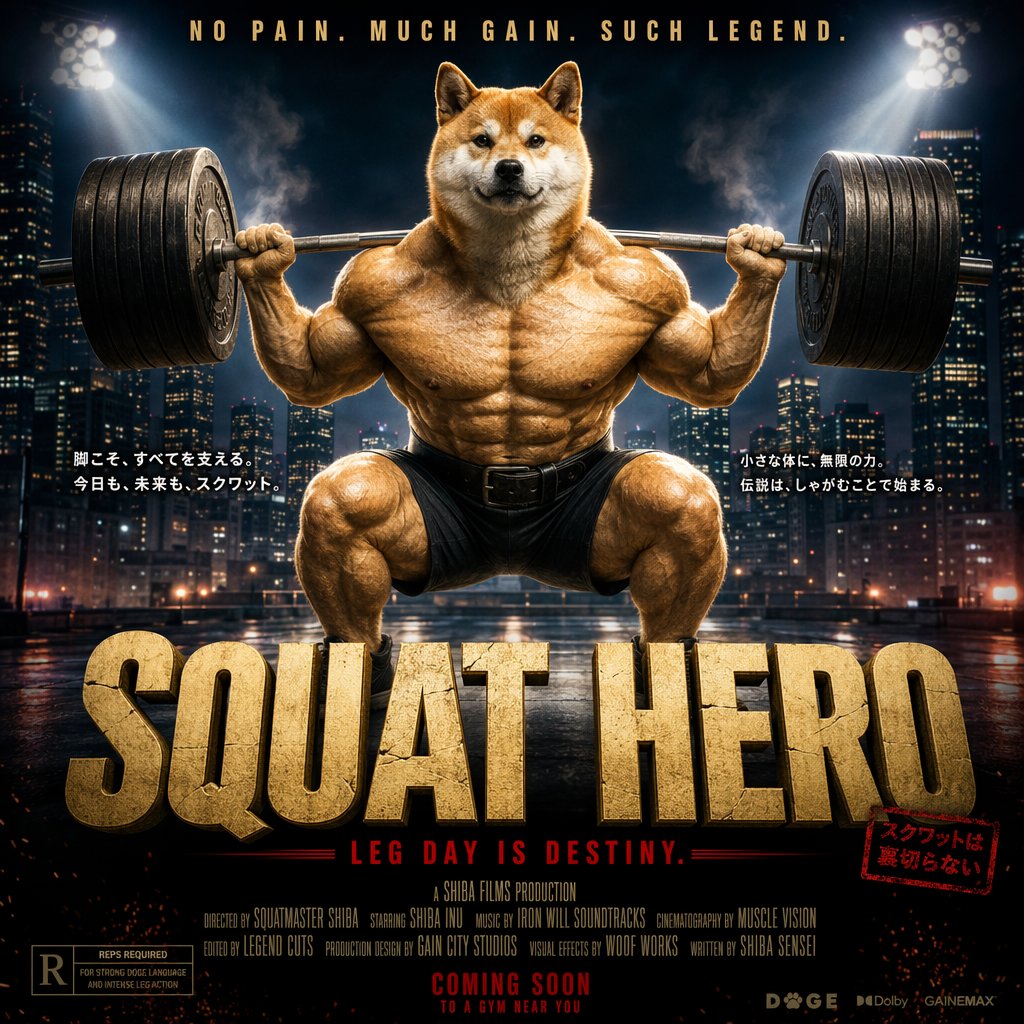
Cinematic Shiba Squat Hero Poster
A hyper-detailed blockbuster-style movie poster of a massively muscular Shiba Inu powerlifter squatting a huge barbell, ideal for parody fitness art, meme posters, or dramatic AI-generated promotional imagery.
This is a GPT Image 2 prompt case for Graphic & Poster. Use the copy-ready prompt below to generate similar visuals, and review Awesome GPT Image 2 Prompts attribution plus commercial-use rights before reuse.
Free 1K preview
Generate one preview image instantly, no sign-up required.
Prompt
Copy-ready prompt
Create a hyper-detailed cinematic parody movie poster featuring an anthropomorphic Shiba Inu as an extreme bodybuilding powerlifting hero, centered in a full frontal deep squat while holding a massively overloaded barbell across his shoulders. The dog has a realistic Shiba Inu head with a calm, confident expression, warm orange-and-cream fur, upright ears, and direct eye contact. The body is exaggeratedly muscular and humanlike, with huge deltoids, chest, arms, abs, quads, and calves, rendered with glossy dramatic highlights and dense texture in the fur and skin. He wears only tight black lifting shorts and a dark lifting belt. The squat stance is low and powerful, knees bent wide, feet planted on a wet reflective rooftop or industrial platform at night. Put a modern city skyline in the background with illuminated skyscrapers, bluish haze, smoke, and two bright stadium floodlights in the upper left and upper right creating strong rim light and a heroic sports-arena mood. The composition should be perfectly centered and symmetrical, with the barbell extending horizontally across the frame and stacked with many large black weight plates on both sides. Use a high-contrast teal, amber, black, and gold color palette with intense cinematic grading, sharp focus on the character, and atmospheric glow around the lights. Add stylized poster typography: at the very top, a gold all-caps tagline reading {argument name="top tagline" default="NO PAIN. MUCH GAIN. SUCH LEGEND."}. Add 2 blocks of small white Japanese copy, 1 on the left of the character and 1 on the right, each set in 2 lines. At the bottom, place a gigantic cracked stone-textured gold title in all caps reading {argument name="movie title" default="SQUAT HERO"}. Beneath it, add a red all-caps subtitle reading {argument name="subtitle" default="LEG DAY IS DESTINY."}. Add a small red stamp-like Japanese label near the lower right of the title. Include dense tiny mock film-poster credits in white across the lower center, a ratings box in the lower left, 3 tiny studio or audio logos in the lower right, and a centered release line near the bottom reading {argument name="release text" default="COMING SOON TO A GYM NEAR YOU"}. Make it look like a polished blockbuster action-comedy sports film poster with absurdly epic intensity, photoreal rendering, dramatic shadows, volumetric smoke, reflective ground, and premium theatrical poster design.Prompt variables
Editable argument placeholders found in the prompt, with their default values.
Best for
- - Graphic & Poster visual exploration
- - Image generation and reference-image edits
- - Reusable briefs that keep source attribution visible
Change these parts
- - Subject, product, character, or scene
- - Aspect ratio, camera, lighting, and background
- - Brand, text, color, and output constraints
Recommended model and settings
- - Model: gpt-image-2
- - Input mode: Text to Image
- - Aspect ratio: source
- - Commercial status: review original source
How to use this prompt
- 1. Copy the prompt and preserve its structure for the first test.
- 2. Replace the subject, context, and publishing channel.
- 3. Change one camera, lighting, or style variable per iteration.
- 4. Inspect the output, source, text, and rights before reuse.
Limitations, source, and reuse cautions
- - Generated output is an editable draft, not factual, legal, or rights evidence.
- - Review the linked source, people, brands, logos, text, and third-party media before commercial use.
More cases in this category
Prioritized by category, input mode compatibility, quality, and lower risk.





Reuse and source notes
Use this prompt safely after previewing the case.
- 1.Copy the prompt or open it directly in Dovoo with the generation button.
- 2.Adjust variables, aspect ratio, and reference images for your own use case.
- 3.Before publishing or paid usage, verify source rights, attribution requirements, and brand or likeness risks.
Can I use this prompt commercially?
Commercial-use status is allowed. Review the original source, license, brand constraints, and legal requirements before paid usage.
Where does this case come from?
This case is imported from Awesome GPT Image 2 Prompts; keep attribution visible and check the source URL before reuse.