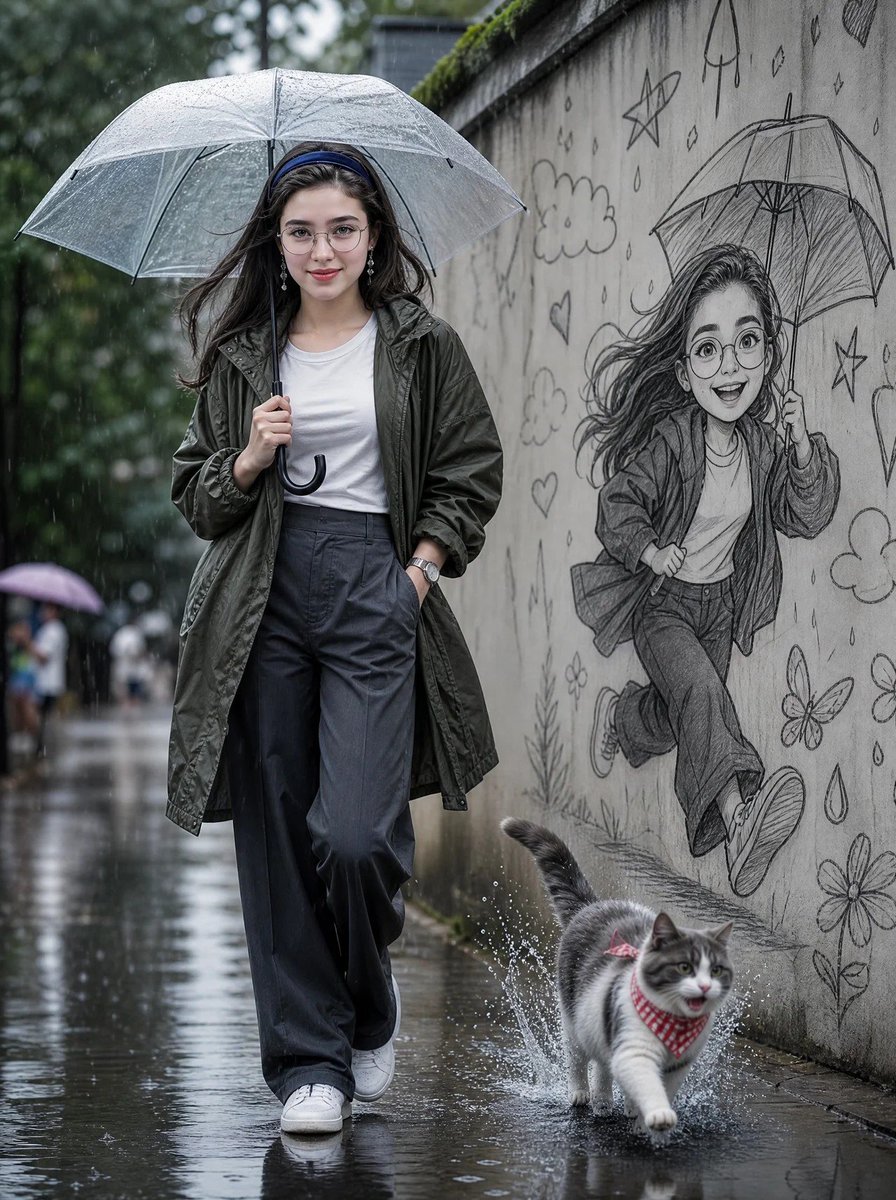
Rainy Street Portrait with Pencil Mural
A detailed cinematic portrait of a woman in the rain, featuring a concrete wall with a graphite pencil sketch and a splashing cat.
This is a GPT Image 2 prompt case for Portrait & Character. Use the copy-ready prompt below to generate similar visuals, and review Awesome GPT Image 2 Prompts attribution plus commercial-use rights before reuse.
Free 1K preview
Generate one preview image instantly, no sign-up required.
Prompt
Copy-ready prompt
Create a cinematic ultra-realistic rainy street portrait of a beautiful young woman walking confidently under a transparent umbrella on a wet road. She wears a {argument name="jacket style" default="dark olive-green oversized rain jacket"} over a {argument name="top" default="plain white fitted T-shirt"}, loose charcoal-gray wide-leg trousers, clean white sneakers, round eyeglasses, and a minimalist wristwatch. One hand gracefully holds the umbrella while the other rests casually in her pocket. Her long, slightly wavy black hair gently flows in the rain with a calm, soft, and confident expression. The pavement is soaked with realistic reflections, puddles, and raindrops splashing beneath her feet.\n\nBeside her is a long concrete wall featuring an incredibly detailed graphite pencil sketch mural of a cheerful cartoon version of the same woman happily running with an umbrella, surrounded by playful doodles including stars, hearts, clouds, raindrops, flowers, butterflies, and a cute kitten. In the foreground, a {argument name="pet" default="fluffy gray-and-white cat"} wearing a red checkered bandana runs through a puddle, creating dramatic water splashes.\n\nSoft overcast daylight, natural rainy atmosphere, shallow depth of field, realistic wet textures, cinematic composition, muted color grading, ultra-detailed facial features, HDR, photorealistic, DSLR photography, 85mm lens, f/1.8, volumetric lighting, masterpiece, 8K, hyper-realistic, professional editorial fashion photography.\n\nFace Reference: Use the uploaded face as the exact face reference. Preserve 100% facial identity, facial structure, skin tone, hairstyle, eye shape, eyebrows, nose, lips, expression, and all unique facial features. Do not beautify, modify, or replace the face. Keep the face perfectly consistent with the reference while matching the pose, outfit, lighting, and overall composition.Prompt variables
Editable argument placeholders found in the prompt, with their default values.
Best for
- - Portrait & Character visual exploration
- - Image generation and reference-image edits
- - Reusable briefs that keep source attribution visible
Change these parts
- - Subject, product, character, or scene
- - Aspect ratio, camera, lighting, and background
- - Brand, text, color, and output constraints
Recommended model and settings
- - Model: gpt-image-2
- - Input mode: Text to Image
- - Aspect ratio: source
- - Commercial status: review original source
How to use this prompt
- 1. Copy the prompt and preserve its structure for the first test.
- 2. Replace the subject, context, and publishing channel.
- 3. Change one camera, lighting, or style variable per iteration.
- 4. Inspect the output, source, text, and rights before reuse.
Limitations, source, and reuse cautions
- - Generated output is an editable draft, not factual, legal, or rights evidence.
- - Review the linked source, people, brands, logos, text, and third-party media before commercial use.
More cases in this category
Prioritized by category, input mode compatibility, quality, and lower risk.

Reuse and source notes
Use this prompt safely after previewing the case.
- 1.Copy the prompt or open it directly in Dovoo with the generation button.
- 2.Adjust variables, aspect ratio, and reference images for your own use case.
- 3.Before publishing or paid usage, verify source rights, attribution requirements, and brand or likeness risks.
Can I use this prompt commercially?
Commercial-use status is allowed. Review the original source, license, brand constraints, and legal requirements before paid usage.
Where does this case come from?
This case is imported from Awesome GPT Image 2 Prompts; keep attribution visible and check the source URL before reuse.