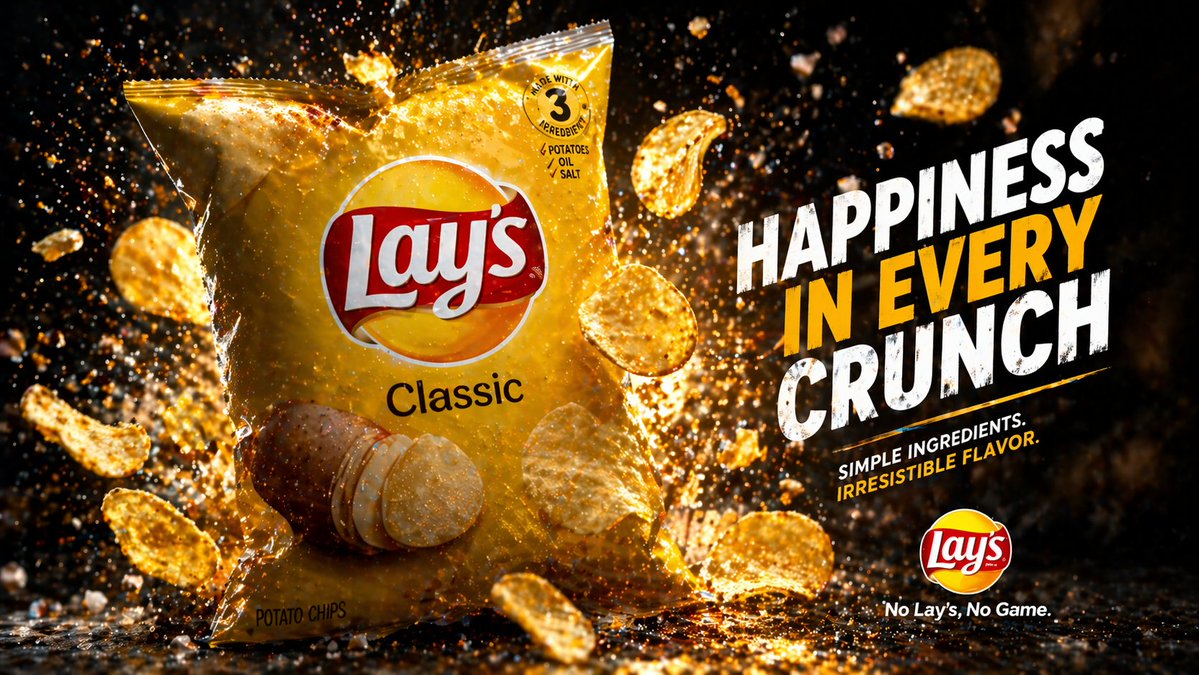
Cinematic Potato Chips Ad
A dramatic photorealistic snack product advertisement for generating bold e-commerce or promotional visuals with flying chips, glowing crumbs, and large marketing text.
This is a GPT Image 2 prompt case for Product & Commercial. Use the copy-ready prompt below to generate similar visuals, and review Awesome GPT Image 2 Prompts attribution plus commercial-use rights before reuse.
Free 1K preview
Generate one preview image instantly, no sign-up required.
Prompt
Copy-ready prompt
Create a high-impact commercial snack advertisement in a dramatic studio setting. Show a large glossy bag of {argument name="brand name" default="Lay's"} {argument name="product flavor" default="Classic"} potato chips standing upright slightly left of center, photographed at a three-quarter front angle. The bag is bright golden yellow with a realistic crinkled plastic texture, a large red-and-white logo centered near the top, the flavor name printed below, a photo of whole potatoes and several stacked potato chips near the lower front, and small package details including a circular badge near the top right that reads "MADE WITH 3 INGREDIENTS" with tiny lines under it reading "POTATOES", "OIL", "SALT", plus small text near the bottom left reading "POTATO CHIPS". Surround the bag with exactly 11 visible potato chips flying through the air at different depths and angles, some curled and some flat, with crisp texture and golden highlights. Fill the scene with explosive golden crumbs, seasoning dust, and sparkling particles bursting around the package, especially behind it and across the floor. Use a deep black background with warm amber rim lighting, strong contrast, glowing highlights, and cinematic backlit particles. On the right side, add a bold stacked headline in large distressed uppercase sans-serif text reading {argument name="headline text" default="HAPPINESS IN EVERY CRUNCH"}, with "HAPPINESS" and "CRUNCH" in white and "IN EVERY" in vivid golden yellow. Beneath the headline, place a two-line subheading in smaller uppercase text reading {argument name="subheading text" default="SIMPLE INGREDIENTS. IRRESISTIBLE FLAVOR."}, with the first line in white and the second line in yellow. At the bottom right, place a small round brand logo above the tagline {argument name="tagline" default="No Lay's, No Game."}. The composition should feel energetic, premium, messy in a controlled way, and optimized for e-commerce or promotional ad creative, with ultra-sharp product focus, dramatic lighting, floating debris, glossy reflections on the ground, and a polished photorealistic food photography look.Prompt variables
Editable argument placeholders found in the prompt, with their default values.
Best for
- - Product & Commercial visual exploration
- - Image generation and reference-image edits
- - Reusable briefs that keep source attribution visible
Change these parts
- - Subject, product, character, or scene
- - Aspect ratio, camera, lighting, and background
- - Brand, text, color, and output constraints
Recommended model and settings
- - Model: gpt-image-2
- - Input mode: Text to Image
- - Aspect ratio: source
- - Commercial status: review original source
How to use this prompt
- 1. Copy the prompt and preserve its structure for the first test.
- 2. Replace the subject, context, and publishing channel.
- 3. Change one camera, lighting, or style variable per iteration.
- 4. Inspect the output, source, text, and rights before reuse.
Limitations, source, and reuse cautions
- - Generated output is an editable draft, not factual, legal, or rights evidence.
- - Review the linked source, people, brands, logos, text, and third-party media before commercial use.
More cases in this category
Prioritized by category, input mode compatibility, quality, and lower risk.




Reuse and source notes
Use this prompt safely after previewing the case.
- 1.Copy the prompt or open it directly in Dovoo with the generation button.
- 2.Adjust variables, aspect ratio, and reference images for your own use case.
- 3.Before publishing or paid usage, verify source rights, attribution requirements, and brand or likeness risks.
Can I use this prompt commercially?
Commercial-use status is allowed. Review the original source, license, brand constraints, and legal requirements before paid usage.
Where does this case come from?
This case is imported from Awesome GPT Image 2 Prompts; keep attribution visible and check the source URL before reuse.