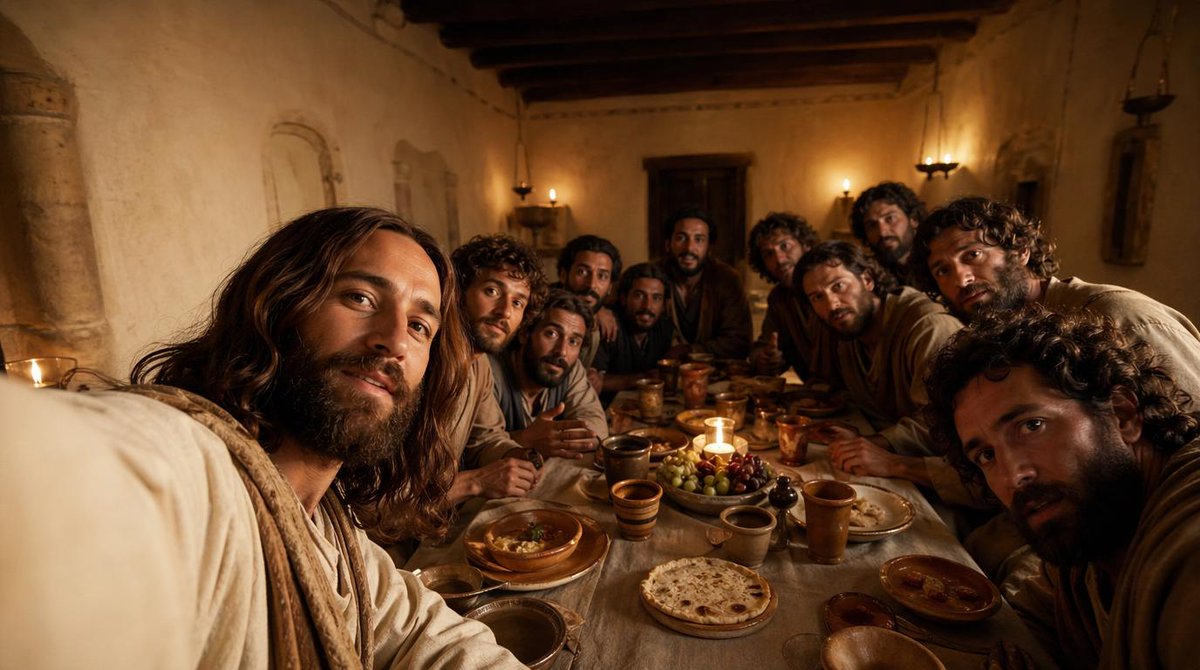
Cinematic Last Supper Scene
This prompt generates a warm, photorealistic biblical dinner scene of Jesus and the 12 disciples, ideal for historical, devotional, or cinematic concept imagery.
This is a GPT Image 2 prompt case for Illustration & Art. Use the copy-ready prompt below to generate similar visuals, and review Awesome GPT Image 2 Prompts attribution plus commercial-use rights before reuse.
Free 1K preview
Generate one preview image instantly, no sign-up required.
Prompt
Copy-ready prompt
A cinematic, historically grounded depiction of {argument name="scene subject" default="Jesus with his disciples during the Last Supper"} inside a modest ancient Middle Eastern dining room at night, shown from a close, immersive viewpoint at table height as if the viewer is seated among them. Include exactly 13 men gathered tightly around a long narrow supper table, with the central figure reading clearly as Jesus through calm presence, shoulder-length dark brown hair, a beard, and a soft off-white robe with a light beige shawl. The 12 disciples should vary in age and appearance, with curly or wavy dark hair, beards, and earth-toned robes in cream, brown, tan, muted blue, and dusty gray, leaning inward in conversation and attention. The room should have rough plaster walls, dark exposed wooden ceiling beams, a heavy wooden door at the back, simple wall niches, and small oil lamps or candle sconces casting warm amber light. On the table, show rustic period-appropriate food and vessels: round flatbread, grapes, olives, shallow bowls, clay plates, ceramic cups, and copper or earthenware goblets, with one small candle near the center creating a focal glow. Composition should be wide and intimate, slightly crowded at the foreground edges, with several figures partially cropped to enhance realism and immersion. Lighting should be low, golden, and dramatic, with soft shadows, a reverent mood, realistic skin tones, natural fabric folds, and rich cinematic contrast. Render in a photorealistic style with ultra-detailed textures, subtle depth of field, and the emotional tone of a historical biblical film still.Prompt variables
Editable argument placeholders found in the prompt, with their default values.
Best for
- - Illustration & Art visual exploration
- - Image generation and reference-image edits
- - Reusable briefs that keep source attribution visible
Change these parts
- - Subject, product, character, or scene
- - Aspect ratio, camera, lighting, and background
- - Brand, text, color, and output constraints
Recommended model and settings
- - Model: gpt-image-2
- - Input mode: Text to Image
- - Aspect ratio: source
- - Commercial status: review original source
How to use this prompt
- 1. Copy the prompt and preserve its structure for the first test.
- 2. Replace the subject, context, and publishing channel.
- 3. Change one camera, lighting, or style variable per iteration.
- 4. Inspect the output, source, text, and rights before reuse.
Limitations, source, and reuse cautions
- - Generated output is an editable draft, not factual, legal, or rights evidence.
- - Review the linked source, people, brands, logos, text, and third-party media before commercial use.
More cases in this category
Prioritized by category, input mode compatibility, quality, and lower risk.


Reuse and source notes
Use this prompt safely after previewing the case.
- 1.Copy the prompt or open it directly in Dovoo with the generation button.
- 2.Adjust variables, aspect ratio, and reference images for your own use case.
- 3.Before publishing or paid usage, verify source rights, attribution requirements, and brand or likeness risks.
Can I use this prompt commercially?
Commercial-use status is allowed. Review the original source, license, brand constraints, and legal requirements before paid usage.
Where does this case come from?
This case is imported from Awesome GPT Image 2 Prompts; keep attribution visible and check the source URL before reuse.