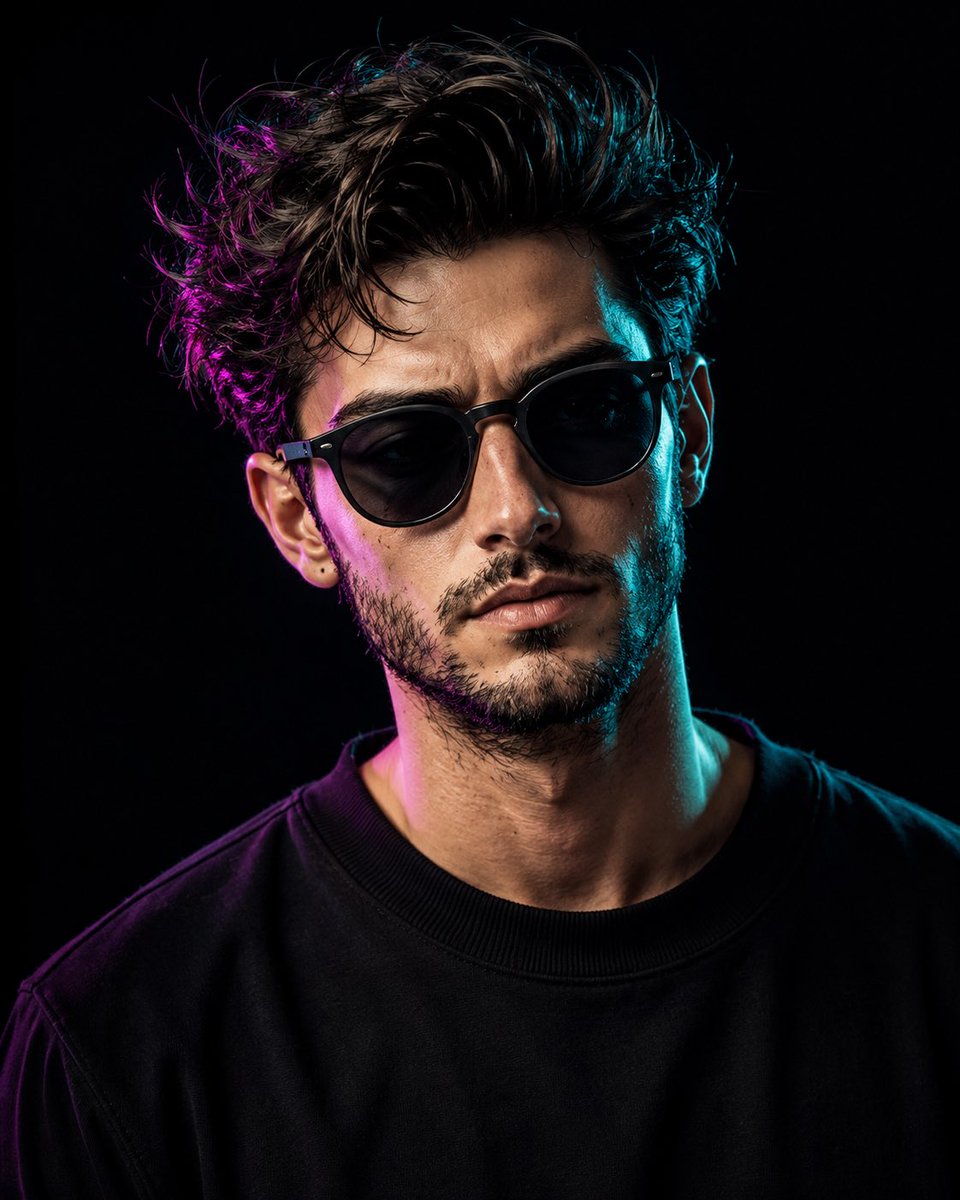
Cinematic Dual-Tone Studio Portrait
A highly detailed studio portrait prompt that uses dramatic magenta and cyan gel lighting to create a professional photography look while maintaining natural skin textures.
This is a GPT Image 2 prompt case for 人像角色. Use the copy-ready prompt below to generate similar visuals, and review Awesome GPT Image 2 Prompts attribution plus commercial-use rights before reuse.
Prompt
Copy-ready prompt
创作一张具有电影感、超写实的摄影棚上半身肖像,主角为 {argument name="subject" default="任意男性"},保留其自然的头发、胡须造型、眼镜或配饰(若参考图中存在),并保持整体面部特征,不改变其自然外观。构图从上胸部到头部,清晰展示 {argument name="clothing" default="黑色圆领卫衣"}。人物应自然地面向镜头,下巴微抬,双眼略微向上看,表情柔和、冷静且自信,带着一丝极其细微的放松微笑,既不过分喜悦也不严肃。

使用深邃的纯黑色摄影棚背景,确保无杂乱干扰。布光应具有戏剧性但可控:从一侧添加鲜艳的 {argument name="accent color 1" default="洋红色/紫色"} 强调光,主要照亮头发、脸颊边缘、胡须边缘、颈部和肩部;从另一侧添加冷色调的 {argument name="accent color 2" default="青色/蓝绿色"} 强调光,主要营造柔和的轮廓光和侧面高光。保持面部中心自然受光,呈现真实的肤色;不要让整张脸看起来像涂了油漆、霓虹灯效果或被生硬地分割成两种颜色。双色调效果应呈现出专业摄影棚滤色片布光的质感,而非赛博朋克风格的色彩遮罩。

保持平滑但自然的皮肤纹理、清晰的面部细节、真实的胡须质感(若存在)、明亮清澈的双眼,并确保面部焦点锐利。专业编辑摄影风格,浅景深,柔和轮廓光,高动态范围,85mm 镜头感,f/1.8 光圈,照片级摄影棚质量,高分辨率细节,现代电影美学。垂直 4:5 纵横比。
Prompt variables
Editable argument placeholders found in the prompt, with their default values.
More cases in this category
Prioritized by category, input mode compatibility, quality, and lower risk.
Reuse and source notes
Use this prompt safely after previewing the case.
- 1.Copy the prompt or open it directly in Dovoo with the generation button.
- 2.Adjust variables, aspect ratio, and reference images for your own use case.
- 3.Before publishing or paid usage, verify source rights, attribution requirements, and brand or likeness risks.
Can I use this prompt commercially?
Commercial-use status is allowed. Review the original source, license, brand constraints, and legal requirements before paid usage.
Where does this case come from?
This case is imported from Awesome GPT Image 2 Prompts; keep attribution visible and check the source URL before reuse.