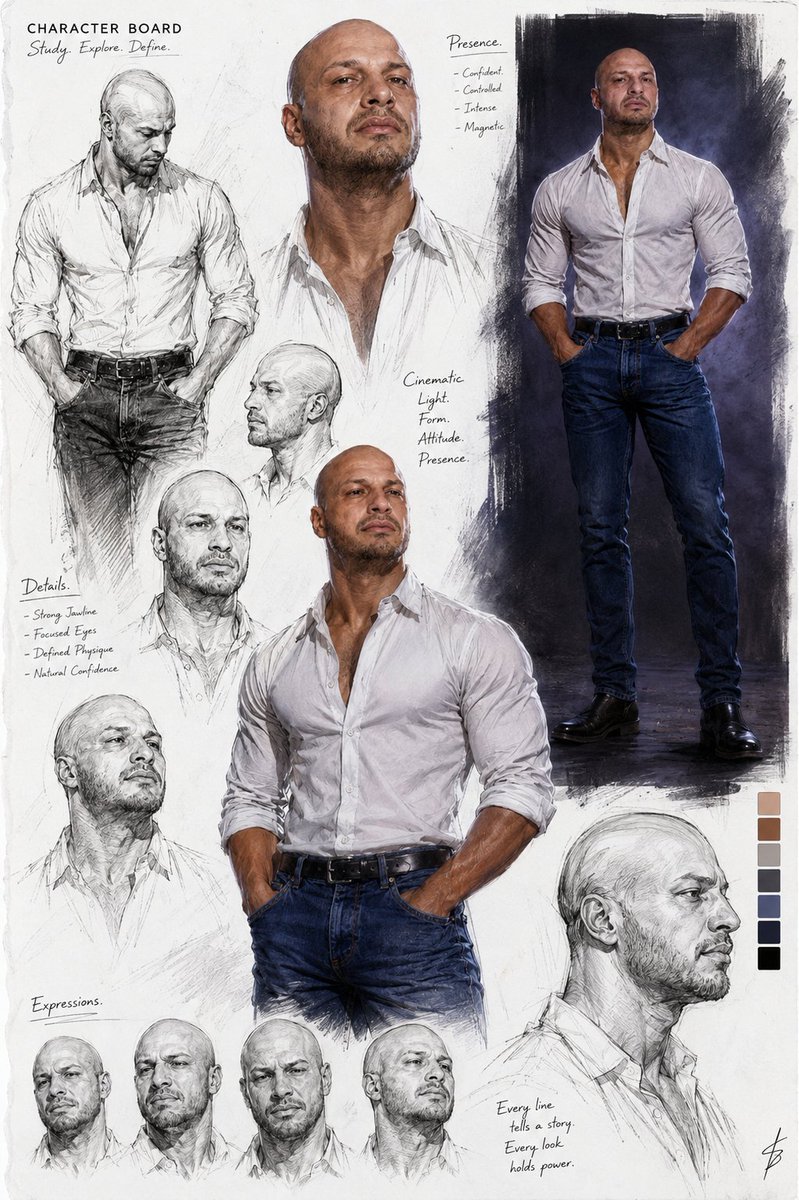
Cinematic Male Character Concept Board
A premium cinematic character design board showcasing a muscular male subject through various expressions and poses on a clean white page.
This is a GPT Image 2 prompt case for Portrait & Character. Use the copy-ready prompt below to generate similar visuals, and review Awesome GPT Image 2 Prompts attribution plus commercial-use rights before reuse.
Free 1K preview
Generate one preview image instantly, no sign-up required.
Prompt
Copy-ready prompt
Using the referenced image, create a Premium cinematic sketchbook character board showcasing a {argument name="subject" default="handsome muscular bald man with short trimmed beard"} and intense gaze through multiple realistic illustrations and portrait studies.

The man has a shaved head, strong jawline, short dark beard and mustache, muscular build with broad shoulders and defined arms. Collection of emotional expressions including serious intense look, slight smirk, profile views, three-quarter views, fashion poses in {argument name="clothing" default="white button-up shirt with top buttons open and sleeves rolled up, blue jeans, black belt"}, relaxed confident stances, and detailed facial sketches. Arranged organically on a bright white page like a professional character design board.

Strong cinematic lighting, ultra-detailed mixed sketch techniques combining realistic rendering, pencil sketches, ink lines, and subtle color accents. Luxury fashion concept art style, high-end character board presentation, clean layout with multiple panels and studies, professional illustration quality.
Prompt variables
Editable argument placeholders found in the prompt, with their default values.
Best for
- - Portrait & Character visual exploration
- - Image generation and reference-image edits
- - Reusable briefs that keep source attribution visible
Change these parts
- - Subject, product, character, or scene
- - Aspect ratio, camera, lighting, and background
- - Brand, text, color, and output constraints
Recommended model and settings
- - Model: gpt-image-2
- - Input mode: Text to Image
- - Aspect ratio: source
- - Commercial status: review original source
How to use this prompt
- 1. Copy the prompt and preserve its structure for the first test.
- 2. Replace the subject, context, and publishing channel.
- 3. Change one camera, lighting, or style variable per iteration.
- 4. Inspect the output, source, text, and rights before reuse.
Limitations, source, and reuse cautions
- - Generated output is an editable draft, not factual, legal, or rights evidence.
- - Review the linked source, people, brands, logos, text, and third-party media before commercial use.
More cases in this category
Prioritized by category, input mode compatibility, quality, and lower risk.

Reuse and source notes
Use this prompt safely after previewing the case.
- 1.Copy the prompt or open it directly in Dovoo with the generation button.
- 2.Adjust variables, aspect ratio, and reference images for your own use case.
- 3.Before publishing or paid usage, verify source rights, attribution requirements, and brand or likeness risks.
Can I use this prompt commercially?
Commercial-use status is allowed. Review the original source, license, brand constraints, and legal requirements before paid usage.
Where does this case come from?
This case is imported from Awesome GPT Image 2 Prompts; keep attribution visible and check the source URL before reuse.