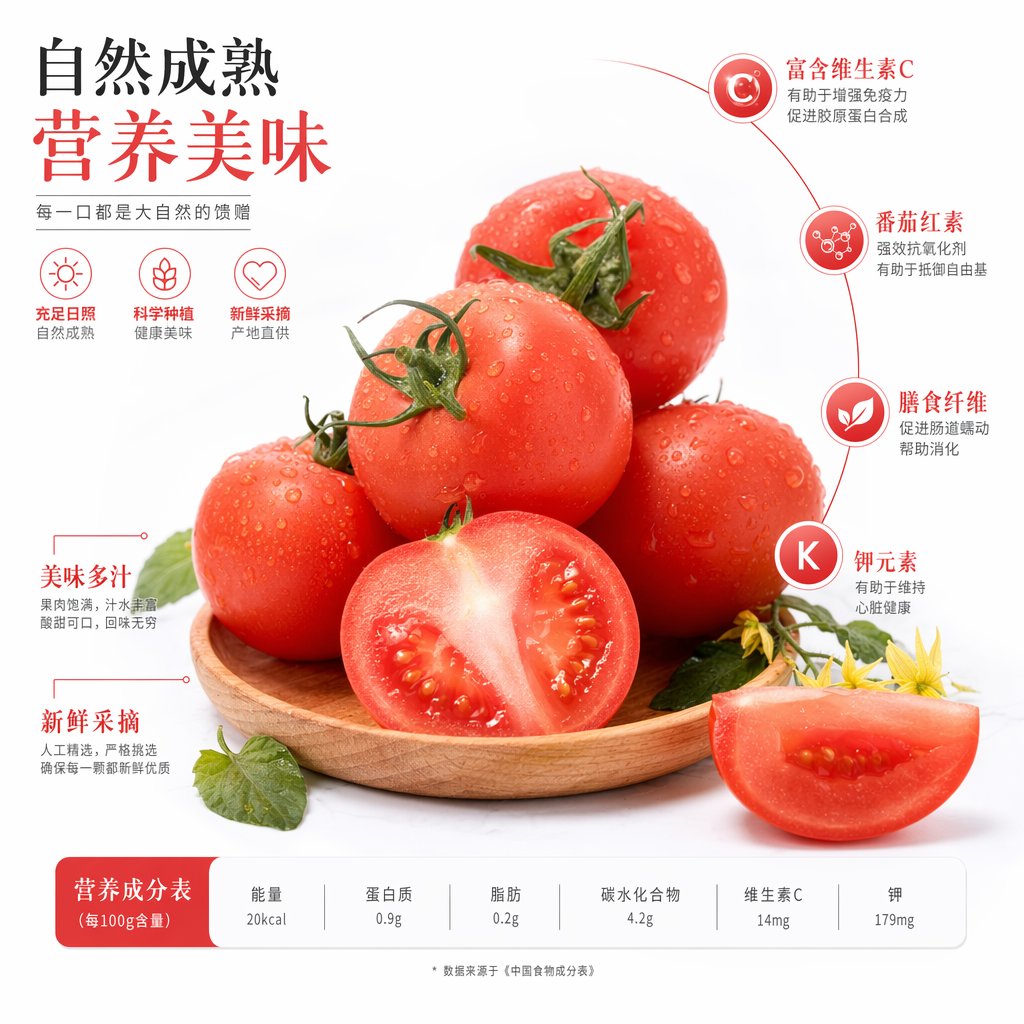
Chinese Tomato Nutrition Poster
A polished Chinese produce advertisement showing fresh tomatoes with nutritional callouts and a bottom nutrition table, ideal for grocery, packaging, or food marketing visuals.
This is a GPT Image 2 prompt case for Food & Beverage. Use the copy-ready prompt below to generate similar visuals, and review Awesome GPT Image 2 Prompts attribution plus commercial-use rights before reuse.
Free 1K preview
Generate one preview image instantly, no sign-up required.
Prompt
Copy-ready prompt
A simple, high-end food advertisement poster with a light gray-white studio background, featuring {argument name="fruit name" default="tomatoes"} as the main subject. In the center of the image, display 7 tomatoes arranged on a shallow circular wooden plate: 5 ripe red tomatoes stacked in a pyramid shape, 1 tomato cut in half standing upright in the front center with glistening flesh and visible seeds, and another 1 tomato wedge placed in the lower right foreground. The tomatoes are fresh, vividly red, and covered with realistic water droplets, with most whole fruits having green stems. Add a few green leaves and two yellow tomato blossoms along the lower right edge to enhance freshness. Use soft commercial lighting, gentle shadows, sharp focus, and highly realistic textures to create a sophisticated supermarket poster style.

Design the layout as a Chinese-style nutrition and freshness infographic poster. In the upper left corner, place a prominent two-line Chinese title with a strong typographic hierarchy: the first line in black text is {argument name="headline line 1" default="Naturally ripened"}, and the second line in large warm red text is {argument name="headline line 2" default="Nutritious and delicious"}. Below it, add a smaller gray Chinese slogan: {argument name="slogan text" default="Every bite is a gift from nature"}. Below the slogan, arrange 3 simple red line icons horizontally, each with a short Chinese label and gray subtitle: 1) a sun icon, text “Ample Sunlight”, subtitle “Naturally Ripened”; 2) a sprout or leaf icon, text “Scientific Cultivation”, subtitle “Healthy and Delicious”; 3) a heart outline icon, text “Freshly Picked”, subtitle “Direct from Origin”.

On the right side, draw a thin red arc guide line circling the tomatoes, and stack 4 circular nutrition labels vertically. Each label is a red or red-orange gradient circle with a white symbol or letter inside, connected to the guide line. Use the following Chinese labels and descriptions: 1) the top label is “C”, title “Rich in Vitamin C”, description “Helps boost immunity and promote collagen synthesis”; 2) the second label is a molecule icon, title “Lycopene”, description “Powerful antioxidant helps defend against free radicals”; 3) the third label is a leaf icon, title “Dietary Fiber”, description “Promotes intestinal motility and aids digestion”; 4) the bottom label is “K”, title “Potassium”, description “Helps maintain heart health”.

Below the tomatoes on the left, add 2 red text feature labels with red guide lines: the upper title is “Delicious and Juicy”, accompanied by smaller gray text “Full flesh, rich juice, sweet and sour, with a lasting aftertaste”; the lower title is “Freshly Picked”, accompanied by smaller gray text “Manually selected, strictly chosen to ensure each one is fresh and high quality”.

At the bottom, place a white rounded rectangle nutrition facts bar with a light gray separator. Add a solid red rounded corner label block on the left with the Chinese title {argument name="table title" default="Nutrition Facts (per 100g)"}. On the right, display 6 columns of nutritional components, with gray titles above and dark numerical values below: “Energy” “20kcal”; “Protein” “0.9g”; “Fat” “0.2g”; “Carbohydrates” “4.2g”; “Vitamin C” “14mg”; “Potassium” “179mg”. Place a tiny gray footnote centered below the table: “* Data sourced from the ‘Chinese Food Composition Table’”. Overall style: elegant Chinese fresh food marketing poster, balanced whitespace, infographic design with red accents, and a perfect fusion of realistic product photography and simple vector UI elements.
Prompt variables
Editable argument placeholders found in the prompt, with their default values.
Best for
- - Food & Beverage visual exploration
- - Image generation and reference-image edits
- - Reusable briefs that keep source attribution visible
Change these parts
- - Subject, product, character, or scene
- - Aspect ratio, camera, lighting, and background
- - Brand, text, color, and output constraints
Recommended model and settings
- - Model: gpt-image-2
- - Input mode: Text to Image
- - Aspect ratio: source
- - Commercial status: review original source
How to use this prompt
- 1. Copy the prompt and preserve its structure for the first test.
- 2. Replace the subject, context, and publishing channel.
- 3. Change one camera, lighting, or style variable per iteration.
- 4. Inspect the output, source, text, and rights before reuse.
Limitations, source, and reuse cautions
- - Generated output is an editable draft, not factual, legal, or rights evidence.
- - Review the linked source, people, brands, logos, text, and third-party media before commercial use.
More cases in this category
Prioritized by category, input mode compatibility, quality, and lower risk.
Reuse and source notes
Use this prompt safely after previewing the case.
- 1.Copy the prompt or open it directly in Dovoo with the generation button.
- 2.Adjust variables, aspect ratio, and reference images for your own use case.
- 3.Before publishing or paid usage, verify source rights, attribution requirements, and brand or likeness risks.
Can I use this prompt commercially?
Commercial-use status is allowed. Review the original source, license, brand constraints, and legal requirements before paid usage.
Where does this case come from?
This case is imported from Awesome GPT Image 2 Prompts; keep attribution visible and check the source URL before reuse.