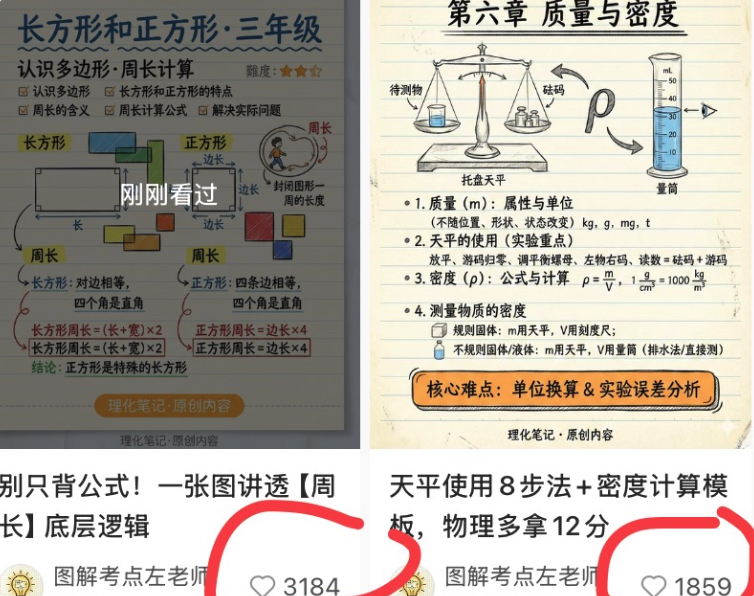
Chinese Study Card Social Screenshot
Generates a two-column social media screenshot featuring Chinese math and physics educational infographic cards with captions and circled like counts.
This is a GPT Image 2 prompt case for Graphic & Poster. Use the copy-ready prompt below to generate similar visuals, and review Awesome GPT Image 2 Prompts attribution plus commercial-use rights before reuse.
Free 1K preview
Generate one preview image instantly, no sign-up required.
Prompt
Copy-ready prompt
Objective: Create a square social media collage screenshot showcasing two Chinese learning card posts side-by-side, resembling a portfolio preview of work by creators of elementary school math and science visual notes.

Canvas: A square screenshot crop of 756x628 pixels, with a white background, divided into left and right columns. Each column contains an educational note image at the top, followed by a partial social media title area. The overall appearance should present a slightly compressed feel, similar to a phone screenshot, with soft shadows and edge cropping.

Layout: Use 2 post cards. Left post: A math knowledge card about rectangles and squares for grade 3, located in the upper left, with the title and number of likes displayed below. Right post: A physics knowledge card about mass and density, located in the upper right, with the title and number of likes displayed below. Add bold, hand-drawn red marker circles around the two like areas, slightly cropped at the bottom.

Left Card Details: Beige lined notebook paper background with blue and black handwritten Chinese. Title text: {argument name="left card title" default="Rectangle and Square · Grade 3"}. Subtitle: “Recognizing Polygons · Perimeter Calculation”. The upper right corner includes a 3-star orange difficulty rating. The card contains 2 main illustration sections: one labeled “Rectangle”, showing a rectangle with length and width arrows; and another labeled “Square”, showing a square with equal side length labels. Include 4 colored small squares/rectangles around the illustrations: blue, green, orange, and yellow. Include a small circular illustration of a person walking around the shape to explain the perimeter. Add a semi-transparent dark mask in the center of the card with large white text “Just Viewed”. The bottom formulas and notes explain the perimeter of a rectangle and the perimeter of a square, including boxed formulas such as “Rectangle Perimeter = (Length + Width) × 2” and “Square Perimeter = Side Length × 4”. Add an orange rounded capsule label at the bottom that reads “Physics and Chemistry Notes · Original Content”.

Right Card Details: Beige lined notebook paper background with neat black handwritten Chinese. Title text: {argument name="right card title" default="Chapter Six: Mass and Density"}. The top includes 3 main science object illustrations: a balance scale with items and weights, a horseshoe magnet with arrows, and a graduated cylinder with blue liquid. Add labels such as “Object to be measured”, “Weights”, “Balance Scale”, and “Graduated Cylinder”. Below, include 4 numbered learning sections: 1. Mass and Units, 2. Steps for Using a Balance Scale, 3. Density Formula and Units, 4. Density Measurement. Show the density formula “ρ=m/V” and unit conversions, including “1 g/cm³ = 1000 kg/m³”. Add an orange rounded rectangular annotation at the bottom that reads “Key Difficulties: Unit Conversion & Experimental Error Analysis”, along with small text at the bottom that reads “Physics and Chemistry Notes · Original Content”.

Bottom Social Media Area: Below the left card, display a bold Chinese title starting with “Don’t just memorize formulas! Understand the underlying logic of [Perimeter] in one diagram”. Below the right card, display a bold Chinese title starting with “8 Steps for Using a Balance Scale + Density Calculation Template, Get 12 More Points in Physics”. Below each title, display a small circular avatar with a yellow light bulb icon and the creator’s name “Teacher Zuo of Illustrated Exam Points”. Display 2 visible like widgets, each with a gray outline heart icon and a number: left side likes {argument name="left like count" default="3184"}, right side likes {argument name="right like count" default="1859"}. Circle these two like widgets with bold red hand-drawn markers.

Visual Style: Concise Chinese educational infographic cards, hand-drawn textbook aesthetics, lined paper texture, soft pastel chart colors, black/blue handwritten annotations, orange emphasis boxes, realistic screenshot cropping, no photorealistic people except for small, simple illustrations, no watermarks except for the displayed creator/footer text.

Constraints: All visible text must be in Chinese in the specified locations. No more than 2 post cards, no more than 3 science objects at the top of the right card, no more than 2 main geometric illustrations on the left card, no more than 4 numbered sections on the right card, and no more than 2 circled like widgets.
Prompt variables
Editable argument placeholders found in the prompt, with their default values.
Best for
- - Graphic & Poster visual exploration
- - Image generation and reference-image edits
- - Reusable briefs that keep source attribution visible
Change these parts
- - Subject, product, character, or scene
- - Aspect ratio, camera, lighting, and background
- - Brand, text, color, and output constraints
Recommended model and settings
- - Model: gpt-image-2
- - Input mode: Text to Image
- - Aspect ratio: source
- - Commercial status: review original source
How to use this prompt
- 1. Copy the prompt and preserve its structure for the first test.
- 2. Replace the subject, context, and publishing channel.
- 3. Change one camera, lighting, or style variable per iteration.
- 4. Inspect the output, source, text, and rights before reuse.
Limitations, source, and reuse cautions
- - Generated output is an editable draft, not factual, legal, or rights evidence.
- - Review the linked source, people, brands, logos, text, and third-party media before commercial use.
More cases in this category
Prioritized by category, input mode compatibility, quality, and lower risk.




Reuse and source notes
Use this prompt safely after previewing the case.
- 1.Copy the prompt or open it directly in Dovoo with the generation button.
- 2.Adjust variables, aspect ratio, and reference images for your own use case.
- 3.Before publishing or paid usage, verify source rights, attribution requirements, and brand or likeness risks.
Can I use this prompt commercially?
Commercial-use status is allowed. Review the original source, license, brand constraints, and legal requirements before paid usage.
Where does this case come from?
This case is imported from Awesome GPT Image 2 Prompts; keep attribution visible and check the source URL before reuse.