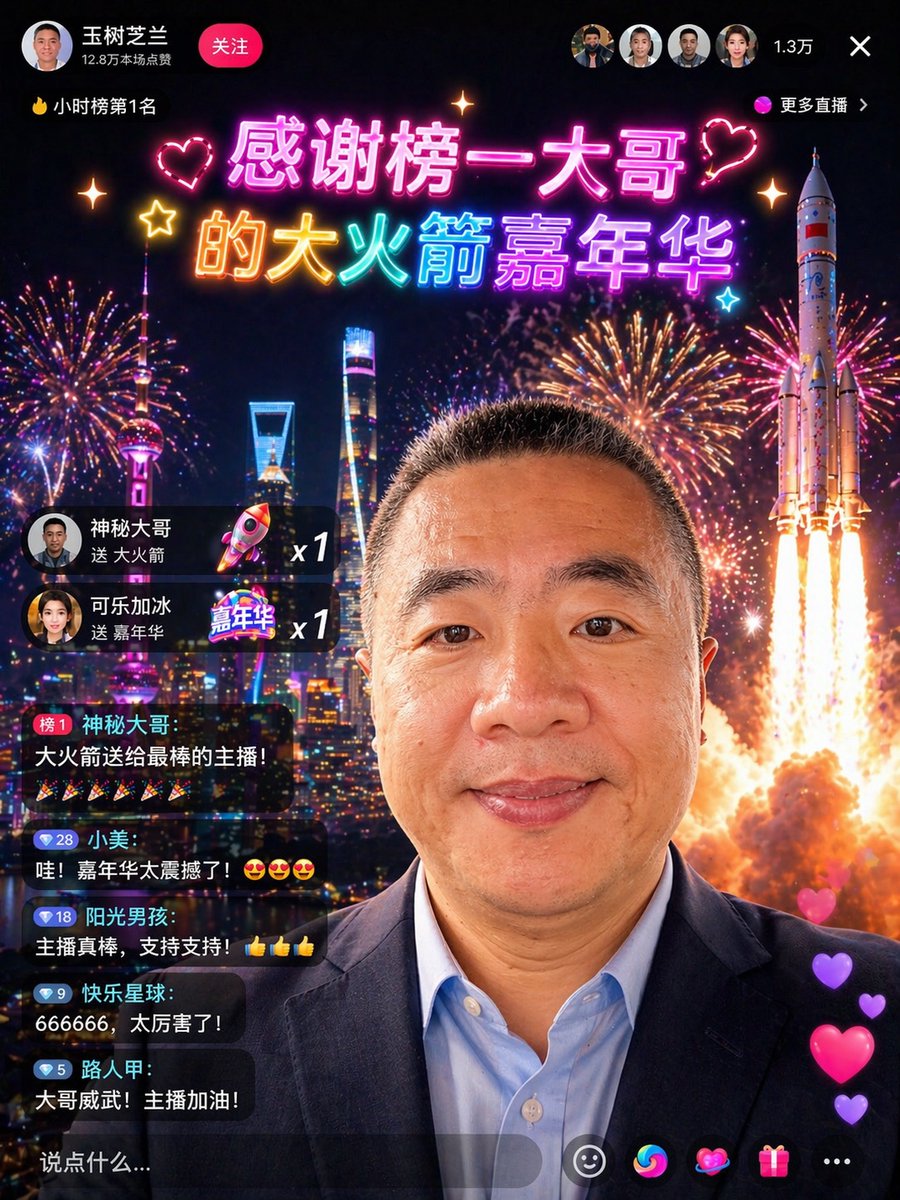
Chinese Livestream Rocket Gala Edit
This prompt turns a portrait reference into a flashy Chinese livestream screenshot with celebratory UI overlays, fireworks, gifts, and a rocket-launch spectacle for social-media mockups or viral demo images.
This is a GPT Image 2 prompt case for Graphic & Poster. Use the copy-ready prompt below to generate similar visuals, and review Awesome GPT Image 2 Prompts attribution plus commercial-use rights before reuse.
Free 1K preview
Generate one preview image instantly, no sign-up required.
Free text preview doesn’t preserve reference-image consistency.
Prompt
Copy-ready prompt
Using the provided reference photo, transform the person into a cool Chinese livestream screenshot, while maintaining the head position, cropping ratio, hairstyle, and overall features. Replace the outdoor umbrella and street background with a nighttime city skyline filled with fireworks, and add a large rocket launch effect on the right side. Change the clothing to a dark business suit jacket with a light blue shirt, making the subject look like a high-value livestream VIP guest. Overlay a sophisticated Chinese livestream App interface: the upper left corner displays the name “Wang Shuzhilan”, a red “Follow” button, and the text “128k wasted this session”; the upper left corner displays a ranking label “🔥Hourly Ranking #1”; the top center displays two lines of neon-style celebratory titles, reading “Thank you to the top contributor” and “’s Rocket Carnival”, accompanied by heart and sparkle decorations; the upper right corner displays 4 small circular viewer avatars, the number “13k”, a close “×” icon, and a “More Livestreams” label. Add 2 gift notification cards on the left side: “Mysterious Big Brother sent Rocket x1” and “Cola with Ice sent Carnival x1”. Add 5 stacked chat bubbles below, displaying specific usernames and messages: 1) “Ranking #1 Mysterious Big Brother: Rocket for the best streamer!” followed by 6 firework emojis, 2) “Xiaomei: Wow! The Carnival is amazing! 😍😍😍”, 3) “Sunshine Boy: Great streamer, support support! 👍👍👍”, 4) “Happy Planet: 666666, so awesome!”, 5) “Passerby A: Big brother is awesome! Streamer, keep it up!”. Add a semi-transparent comment bar at the bottom, displaying “Say something...”. Add 5 bottom operation icons: smiley face, colorful swirl, heart, gift box, and three dots. Add a string of 4 vertically floating heart like effect on the bottom right. Make the composite image look like a realistic, high-end social app livestream screenshot, with smooth Chinese typography, vibrant neon colors, realistic UI integration, and a festive viral visual effect.
Best for
- - Graphic & Poster visual exploration
- - Image generation and reference-image edits
- - Reusable briefs that keep source attribution visible
Change these parts
- - Subject, product, character, or scene
- - Aspect ratio, camera, lighting, and background
- - Brand, text, color, and output constraints
Recommended model and settings
- - Model: gpt-image-2
- - Input mode: Image to Image
- - Aspect ratio: source
- - Commercial status: review original source
How to use this prompt
- 1. Copy the prompt and preserve its structure for the first test.
- 2. Replace the subject, context, and publishing channel.
- 3. Change one camera, lighting, or style variable per iteration.
- 4. Inspect the output, source, text, and rights before reuse.
Limitations, source, and reuse cautions
- - Generated output is an editable draft, not factual, legal, or rights evidence.
- - Review the linked source, people, brands, logos, text, and third-party media before commercial use.
More cases in this category
Prioritized by category, input mode compatibility, quality, and lower risk.




Reuse and source notes
Use this prompt safely after previewing the case.
- 1.Copy the prompt or open it directly in Dovoo with the generation button.
- 2.Adjust variables, aspect ratio, and reference images for your own use case.
- 3.Before publishing or paid usage, verify source rights, attribution requirements, and brand or likeness risks.
Can I use this prompt commercially?
Commercial-use status is allowed. Review the original source, license, brand constraints, and legal requirements before paid usage.
Where does this case come from?
This case is imported from Awesome GPT Image 2 Prompts; keep attribution visible and check the source URL before reuse.