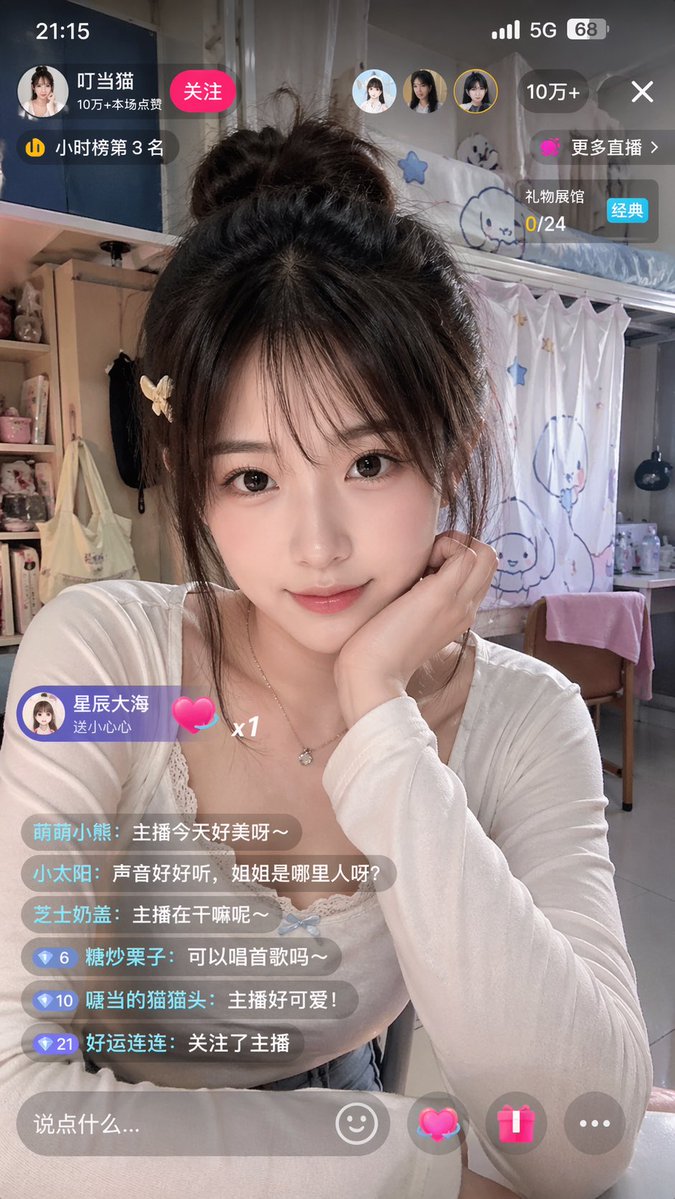
Chinese Livestream Dorm Selfie UI
This prompt generates a photorealistic vertical screenshot of a young female streamer in a dorm room with complete Chinese livestream app overlays, useful for social media mockups or UI realism demos.
This is a GPT Image 2 prompt case for Product & Commercial. Use the copy-ready prompt below to generate similar visuals, and review Awesome GPT Image 2 Prompts attribution plus commercial-use rights before reuse.
Free 1K preview
Generate one preview image instantly, no sign-up required.
Prompt
Copy-ready prompt
A realistic, vertical smartphone screenshot showcasing a Chinese live streaming interface. The scene features a young female streamer sitting in a cozy dorm room, framed in a medium shot from the chest up. Show every face clearly with natural, detailed facial features, large-sized, soft rectangular effect. She has long, messy dark brown hair tied into a loose high bun, with a few strands framing her face, and a light-colored small butterfly clip on her left side. She's wearing a fitted white long-sleeved round-neck top with delicate lace trim, and a thin necklace with a small pendant. She's propping her chin with her right hand in a casual and cute pose, creating a soft, intimate, and lively atmosphere. The background is a student dorm interior filled with a girlish aesthetic: a bunk bed in the upper right corner, white curtains with simple blue cartoon characters and stars, bottles and clutter on the desk, a pink towel draped over a wooden chair, and plush toys, cosmetics, and a bag on the shelf to the left. Add a complete Chinese live streaming App UI overlay at the top of the image, designed to resemble a genuine smartphone live streaming app screenshot. Top status bar: displays the time 21:15 in the upper left corner, and mobile signal, 5G icon, and 68% battery in the upper right corner. Top creator area: a circular avatar, streamer name as {argument name="streamer name" default="Doraemon"}, a red “Follow” button, and a line displaying popularity stats “100k+ Likes in this stream”. Add a small ranking badge indicating “3rd on Hourly Ranking”. Near the upper right side, include 3 small circular user avatars. Add a dark rounded popularity capsule in the upper right corner displaying “100k+”, a close X icon, a purple “More Live Streams” button, and a gift progress card displaying “Gift Hall 0/24” with a “Classic” blue label. Floating gift banner on the lower left side: sender avatar and text “Starry Sea sent a Heart”, accompanied by a pink heart icon and x1. Lower left corner comment section: sequentially arranged 6 semi-transparent chat bubbles with the following content: 1. Cute Little Bear: The streamer looks so beautiful today~ 2. Little Sun: Her voice is so nice, where is the sister from? 3. Cheese Milk Cover: What is the streamer doing~ 4. Candied Chestnut: Can you sing a song~ 5. Cat with a Mouth: The streamer is so cute! 6. Lucky Streak: Followed the streamer. Add small blue diamond level badges with numbers 6, 10, and 21 before the last three comments. Bottom input bar: a rounded semi-transparent text box with the placeholder “Say something…”, and 4 controls on the right side: a smiley face icon, a glowing pink heart gift icon, a pink gift box icon, and a gray three-dot icon. Photo-realistic smartphone shooting style, natural skin and fabric textures, with a slight beauty camera soft-focus effect, realistic app overlay transparency, 9:16 vertical aspect ratio.Prompt variables
Editable argument placeholders found in the prompt, with their default values.
Best for
- - Product & Commercial visual exploration
- - Image generation and reference-image edits
- - Reusable briefs that keep source attribution visible
Change these parts
- - Subject, product, character, or scene
- - Aspect ratio, camera, lighting, and background
- - Brand, text, color, and output constraints
Recommended model and settings
- - Model: gpt-image-2
- - Input mode: Text to Image
- - Aspect ratio: source
- - Commercial status: review original source
How to use this prompt
- 1. Copy the prompt and preserve its structure for the first test.
- 2. Replace the subject, context, and publishing channel.
- 3. Change one camera, lighting, or style variable per iteration.
- 4. Inspect the output, source, text, and rights before reuse.
Limitations, source, and reuse cautions
- - Generated output is an editable draft, not factual, legal, or rights evidence.
- - Review the linked source, people, brands, logos, text, and third-party media before commercial use.
More cases in this category
Prioritized by category, input mode compatibility, quality, and lower risk.


Reuse and source notes
Use this prompt safely after previewing the case.
- 1.Copy the prompt or open it directly in Dovoo with the generation button.
- 2.Adjust variables, aspect ratio, and reference images for your own use case.
- 3.Before publishing or paid usage, verify source rights, attribution requirements, and brand or likeness risks.
Can I use this prompt commercially?
Commercial-use status is allowed. Review the original source, license, brand constraints, and legal requirements before paid usage.
Where does this case come from?
This case is imported from Awesome GPT Image 2 Prompts; keep attribution visible and check the source URL before reuse.