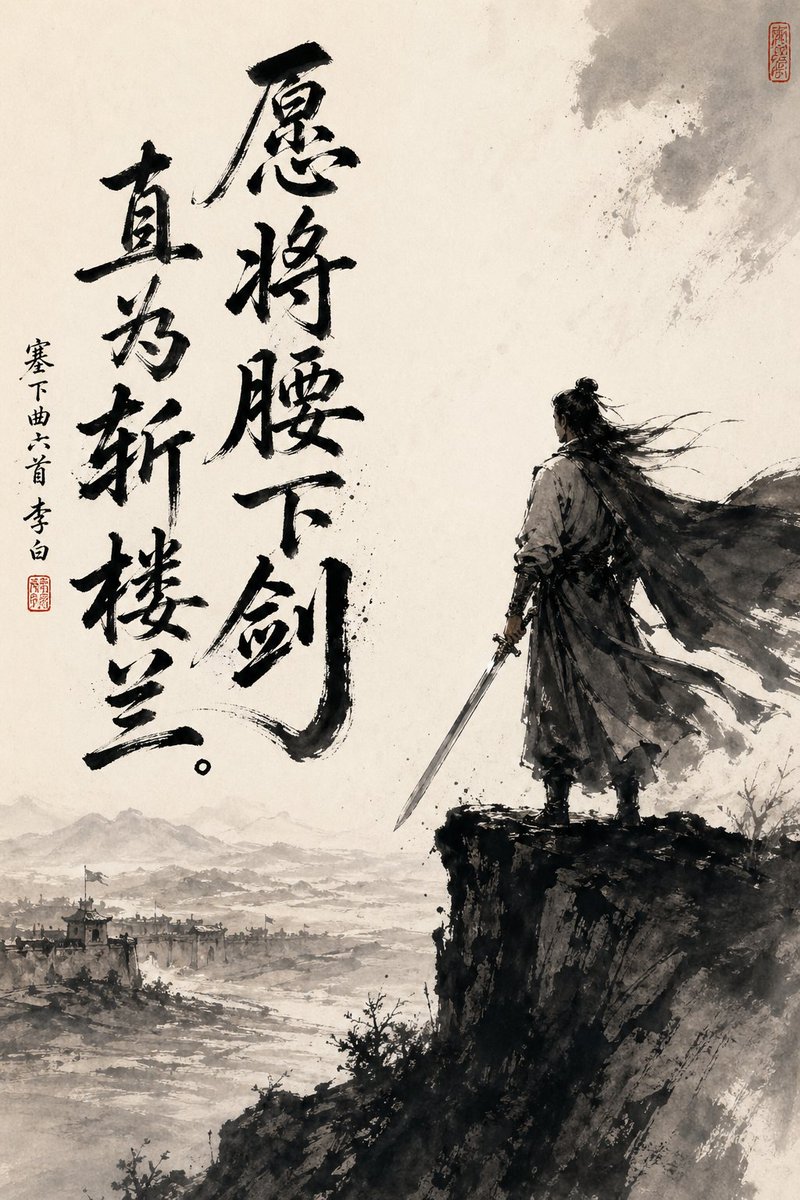
Chinese Ink Swordsman and Calligraphy
This prompt generates a dramatic wuxia-style ink painting poster with a lone swordsman, frontier landscape, and bold Chinese calligraphy, suitable for literary or historical art prints.
This is a GPT Image 2 prompt case for Illustration & Art. Use the copy-ready prompt below to generate similar visuals, and review Awesome GPT Image 2 Prompts attribution plus commercial-use rights before reuse.
Free 1K preview
Generate one preview image instantly, no sign-up required.
Prompt
Copy-ready prompt
A dramatically composed vertical Chinese ink painting, drawn on aged Xuan paper, employing a minimalist monochrome style with soft, warm parchment tones. On the right side of the painting, an ancient swordsman stands alone on the edge of a steep, dark cliff, shown primarily from a three-quarter back view. He is dressed in flowing ancient attire, with a long cloak billowing in the wind, and his long hair tied in a bun is swept to the side. The lower left extends into a vast misty landscape, revealing 1 distant frontier city, faintly visible watchtowers and rooftops, winding rivers or plains, and layered mountain silhouettes hidden in the mist. Utilize expressive black brushstrokes, splashed ink textures, dry brush edges, ethereal negative space, and a strong contrast between the dark figure and cliff against the pale, open background. Add 2 columns of prominent large black calligraphy on the left side, reading “愿将腰下剑 (Yuàn jiāng yāo xià jiàn)” and “直为斩楼兰 (Zhí wèi zhǎn lóulán),” and add 1 column of smaller vertical text on the far left, reading “塞下曲六首 李白 (Sài xià qǔ liù shǒu Lǐ Bái),” along with 2 red seals, one near the small text and the other near the upper right corner. Overall mood: full of heroic spirit, loneliness, contemplation, and pride, like a poster presenting the image of a Tang Dynasty poet and warrior in the style of traditional ink painting.
Best for
- - Illustration & Art visual exploration
- - Image generation and reference-image edits
- - Reusable briefs that keep source attribution visible
Change these parts
- - Subject, product, character, or scene
- - Aspect ratio, camera, lighting, and background
- - Brand, text, color, and output constraints
Recommended model and settings
- - Model: gpt-image-2
- - Input mode: Text to Image
- - Aspect ratio: source
- - Commercial status: review original source
How to use this prompt
- 1. Copy the prompt and preserve its structure for the first test.
- 2. Replace the subject, context, and publishing channel.
- 3. Change one camera, lighting, or style variable per iteration.
- 4. Inspect the output, source, text, and rights before reuse.
Limitations, source, and reuse cautions
- - Generated output is an editable draft, not factual, legal, or rights evidence.
- - Review the linked source, people, brands, logos, text, and third-party media before commercial use.
More cases in this category
Prioritized by category, input mode compatibility, quality, and lower risk.



Reuse and source notes
Use this prompt safely after previewing the case.
- 1.Copy the prompt or open it directly in Dovoo with the generation button.
- 2.Adjust variables, aspect ratio, and reference images for your own use case.
- 3.Before publishing or paid usage, verify source rights, attribution requirements, and brand or likeness risks.
Can I use this prompt commercially?
Commercial-use status is allowed. Review the original source, license, brand constraints, and legal requirements before paid usage.
Where does this case come from?
This case is imported from Awesome GPT Image 2 Prompts; keep attribution visible and check the source URL before reuse.