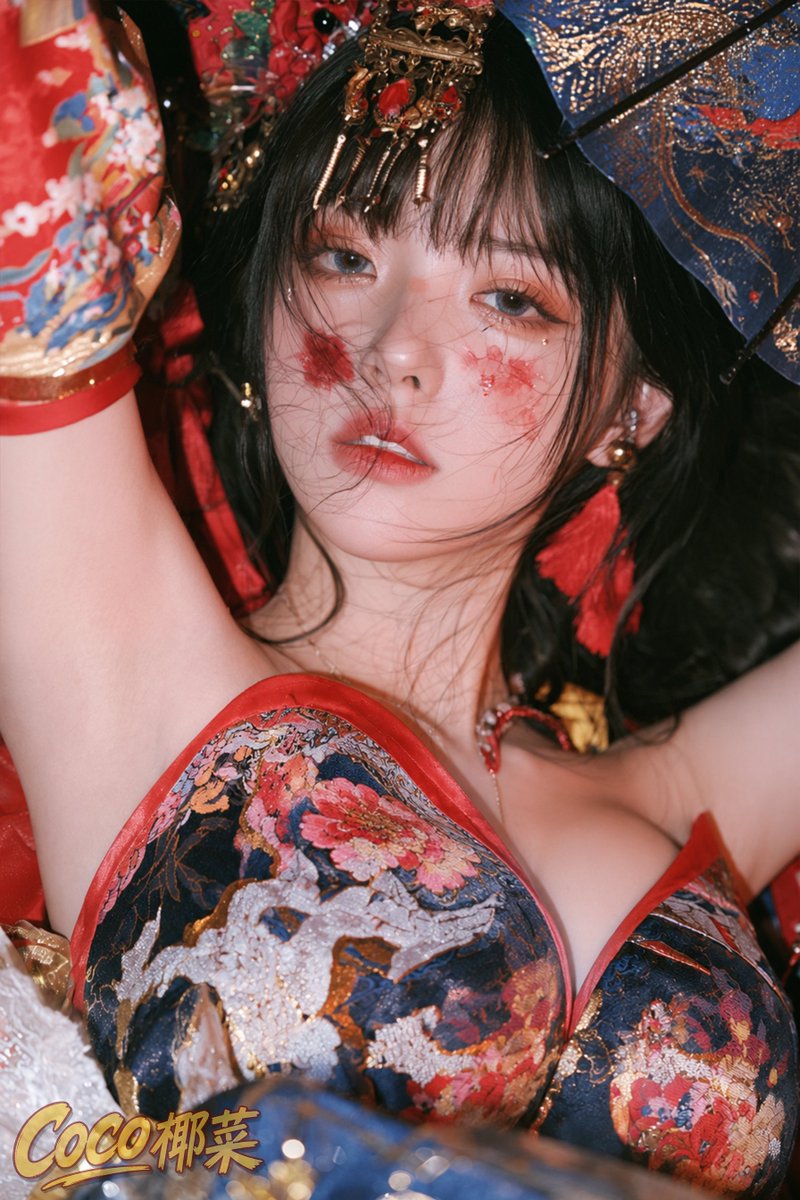
Ornate Chinese Festival Portrait
Generates a glamorous close-up portrait of an adult woman in richly embroidered Chinese-inspired festival styling with parasol, jewels, and dramatic flash lighting.
This is a GPT Image 2 prompt case for Portrait & Character. Use the copy-ready prompt below to generate similar visuals, and review Awesome GPT Image 2 Prompts attribution plus commercial-use rights before reuse.
Free 1K preview
Generate one preview image instantly, no sign-up required.
Prompt
Copy-ready prompt
Create a highly polished vertical close-up fashion portrait of an adult East Asian woman in ornate Chinese opera / fantasy festival styling, viewed from slightly below with her face centered and her two arms raised above her head. She has {argument name="hair color" default="long black hair"} with loose windblown strands crossing her face, pale luminous skin, soft blue-gray eyes, glossy red lips slightly parted, and a dreamy calm expression. Add exactly two red painterly floral smudges on her cheeks, one on each cheek, with tiny rhinestone-like highlights near the eyes. She wears one elaborate gold-and-red jeweled headpiece with dangling tassels across her bangs, red tassel earrings, and a richly embroidered navy, red, and gold floral bodice with red trim. Include one ornate blue parasol in the upper right background with gold speckled patterning, plus red embroidered fabric and floral brocade filling the left and rear background. Use dramatic flash photography, shallow depth of field, high-fashion editorial realism, crisp facial detail, glossy textures, saturated reds and deep blues, cinematic close crop, soft skin retouching, and a luxurious festive atmosphere. Add one stylized logo watermark at the bottom left reading {argument name="logo text" default="Coco Cabbage"} in gold-yellow script with a dark outline. Keep the image vertical, intimate, glamorous, and photorealistic; avoid distorted anatomy, extra fingers, duplicated faces, or messy unreadable ornamentation.Prompt variables
Editable argument placeholders found in the prompt, with their default values.
Best for
- - Portrait & Character visual exploration
- - Image generation and reference-image edits
- - Reusable briefs that keep source attribution visible
Change these parts
- - Subject, product, character, or scene
- - Aspect ratio, camera, lighting, and background
- - Brand, text, color, and output constraints
Recommended model and settings
- - Model: gpt-image-2
- - Input mode: Text to Image
- - Aspect ratio: source
- - Commercial status: review original source
How to use this prompt
- 1. Copy the prompt and preserve its structure for the first test.
- 2. Replace the subject, context, and publishing channel.
- 3. Change one camera, lighting, or style variable per iteration.
- 4. Inspect the output, source, text, and rights before reuse.
Limitations, source, and reuse cautions
- - Generated output is an editable draft, not factual, legal, or rights evidence.
- - Review the linked source, people, brands, logos, text, and third-party media before commercial use.
More cases in this category
Prioritized by category, input mode compatibility, quality, and lower risk.





Reuse and source notes
Use this prompt safely after previewing the case.
- 1.Copy the prompt or open it directly in Dovoo with the generation button.
- 2.Adjust variables, aspect ratio, and reference images for your own use case.
- 3.Before publishing or paid usage, verify source rights, attribution requirements, and brand or likeness risks.
Can I use this prompt commercially?
Commercial-use status is allowed. Review the original source, license, brand constraints, and legal requirements before paid usage.
Where does this case come from?
This case is imported from Awesome GPT Image 2 Prompts; keep attribution visible and check the source URL before reuse.