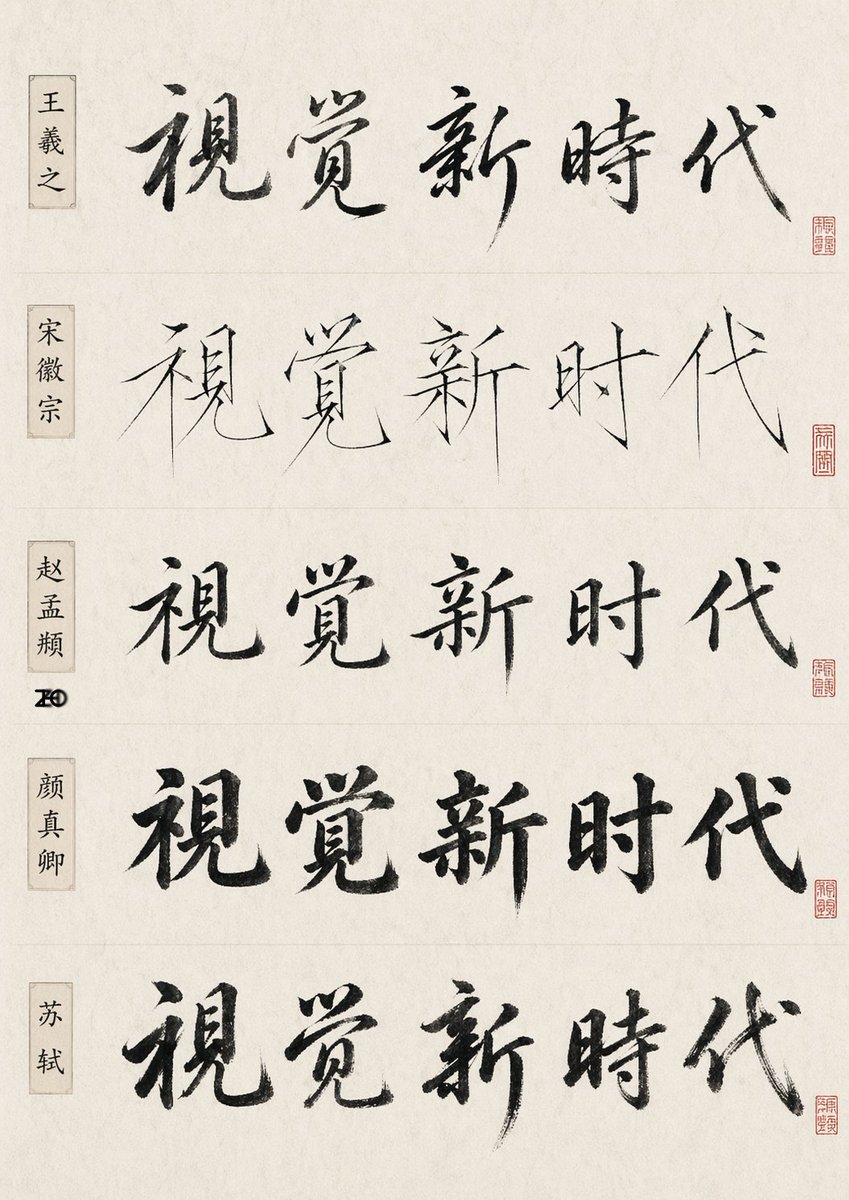
Chinese Calligraphy Style Comparison
A scholarly poster showing one Chinese phrase rendered in five historic calligraphy styles, useful for testing AI brush lettering and style emulation.
This is a GPT Image 2 prompt case for Graphic & Poster. Use the copy-ready prompt below to generate similar visuals, and review Awesome GPT Image 2 Prompts attribution plus commercial-use rights before reuse.
Free 1K preview
Generate one preview image instantly, no sign-up required.
Prompt
Copy-ready prompt
{
  "type": "Chinese calligraphy comparison sheet",
  "subject": "the same five-character phrase written in five famous-calligrapher-inspired styles",
  "phrase": "{argument name=\"calligraphy text\" default=\"A visual new era\"}",
  "canvas": {
    "orientation": "Vertical poster",
    "background": "Warm white Xuan paper texture with subtle fibers, slight aging, and soft, uneven tones"
  },
  "layout": {
    "structure": "5 rows horizontally arranged separated by a thin dividing line",
    "row count": 5,
    "left labels count": 5,
    "seal count": 5,
    "left labels": [
      "Wang Xizhi",
      "Emperor Huizong of Song",
      "Zhao Mengfu",
      "Yan Zhenqing",
      "Su Shi"
    ],
    "rows": [
      {
        "position": "First line",
        "style": "Running script inspired by Wang Xizhi",
        "main text": "A visual new era",
        "label": "Wang Xizhi",
        "seal": "Small red square seal on the far right"
      },
      {
        "position": "Second line",
        "style": "Inspired by the slender gold style of Emperor Huizong of the Song Dynasty, elegant calligraphy with sharp and strong strokes and open structure.",
        "main text": "A visual new era",
        "label": "Emperor Huizong of Song",
        "seal": "Small red square seal on the far right"
      },
      {
        "position": "Third line",
        "style": "Refined regular script inspired by Zhao Mengfu",
        "main text": "A visual new era",
        "label": "Zhao Mengfu",
        "seal": "Small red square seal on the far right"
      },
      {
        "position": "Fourth line",
        "style": "Bold and weighty regular script inspired by Yan Zhenqing.",
        "main text": "A visual new era",
        "label": "Yan Zhenqing",
        "seal": "Small red square seal on the far right"
      },
      {
        "position": "Fifth line",
        "style": "A vigorous and bold running script inspired by Su Shi",
        "main text": "A visual new era",
        "label": "Su Shi",
        "seal": "Small red square seal on the far right"
      }
    ],
    "left label design": "Each line is accompanied by a vertical, beige narrow nameplate on the left side, printed with black Chinese characters",
    "centerpiece": "Large black brushstroke phrases are written in the center of each line"
  },
  "style": {
    "ink": "Deep black ink, showing obvious dry brush texture, flying white, variations in strength, and natural brushstroke endings",
    "mood": "Academic, experimental, museum exhibit-style presentation",
    "composition": "Clean and spacious whitespace, balanced leading, flat front scan or document photography"
  },
  "quality": {
    "detail": "High resolution, clear brushstroke texture, realistic paper grain",
    "lighting": "Soft, even studio lighting, no harsh shadows"
  }
}
Prompt variables
Editable argument placeholders found in the prompt, with their default values.
Best for
- - Graphic & Poster visual exploration
- - Image generation and reference-image edits
- - Reusable briefs that keep source attribution visible
Change these parts
- - Subject, product, character, or scene
- - Aspect ratio, camera, lighting, and background
- - Brand, text, color, and output constraints
Recommended model and settings
- - Model: gpt-image-2
- - Input mode: Text to Image
- - Aspect ratio: source
- - Commercial status: review original source
How to use this prompt
- 1. Copy the prompt and preserve its structure for the first test.
- 2. Replace the subject, context, and publishing channel.
- 3. Change one camera, lighting, or style variable per iteration.
- 4. Inspect the output, source, text, and rights before reuse.
Limitations, source, and reuse cautions
- - Generated output is an editable draft, not factual, legal, or rights evidence.
- - Review the linked source, people, brands, logos, text, and third-party media before commercial use.
More cases in this category
Prioritized by category, input mode compatibility, quality, and lower risk.






Reuse and source notes
Use this prompt safely after previewing the case.
- 1.Copy the prompt or open it directly in Dovoo with the generation button.
- 2.Adjust variables, aspect ratio, and reference images for your own use case.
- 3.Before publishing or paid usage, verify source rights, attribution requirements, and brand or likeness risks.
Can I use this prompt commercially?
Commercial-use status is allowed. Review the original source, license, brand constraints, and legal requirements before paid usage.
Where does this case come from?
This case is imported from Awesome GPT Image 2 Prompts; keep attribution visible and check the source URL before reuse.