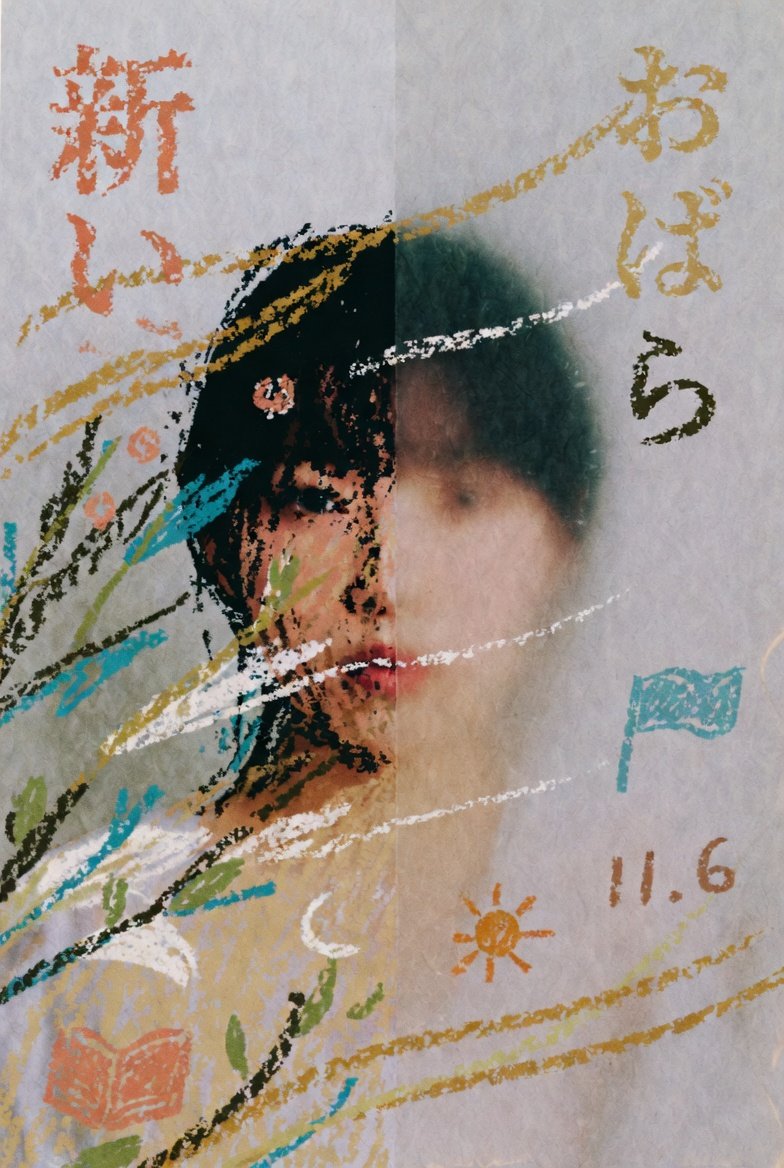
Childlike Pastel Portrait Collage
This prompt generates an expressive mixed-media portrait on textured paper with handwritten Japanese marks, ideal for poetic editorial art or album-cover-style imagery.
This is a GPT Image 2 prompt case for Illustration & Art. Use the copy-ready prompt below to generate similar visuals, and review Awesome GPT Image 2 Prompts attribution plus commercial-use rights before reuse.
Free 1K preview
Generate one preview image instantly, no sign-up required.
Prompt
Copy-ready prompt
A dreamy mixed-media pastel illustration on textured white paper with a visible vertical fold down the center, in a naive childlike crayon-and-oil-pastel style. Show a half-hidden portrait of a girl placed slightly left of center, with only part of her face visible because a large soft-edged rectangular blur obscures the middle of the image from forehead to chest. The visible features include dark teal-black hair, one warm brown eye, hints of cheek and neck, and a cream or pale yellow garment. Surround her with loose scribbled botanical lines and abstract strokes in turquoise, olive green, black, white, ochre, and peach. Scatter hand-drawn Japanese hiragana and numbers around the composition like children’s marks on paper: 「新」 and 「し」 in orange at the upper left, 「お」「ば」「ら」 stacked vertically on the upper right in mustard and dark olive, a small turquoise flag shape at mid-right, an orange sun symbol near the lower center-right, the number-like text 「11.6」 in brown at the lower right, and an orange open-book icon at the lower left. Add several sweeping diagonal crayon lines in golden yellow and white crossing behind and around the figure. Keep the composition airy, imperfect, expressive, and slightly melancholic, with rough grainy pigment, visible paper texture, muted earthy colors, and the feel of a child’s memory drawing combined with contemporary art illustration.
Best for
- - Illustration & Art visual exploration
- - Image generation and reference-image edits
- - Reusable briefs that keep source attribution visible
Change these parts
- - Subject, product, character, or scene
- - Aspect ratio, camera, lighting, and background
- - Brand, text, color, and output constraints
Recommended model and settings
- - Model: gpt-image-2
- - Input mode: Text to Image
- - Aspect ratio: source
- - Commercial status: review original source
How to use this prompt
- 1. Copy the prompt and preserve its structure for the first test.
- 2. Replace the subject, context, and publishing channel.
- 3. Change one camera, lighting, or style variable per iteration.
- 4. Inspect the output, source, text, and rights before reuse.
Limitations, source, and reuse cautions
- - Generated output is an editable draft, not factual, legal, or rights evidence.
- - Review the linked source, people, brands, logos, text, and third-party media before commercial use.
More cases in this category
Prioritized by category, input mode compatibility, quality, and lower risk.




Reuse and source notes
Use this prompt safely after previewing the case.
- 1.Copy the prompt or open it directly in Dovoo with the generation button.
- 2.Adjust variables, aspect ratio, and reference images for your own use case.
- 3.Before publishing or paid usage, verify source rights, attribution requirements, and brand or likeness risks.
Can I use this prompt commercially?
Commercial-use status is allowed. Review the original source, license, brand constraints, and legal requirements before paid usage.
Where does this case come from?
This case is imported from Awesome GPT Image 2 Prompts; keep attribution visible and check the source URL before reuse.