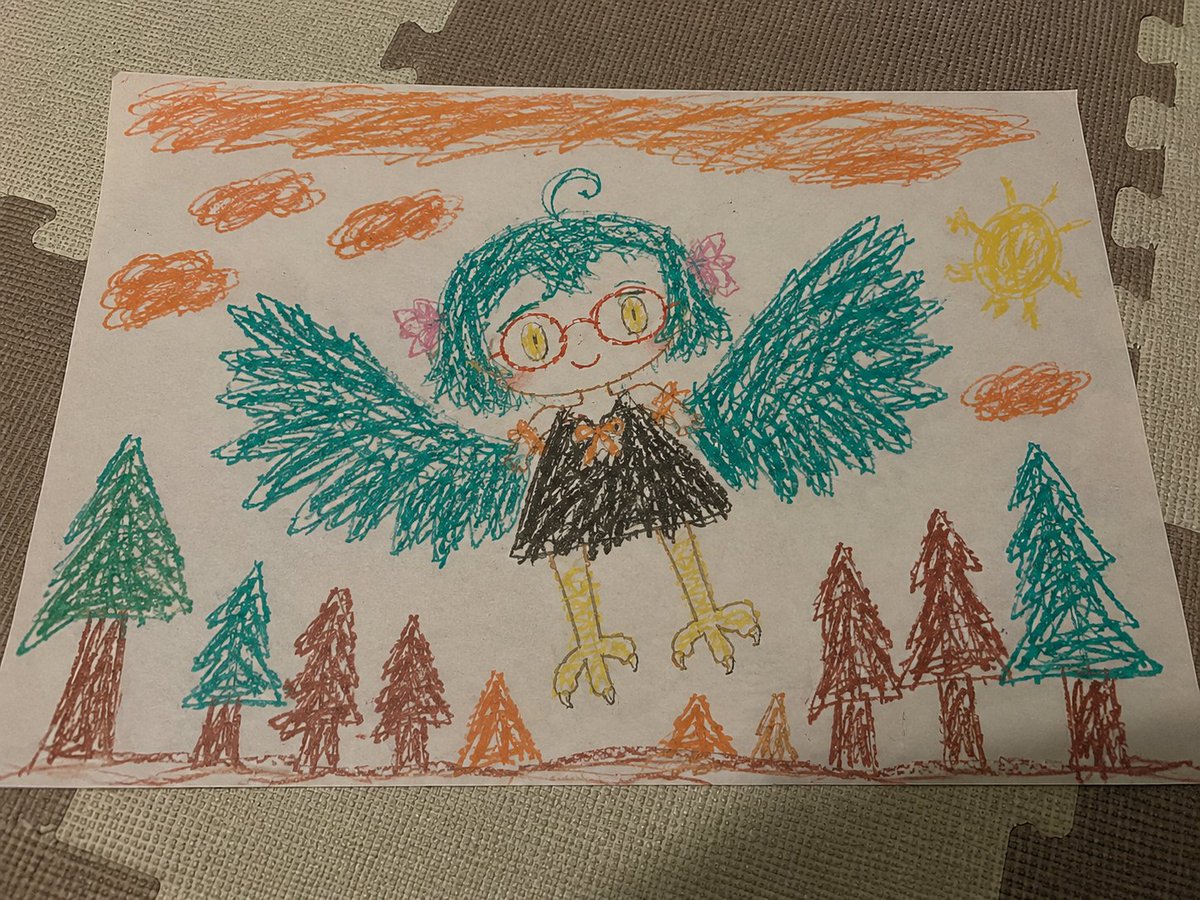
Clean Rephoto of Child Crayon Drawing
Transforms a reference photo of a child's crayon drawing into a cleaner, centered re-photographed version while preserving the handmade style.
This is a GPT Image 2 prompt case for Illustration & Art. Use the copy-ready prompt below to generate similar visuals, and review Awesome GPT Image 2 Prompts attribution plus commercial-use rights before reuse.
Free 1K preview
Generate one preview image instantly, no sign-up required.
Prompt
Copy-ready prompt
Using REFERENCE_0 as the sole source, regenerate the same photographed childlike crayon drawing as a cleaner, more evenly composed version. Keep it looking like a real sheet of white paper lying on interlocking foam floor mats, photographed from above at a slight angle, with natural indoor lighting and visible paper edges. Preserve the handmade crayon texture, scribbly line quality, colors, and overall subject, but subtly tidy the framing so the paper is more centered and the drawing fills the page more evenly.

Maintain the same child-art scene: the owl-like girl character flying above a forest, with teal wings spread wide, round glasses, yellow eyes, short teal hair, pink hair bows, black dress, yellow bird legs, orange sky scribbles, a yellow sun, and simple triangular pine trees along the bottom. Use exactly 4 small orange cloud scribbles plus 1 long orange scribbled band across the top sky. Use exactly 10 bottom forest elements: 2 teal trees on the left, 3 brown trees near the left-center, 3 small orange/brown triangular shrubs near the center, and 2 tall trees on the right plus the large teal tree at the far right integrated into that right group. Slightly refine the central clothing detail into an orange bow at the chest while keeping the naive crayon look.

Style constraints: do not turn it into polished digital art; keep the uneven crayon strokes, imperfect anatomy, childlike proportions, paper texture, and casual photo realism. Avoid adding text, signatures, watermarks, extra characters, or new objects. The result should feel like the same drawing re-photographed with improved alignment, lighting consistency, and cleaner composition.
Best for
- - Illustration & Art visual exploration
- - Image generation and reference-image edits
- - Reusable briefs that keep source attribution visible
Change these parts
- - Subject, product, character, or scene
- - Aspect ratio, camera, lighting, and background
- - Brand, text, color, and output constraints
Recommended model and settings
- - Model: gpt-image-2
- - Input mode: Text to Image
- - Aspect ratio: source
- - Commercial status: review original source
How to use this prompt
- 1. Copy the prompt and preserve its structure for the first test.
- 2. Replace the subject, context, and publishing channel.
- 3. Change one camera, lighting, or style variable per iteration.
- 4. Inspect the output, source, text, and rights before reuse.
Limitations, source, and reuse cautions
- - Generated output is an editable draft, not factual, legal, or rights evidence.
- - Review the linked source, people, brands, logos, text, and third-party media before commercial use.
More cases in this category
Prioritized by category, input mode compatibility, quality, and lower risk.


Reuse and source notes
Use this prompt safely after previewing the case.
- 1.Copy the prompt or open it directly in Dovoo with the generation button.
- 2.Adjust variables, aspect ratio, and reference images for your own use case.
- 3.Before publishing or paid usage, verify source rights, attribution requirements, and brand or likeness risks.
Can I use this prompt commercially?
Commercial-use status is allowed. Review the original source, license, brand constraints, and legal requirements before paid usage.
Where does this case come from?
This case is imported from Awesome GPT Image 2 Prompts; keep attribution visible and check the source URL before reuse.