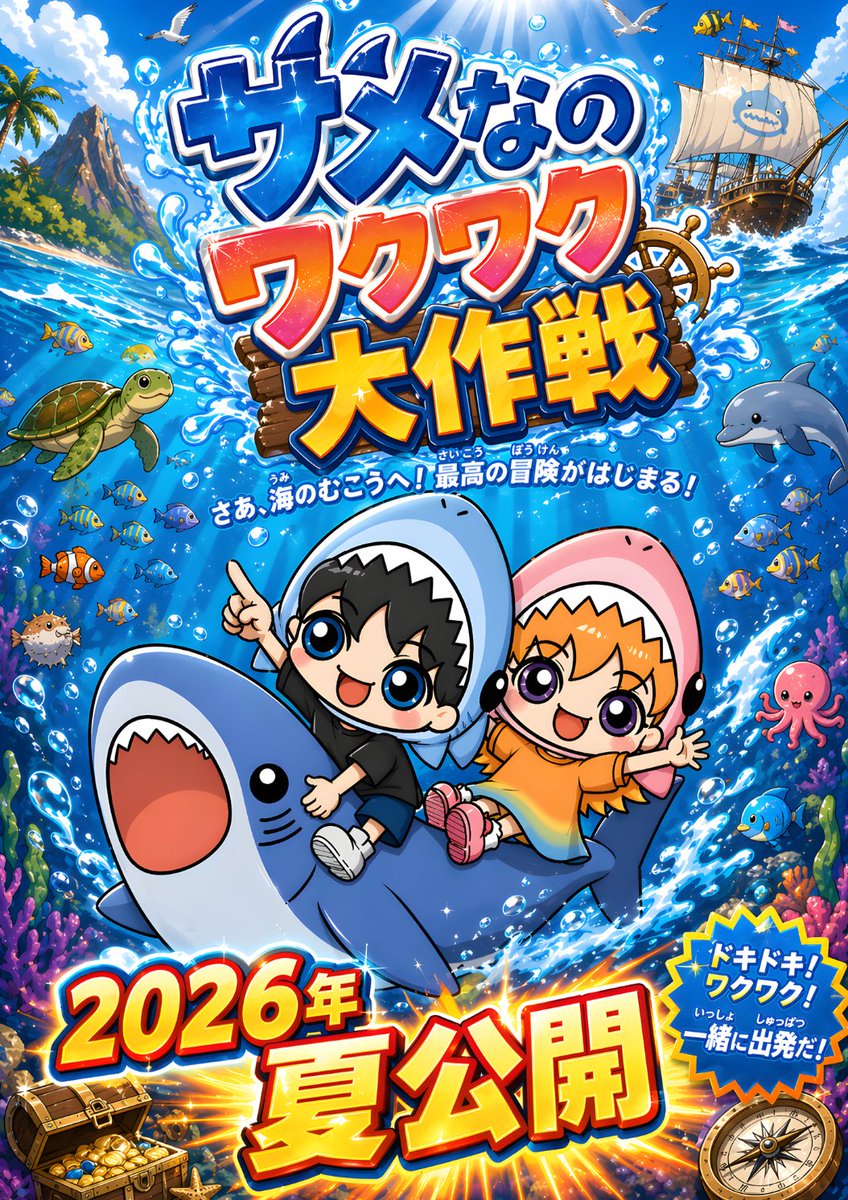
Chibi Shark Adventure Movie Poster
A colorful Japanese-style anime poster for a children’s ocean adventure film, ideal for recreating bold promotional key art with cute characters and dramatic title typography.
This is a GPT Image 2 prompt case for Anime & Game. Use the copy-ready prompt below to generate similar visuals, and review Awesome GPT Image 2 Prompts attribution plus commercial-use rights before reuse.
Free 1K preview
Generate one preview image instantly, no sign-up required.
Prompt
Copy-ready prompt
A bright, hyper-energetic Japanese movie poster illustration in a polished anime chibi style, set in a sparkling tropical ocean adventure scene. Center the composition on 2 cute chibi children riding a smiling blue shark that leaps diagonally upward through swirling seawater and white splash effects. The left child is a boy with short black hair, huge glossy blue eyes, a happy open-mouth smile, a black T-shirt, dark shorts, white sneakers, and a light blue shark hoodie with a tooth-edged hood framing his face; he points upward with one hand and hugs the shark with the other. The right child is a girl with orange hair, large glossy purple eyes, a joyful open-mouth smile, an orange dress, pink shoes, and a pink shark hoodie with a tooth-edged hood; she throws one arm wide in excitement while holding on with the other. Make the shark large and friendly with a rounded body, pale belly, tiny black eyes, and a wide open mouth. Surround them with a vivid underwater-and-surface world: schools of small tropical fish, exactly 1 sea turtle on the left, exactly 1 dolphin on the right, exactly 1 pink octopus on the right, exactly 1 pufferfish on the lower left, coral reefs and sea plants along the bottom edges, air bubbles throughout, and strong blue water motion lines. In the upper background, show a sunny sky with dramatic sun rays streaming into the water, fluffy clouds, 2 seagulls flying, a rocky tropical island with palm trees on the upper left, and a pirate ship on the upper right with white sails and a cute shark emblem. Add a ship wheel partly visible behind the main title. Use a dense, exciting Japanese kids-anime promotional layout with oversized 3D lettering and explosive effects. At the top, place the giant Japanese title text {argument name="headline text" default="サメなの ワクワク 大作戦"} in stacked lines, with glossy blue, orange-pink, and yellow-orange gradient letters, thick white outlines, dark blue shadows, water splashes, and sparkles. Beneath the title, add a smaller curved Japanese tagline in white with blue outline: {argument name="tagline" default="さあ、海のむこうへ!最高の冒険がはじまる!"}. At the bottom, place huge release text in Japanese, {argument name="release text" default="Summer 2026 Release"}, in bold red-to-yellow gradient 3D letters with white and blue edging, sitting over a radiant orange burst. On the lower right, add a blue starburst badge with the Japanese text {argument name="badge text" default="ドキドキ!ワクワク!いっしょに出発だ!"} in white and yellow. Include exactly 2 treasure-themed corner props: an open treasure chest with gold coins at the lower left and a compass at the lower right. The overall look should be glossy, saturated, family-friendly, whimsical, cinematic, and toy-like, with crisp outlines, exaggerated expressions, high contrast, and a poster-ready vertical composition. No photorealism, no muted colors, no minimalism.Prompt variables
Editable argument placeholders found in the prompt, with their default values.
Best for
- - Anime & Game visual exploration
- - Image generation and reference-image edits
- - Reusable briefs that keep source attribution visible
Change these parts
- - Subject, product, character, or scene
- - Aspect ratio, camera, lighting, and background
- - Brand, text, color, and output constraints
Recommended model and settings
- - Model: gpt-image-2
- - Input mode: Text to Image
- - Aspect ratio: source
- - Commercial status: review original source
How to use this prompt
- 1. Copy the prompt and preserve its structure for the first test.
- 2. Replace the subject, context, and publishing channel.
- 3. Change one camera, lighting, or style variable per iteration.
- 4. Inspect the output, source, text, and rights before reuse.
Limitations, source, and reuse cautions
- - Generated output is an editable draft, not factual, legal, or rights evidence.
- - Review the linked source, people, brands, logos, text, and third-party media before commercial use.
More cases in this category
Prioritized by category, input mode compatibility, quality, and lower risk.
Reuse and source notes
Use this prompt safely after previewing the case.
- 1.Copy the prompt or open it directly in Dovoo with the generation button.
- 2.Adjust variables, aspect ratio, and reference images for your own use case.
- 3.Before publishing or paid usage, verify source rights, attribution requirements, and brand or likeness risks.
Can I use this prompt commercially?
Commercial-use status is allowed. Review the original source, license, brand constraints, and legal requirements before paid usage.
Where does this case come from?
This case is imported from Awesome GPT Image 2 Prompts; keep attribution visible and check the source URL before reuse.