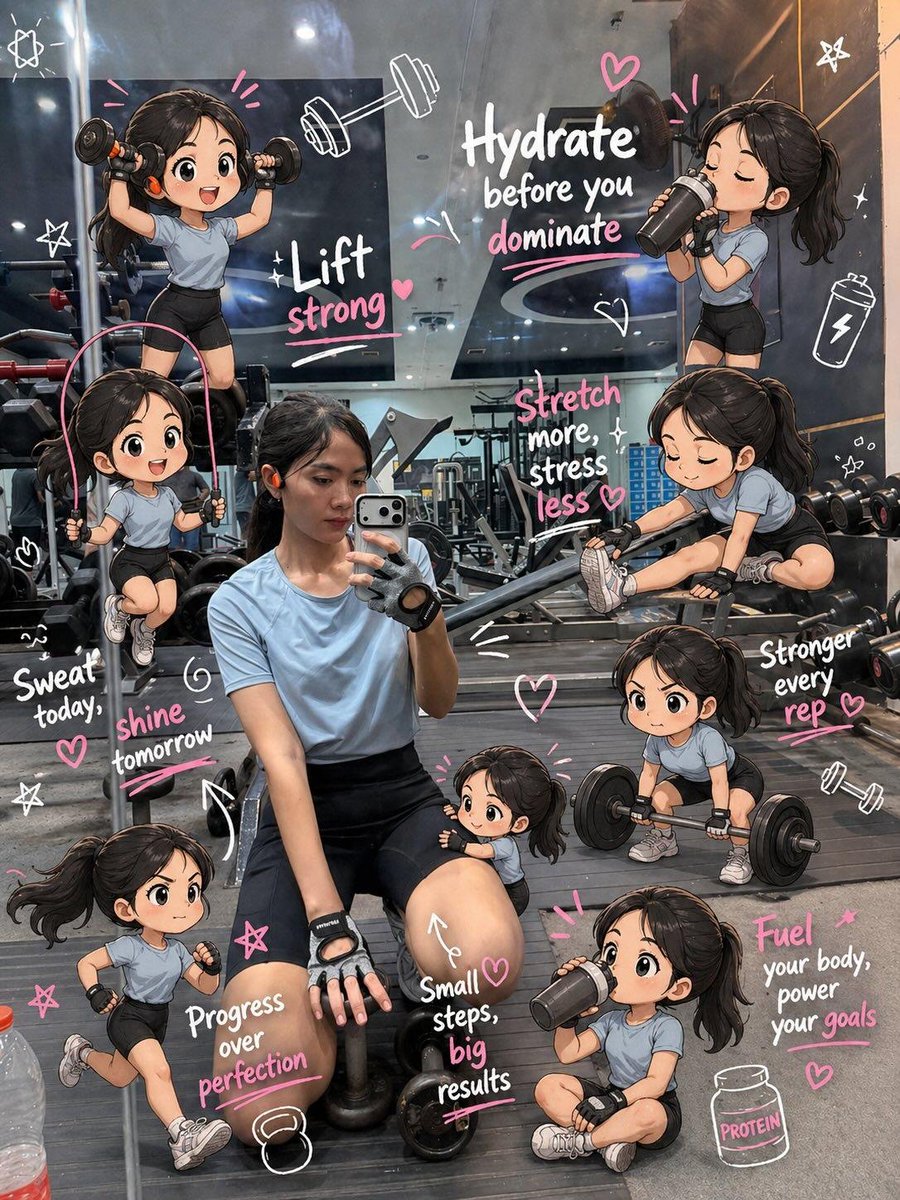
Chibi Mini Versions Photo Edit
A prompt to add multiple cute chibi-style mini versions of a person into an existing gym photo, performing various activities like cheering, running, and drinking.
This is a GPT Image 2 prompt case for Portrait & Character. Use the copy-ready prompt below to generate similar visuals, and review Awesome GPT Image 2 Prompts attribution plus commercial-use rights before reuse.
Free 1K preview
Generate one preview image instantly, no sign-up required.
Free text preview doesn’t preserve reference-image consistency.
Prompt
Copy-ready prompt
Edit the image while keeping the original photo completely unchanged — including the person, face, body, pose, lighting, and gym background.

Add multiple small, cute chibi-style “mini versions” of her around the image. Each mini character should have a big head, expressive facial features, and match her hairstyle and outfit.

Depict each mini version doing different gym-related activities:

one cheering with arms raised

one running in running shoes

one drinking from a shaker bottle

one wearing sporty running glasses

one climbing near her leg

Enhance the image with playful, hand-drawn doodles and handwritten notes in white and pink ink, in a scrapbook style. Include elements like arrows, stars, hearts, sparkles, and sketchy lines.

Add cute, handwritten gym-themed motivational phrases:

“lift strong”

“stronger every rep”

“no pain no gain”

“sweat now, shine later”

“progress over perfection”

“train hard, stay soft”

The overall vibe should feel fun, energetic, and feminine.
Best for
- - Portrait & Character visual exploration
- - Image generation and reference-image edits
- - Reusable briefs that keep source attribution visible
Change these parts
- - Subject, product, character, or scene
- - Aspect ratio, camera, lighting, and background
- - Brand, text, color, and output constraints
Recommended model and settings
- - Model: gpt-image-2
- - Input mode: Image to Image
- - Aspect ratio: source
- - Commercial status: review original source
How to use this prompt
- 1. Copy the prompt and preserve its structure for the first test.
- 2. Replace the subject, context, and publishing channel.
- 3. Change one camera, lighting, or style variable per iteration.
- 4. Inspect the output, source, text, and rights before reuse.
Limitations, source, and reuse cautions
- - Generated output is an editable draft, not factual, legal, or rights evidence.
- - Review the linked source, people, brands, logos, text, and third-party media before commercial use.
More cases in this category
Prioritized by category, input mode compatibility, quality, and lower risk.


Reuse and source notes
Use this prompt safely after previewing the case.
- 1.Copy the prompt or open it directly in Dovoo with the generation button.
- 2.Adjust variables, aspect ratio, and reference images for your own use case.
- 3.Before publishing or paid usage, verify source rights, attribution requirements, and brand or likeness risks.
Can I use this prompt commercially?
Commercial-use status is allowed. Review the original source, license, brand constraints, and legal requirements before paid usage.
Where does this case come from?
This case is imported from Awesome GPT Image 2 Prompts; keep attribution visible and check the source URL before reuse.