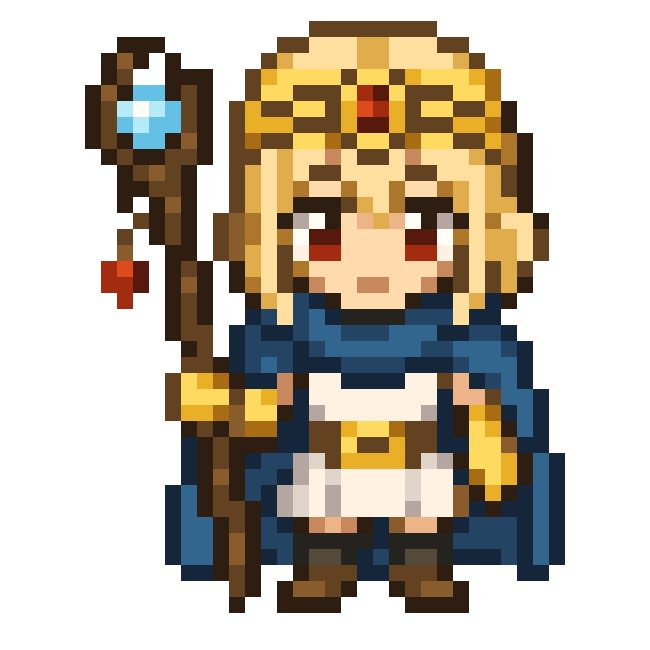
Chibi Fantasy Mage Pixel Sprite
Generates a simple front-facing 8-bit chibi mage sprite suitable for retro RPG character art or pixel icon design.
This is a GPT Image 2 prompt case for Anime & Game. Use the copy-ready prompt below to generate similar visuals, and review Awesome GPT Image 2 Prompts attribution plus commercial-use rights before reuse.
Free 1K preview
Generate one preview image instantly, no sign-up required.
Prompt
Copy-ready prompt
Create a centered 8-bit pixel art sprite on a plain white background, showing exactly 1 chibi fantasy mage character standing front-facing with a neutral expression. The character is {argument name="character name" default="Astra"}, a small super-deformed sorceress with {argument name="hair color" default="golden blonde"} straight hair, pale skin, large dark red eyes, and a gold ornate headdress with a single red jewel centered on the forehead. Outfit: exactly 5 main clothing pieces, consisting of a dark blue scarf or short cape wrapped around the shoulders, a white tunic dress, a gold belt with a small central buckle, yellow-gold gloves or arm guards, and dark brown boots. Pose: arms relaxed at the sides, compact body proportions, feet slightly apart. Include exactly 1 tall wooden staff on the character’s left side, held upright; the staff has a crooked dark-brown shaft, exactly 1 blue diamond-shaped crystal set near the top in a dark frame, exactly 1 small red hanging charm below it, and a gold band near the lower grip. Use a crisp low-resolution pixel-art style with chunky square pixels, hard edges, no antialiasing, black and dark-brown outlines, warm gold highlights, navy shadows, and a simple retro RPG character-sprite look. Keep the composition isolated, symmetrical, and readable, with no text, no background scenery, and no watermark.Prompt variables
Editable argument placeholders found in the prompt, with their default values.
Best for
- - Anime & Game visual exploration
- - Image generation and reference-image edits
- - Reusable briefs that keep source attribution visible
Change these parts
- - Subject, product, character, or scene
- - Aspect ratio, camera, lighting, and background
- - Brand, text, color, and output constraints
Recommended model and settings
- - Model: gpt-image-2
- - Input mode: Text to Image
- - Aspect ratio: source
- - Commercial status: review original source
How to use this prompt
- 1. Copy the prompt and preserve its structure for the first test.
- 2. Replace the subject, context, and publishing channel.
- 3. Change one camera, lighting, or style variable per iteration.
- 4. Inspect the output, source, text, and rights before reuse.
Limitations, source, and reuse cautions
- - Generated output is an editable draft, not factual, legal, or rights evidence.
- - Review the linked source, people, brands, logos, text, and third-party media before commercial use.
More cases in this category
Prioritized by category, input mode compatibility, quality, and lower risk.

Reuse and source notes
Use this prompt safely after previewing the case.
- 1.Copy the prompt or open it directly in Dovoo with the generation button.
- 2.Adjust variables, aspect ratio, and reference images for your own use case.
- 3.Before publishing or paid usage, verify source rights, attribution requirements, and brand or likeness risks.
Can I use this prompt commercially?
Commercial-use status is allowed. Review the original source, license, brand constraints, and legal requirements before paid usage.
Where does this case come from?
This case is imported from Awesome GPT Image 2 Prompts; keep attribution visible and check the source URL before reuse.