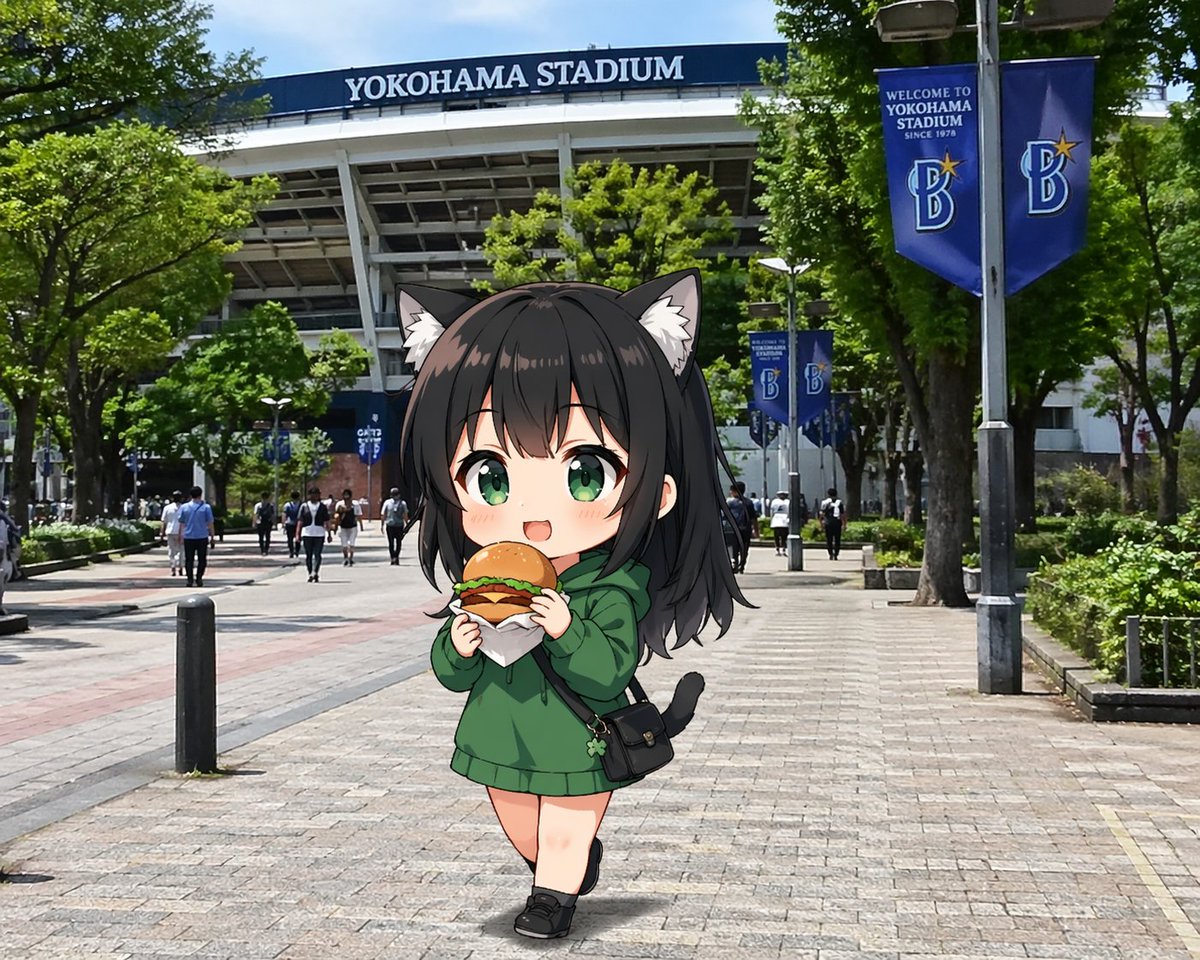
Chibi Catgirl at Yokohama Stadium
This prompt generates a realistic stadium walkway scene with a composited anime chibi catgirl, ideal for playful location-based character art or social media visuals.
This is a GPT Image 2 prompt case for Portrait & Character. Use the copy-ready prompt below to generate similar visuals, and review Awesome GPT Image 2 Prompts attribution plus commercial-use rights before reuse.
Free 1K preview
Generate one preview image instantly, no sign-up required.
Prompt
Copy-ready prompt
A cute anime chibi girl walking toward the camera on the tree-lined pedestrian approach outside {argument name="stadium name" default="YOKOHAMA STADIUM"}, shown in a realistic modern Japanese city photo background under bright midday sunlight with a blue sky peeking through the trees. The stadium fills the upper background with its large white structural beams and a dark blue sign reading {argument name="stadium name" default="YOKOHAMA STADIUM"}. On the right side, there are 2 tall blue vertical banners on lampposts with a stylized B logo and welcome text for Yokohama Stadium, plus 2 smaller matching blue banners farther down the walkway. The paved plaza is wide and open, with 2 short black bollards visible in the foreground-left area, green hedges and mature trees along both sides, and small pedestrians scattered in the distance for scale. In the center foreground, place 1 super-deformed catgirl character composited naturally into the scene: petite chibi proportions, oversized head, soft anime shading, pale skin, long slightly tousled dark hair with bangs, fluffy cat ears, and a small black cat tail. She wears an oversized {argument name="hoodie color" default="forest green"} hoodie that falls like a short dress, black low-cut shoes, and 1 small black crossbody bag with a flap and tiny charm hanging from it. She is holding 1 wrapped burger or sandwich with both hands near her mouth as if eating while walking. Her pose is slightly pigeon-toed and casual, one leg crossing in front of the other, giving a shy adorable feeling. Use a whimsical contrast between highly realistic street photography and a polished anime sticker-like character with clean outlines and subtle shadowing on the pavement. Keep the face centered but obscured by a large square mosaic blur censor block.Prompt variables
Editable argument placeholders found in the prompt, with their default values.
Best for
- - Portrait & Character visual exploration
- - Image generation and reference-image edits
- - Reusable briefs that keep source attribution visible
Change these parts
- - Subject, product, character, or scene
- - Aspect ratio, camera, lighting, and background
- - Brand, text, color, and output constraints
Recommended model and settings
- - Model: gpt-image-2
- - Input mode: Text to Image
- - Aspect ratio: source
- - Commercial status: review original source
How to use this prompt
- 1. Copy the prompt and preserve its structure for the first test.
- 2. Replace the subject, context, and publishing channel.
- 3. Change one camera, lighting, or style variable per iteration.
- 4. Inspect the output, source, text, and rights before reuse.
Limitations, source, and reuse cautions
- - Generated output is an editable draft, not factual, legal, or rights evidence.
- - Review the linked source, people, brands, logos, text, and third-party media before commercial use.
More cases in this category
Prioritized by category, input mode compatibility, quality, and lower risk.




Reuse and source notes
Use this prompt safely after previewing the case.
- 1.Copy the prompt or open it directly in Dovoo with the generation button.
- 2.Adjust variables, aspect ratio, and reference images for your own use case.
- 3.Before publishing or paid usage, verify source rights, attribution requirements, and brand or likeness risks.
Can I use this prompt commercially?
Commercial-use status is allowed. Review the original source, license, brand constraints, and legal requirements before paid usage.
Where does this case come from?
This case is imported from Awesome GPT Image 2 Prompts; keep attribution visible and check the source URL before reuse.