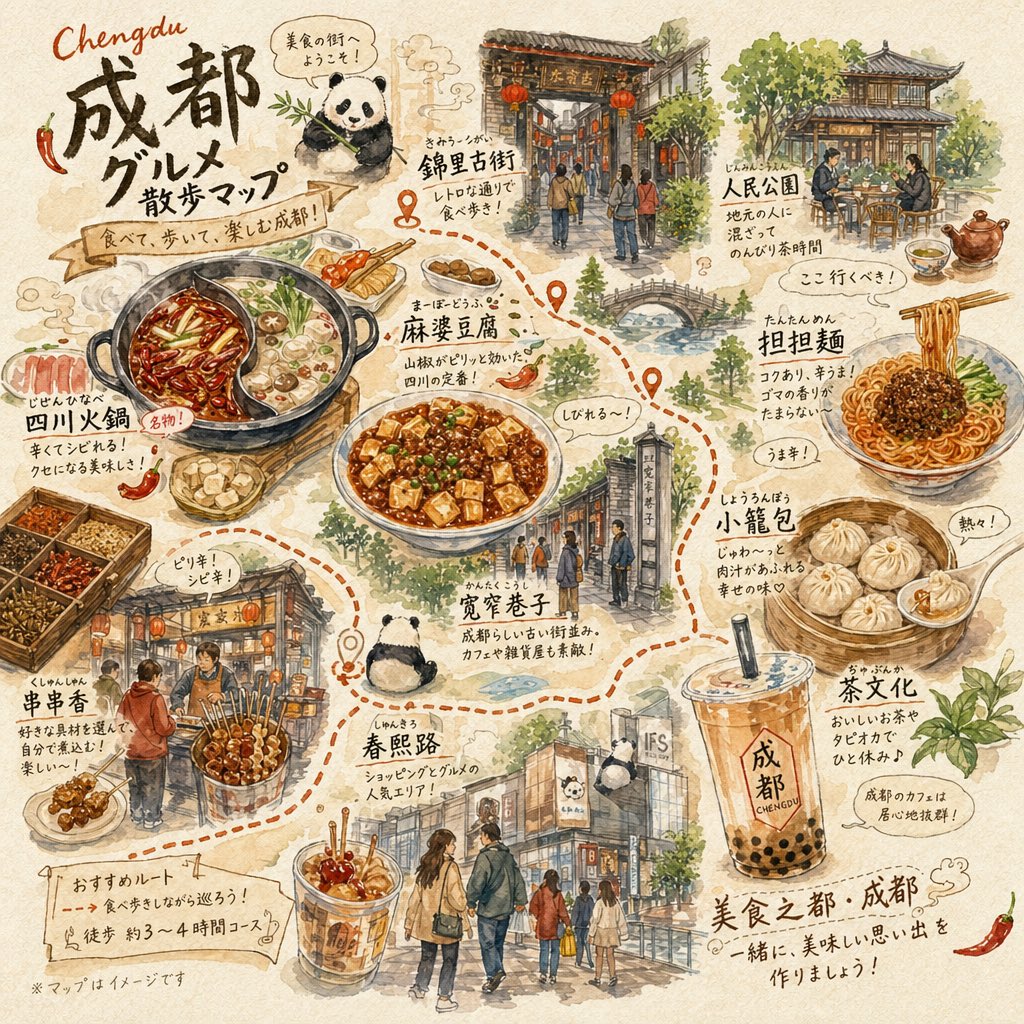
Chengdu Gourmet Walking Map
A hand-drawn watercolor-style illustrated food map of Chengdu, ideal for travel posters, blog thumbnails, and social media content about local cuisine and sightseeing.
This is a GPT Image 2 prompt case for Illustration & Art. Use the copy-ready prompt below to generate similar visuals, and review Awesome GPT Image 2 Prompts attribution plus commercial-use rights before reuse.
Free 1K preview
Generate one preview image instantly, no sign-up required.
Prompt
Copy-ready prompt
A warm hand-drawn travel food poster in a Japanese watercolor sketchbook style, showing a walking gourmet map of {argument name="city name" default="Chengdu"}. Use a textured beige paper background, ink outlines, loose watercolor washes, handwritten Japanese annotations, small decorative steam swirls, and a dotted orange walking route connecting food spots and sightseeing areas. The composition is a dense single-page illustrated map with many labeled mini-scenes and dishes arranged around the page. At the upper left, large brush-lettered title text reads "Chengdu 成都市 グルメ散歩マップ" with a ribbon subtitle that says "食べて、歩いて、楽しむ成都!" and a small speech bubble near a panda saying "美食の街へようこそ!". Include exactly 11 featured labeled elements across the page: 1) "錦里古街" as a traditional Chinese gate street scene with red lanterns and pedestrians, 2) "人民公園" as an outdoor teahouse with people seated at tables under trees, 3) "担担麺" as a bowl of spicy noodles held by chopsticks, 4) "小籠包" as a bamboo steamer with soup dumplings and a small dipping dish, 5) "茶文化" as a large plastic cup of milk tea with black tapioca pearls and the text "成都 CHENGDU" on the cup, 6) "春熙路" as a modern shopping street scene with several people walking and storefronts, 7) "寛窄巷子" as a historic alley entrance with visitors, 8) "麻婆豆腐" as a plate of mapo tofu topped with green garnish, 9) "四川火鍋" as a split hot pot with vivid red spicy broth on one side and pale broth on the other, surrounded by small ingredient trays, 10) "串串香" as a lively street stall with skewers and two customers, 11) a small panda illustration near the lower middle as a cute mascot resting by the route. Add several short handwritten callouts around the foods such as spicy reactions, recommendations, and tasting notes in Japanese, including phrases like "うま辛!", "熱々!", "じわぁ〜る!", "ピリ辛!", and "ここ行くべき!". Scatter small red chili pepper drawings around the page. Near the bottom left, add a torn-paper note box titled "おすすめルート" with a suggested course written beneath it and a small note saying "※マップはイメージです". At the lower right, add a concluding handwritten slogan reading "美食之都・成都" and a friendly invitation line beneath it. Overall mood: charming, appetizing, cozy, editorial, travel-journal-like, highly detailed but airy, with balanced negative space and an inviting illustrated tourist map layout.Prompt variables
Editable argument placeholders found in the prompt, with their default values.
Best for
- - Illustration & Art visual exploration
- - Image generation and reference-image edits
- - Reusable briefs that keep source attribution visible
Change these parts
- - Subject, product, character, or scene
- - Aspect ratio, camera, lighting, and background
- - Brand, text, color, and output constraints
Recommended model and settings
- - Model: gpt-image-2
- - Input mode: Text to Image
- - Aspect ratio: source
- - Commercial status: review original source
How to use this prompt
- 1. Copy the prompt and preserve its structure for the first test.
- 2. Replace the subject, context, and publishing channel.
- 3. Change one camera, lighting, or style variable per iteration.
- 4. Inspect the output, source, text, and rights before reuse.
Limitations, source, and reuse cautions
- - Generated output is an editable draft, not factual, legal, or rights evidence.
- - Review the linked source, people, brands, logos, text, and third-party media before commercial use.
More cases in this category
Prioritized by category, input mode compatibility, quality, and lower risk.





Reuse and source notes
Use this prompt safely after previewing the case.
- 1.Copy the prompt or open it directly in Dovoo with the generation button.
- 2.Adjust variables, aspect ratio, and reference images for your own use case.
- 3.Before publishing or paid usage, verify source rights, attribution requirements, and brand or likeness risks.
Can I use this prompt commercially?
Commercial-use status is allowed. Review the original source, license, brand constraints, and legal requirements before paid usage.
Where does this case come from?
This case is imported from Awesome GPT Image 2 Prompts; keep attribution visible and check the source URL before reuse.