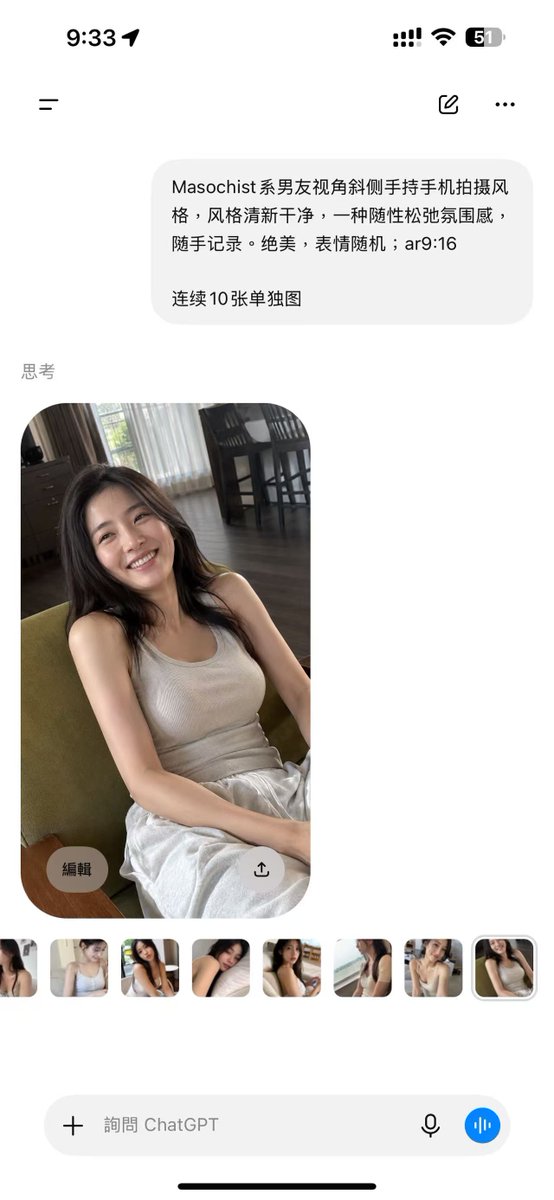
ChatGPT Mobile Photo Carousel Screenshot
Generates a realistic ChatGPT iPhone screenshot featuring a Chinese image prompt and a candid portrait result with thumbnail variations.
This is a GPT Image 2 prompt case for Product & Commercial. Use the copy-ready prompt below to generate similar visuals, and review Awesome GPT Image 2 Prompts attribution plus commercial-use rights before reuse.
Free 1K preview
Generate one preview image instantly, no sign-up required.
Free text preview doesn’t preserve reference-image consistency.
Prompt
Copy-ready prompt
Goal: Create a realistic vertical smartphone screenshot of the ChatGPT mobile app showing an image-generation result, in a clean iOS interface.

Canvas: Tall 9:16 phone screenshot, white background, rounded iPhone safe-area edges, black iOS home indicator at the bottom. Status bar at the top shows 9:33 on the left and exactly 4 right-side status items: cellular signal bars, Wi-Fi icon, battery percentage reading 51, and a battery shape.

Layout: Top navigation row contains exactly 3 controls: a hamburger menu icon on the left, a small compose/edit icon near the upper right, and a three-dot more menu at the far right. Below it, place one light-gray rounded user message bubble aligned slightly right. Under the bubble, add a small gray section label reading “Thinking”. Below the label, show one large generated photo card with rounded corners, then a horizontal strip of exactly 8 small thumbnail images. At the bottom, show one rounded input bar with a plus icon, placeholder text, microphone icon, and a blue circular voice button.

Text content: The user message bubble contains Chinese text: “{argument name="prompt text" default="Masochist-style boyfriend's perspective, shooting with a phone held diagonally, a fresh and clean style, a casual and relaxed atmosphere, casually recorded. Stunning, with random expressions; ar9:16

10 separate images in a row"}”. The bottom input placeholder reads “Ask ChatGPT”.

Main photo subject: The large generated image is a casual handheld portrait of {argument name="character description" default="a young East Asian woman with long dark hair"} sitting indoors on a green upholstered chair, smiling warmly at the camera. She wears {argument name="outfit" default="a beige ribbed tank top and loose white pants"}. The pose feels relaxed and candid, shot from a slightly high, tilted boyfriend-perspective phone angle. Her hands rest casually near her lap, her expression is bright and natural, and the lighting is soft daytime window light.

Environment inside the photo: A cozy apartment living/dining room with dark wood floor, sheer white curtains, darker side curtains, a window with greenery outside, and a dining table with tall dark chairs in the background. Keep the photo realistic, slightly imperfect, and spontaneous rather than studio-polished.

Overlay controls: On the large photo card, include exactly 2 translucent circular overlay buttons near the bottom: one left button labeled “Edit” and one right button with an upload/share arrow icon. The thumbnail strip contains exactly 8 small rounded previews showing alternate similar portraits of the same woman; the final thumbnail is selected with a subtle light outline.

Visual style: Photorealistic iOS screenshot, clean white margins, soft gray interface elements, accurate mobile app spacing, natural Chinese UI typography, no extra watermarks, no additional panels, no extra generated images beyond the 1 main image and 8 thumbnails.
Prompt variables
Editable argument placeholders found in the prompt, with their default values.
Best for
- - Product & Commercial visual exploration
- - Image generation and reference-image edits
- - Reusable briefs that keep source attribution visible
Change these parts
- - Subject, product, character, or scene
- - Aspect ratio, camera, lighting, and background
- - Brand, text, color, and output constraints
Recommended model and settings
- - Model: gpt-image-2
- - Input mode: Image to Image
- - Aspect ratio: source
- - Commercial status: review original source
How to use this prompt
- 1. Copy the prompt and preserve its structure for the first test.
- 2. Replace the subject, context, and publishing channel.
- 3. Change one camera, lighting, or style variable per iteration.
- 4. Inspect the output, source, text, and rights before reuse.
Limitations, source, and reuse cautions
- - Generated output is an editable draft, not factual, legal, or rights evidence.
- - Review the linked source, people, brands, logos, text, and third-party media before commercial use.
More cases in this category
Prioritized by category, input mode compatibility, quality, and lower risk.
Reuse and source notes
Use this prompt safely after previewing the case.
- 1.Copy the prompt or open it directly in Dovoo with the generation button.
- 2.Adjust variables, aspect ratio, and reference images for your own use case.
- 3.Before publishing or paid usage, verify source rights, attribution requirements, and brand or likeness risks.
Can I use this prompt commercially?
Commercial-use status is allowed. Review the original source, license, brand constraints, and legal requirements before paid usage.
Where does this case come from?
This case is imported from Awesome GPT Image 2 Prompts; keep attribution visible and check the source URL before reuse.