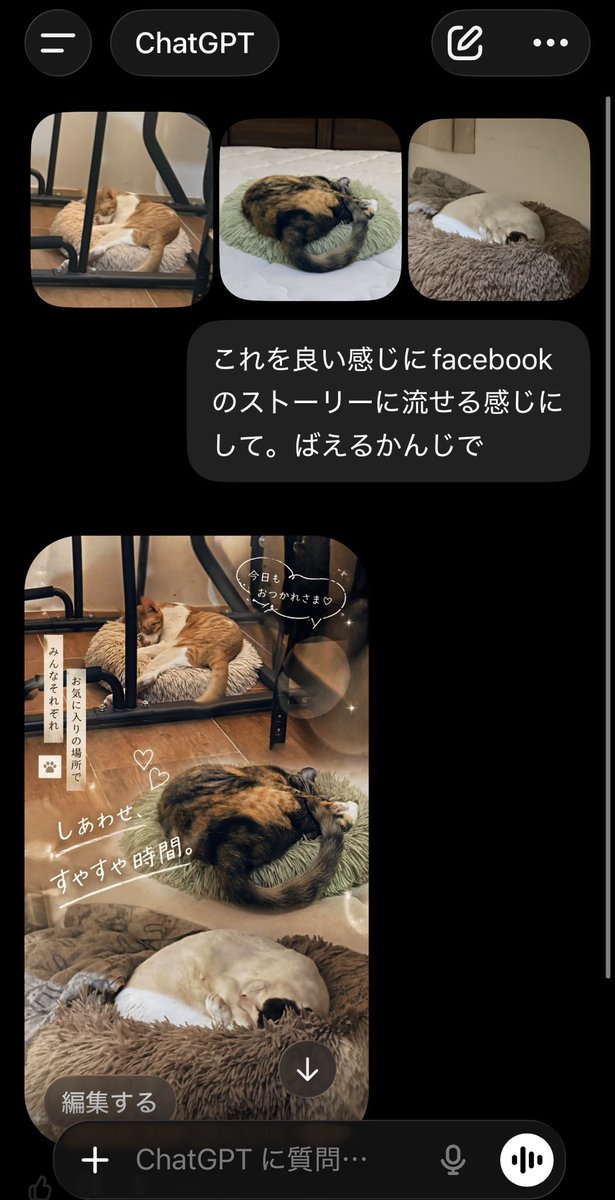
ChatGPT App Cat Story Screenshot
A realistic mobile app screenshot showing ChatGPT turning three cat photos into a cozy Japanese Facebook Story collage, useful for mockups, social media demos, and UI concept visuals.
This is a GPT Image 2 prompt case for Other Inspiration. Use the copy-ready prompt below to generate similar visuals, and review Awesome GPT Image 2 Prompts attribution plus commercial-use rights before reuse.
Free 1K preview
Generate one preview image instantly, no sign-up required.
Prompt
Copy-ready prompt
A realistic smartphone screenshot of the ChatGPT mobile app in dark mode, shown on a black background with iOS-style UI. At the top, display a header with a hamburger menu icon on the left, a rounded tab labeled "ChatGPT" in the center, and two icons on the right: a compose icon and a three-dot menu. Below that, show a row of exactly 3 rounded-corner photo thumbnails of sleeping cats: first, an orange-and-white cat sleeping on a fluffy cushion under a black metal chair frame on a wooden floor; second, a calico cat curled tightly on a pale green round cushion on a bed; third, a cream-colored cat curled up asleep in a brown plush pet bed. Under the thumbnails, place a dark gray chat bubble with white Japanese text that says: "これを良い感じにfacebookのストーリーに流せる感じにして。ばえるかんじで". Beneath the message, show the generated image as a tall vertical Facebook-story-style collage using the same 3 cat photos blended into one warm, cozy composition. The top section features the orange-and-white cat under the chair, the middle section features the curled calico cat, and the bottom section features the cream-colored cat in the fluffy bed. Apply soft beige and brown tones, dreamy lighting, light bokeh circles, subtle sparkles, and a gentle lifestyle aesthetic. Add cute handwritten-style Japanese overlay text and stickers across the collage: a speech bubble near the top saying "今日も おつかれさま♡", a vertical note on the left reading "みんなそれぞれ お気に入りの場所で", two small heart doodles near the center, and a large diagonal caption reading "しあわせ すやすや時間。". At the bottom-left of the generated image, overlay a rounded dark button labeled "編集する", and near the bottom-center place a circular download icon with a downward arrow. At the very bottom of the screen, include the ChatGPT input bar with a plus icon, placeholder text "ChatGPT に質問…", a microphone icon, and a circular voice button. Make the overall image look like an authentic captured app screen, vertically oriented, with a thin white scroll bar visible along the right edge.
Best for
- - Other Inspiration visual exploration
- - Image generation and reference-image edits
- - Reusable briefs that keep source attribution visible
Change these parts
- - Subject, product, character, or scene
- - Aspect ratio, camera, lighting, and background
- - Brand, text, color, and output constraints
Recommended model and settings
- - Model: gpt-image-2
- - Input mode: Text to Image
- - Aspect ratio: source
- - Commercial status: review original source
How to use this prompt
- 1. Copy the prompt and preserve its structure for the first test.
- 2. Replace the subject, context, and publishing channel.
- 3. Change one camera, lighting, or style variable per iteration.
- 4. Inspect the output, source, text, and rights before reuse.
Limitations, source, and reuse cautions
- - Generated output is an editable draft, not factual, legal, or rights evidence.
- - Review the linked source, people, brands, logos, text, and third-party media before commercial use.
More cases in this category
Prioritized by category, input mode compatibility, quality, and lower risk.

Reuse and source notes
Use this prompt safely after previewing the case.
- 1.Copy the prompt or open it directly in Dovoo with the generation button.
- 2.Adjust variables, aspect ratio, and reference images for your own use case.
- 3.Before publishing or paid usage, verify source rights, attribution requirements, and brand or likeness risks.
Can I use this prompt commercially?
Commercial-use status is allowed. Review the original source, license, brand constraints, and legal requirements before paid usage.
Where does this case come from?
This case is imported from Awesome GPT Image 2 Prompts; keep attribution visible and check the source URL before reuse.