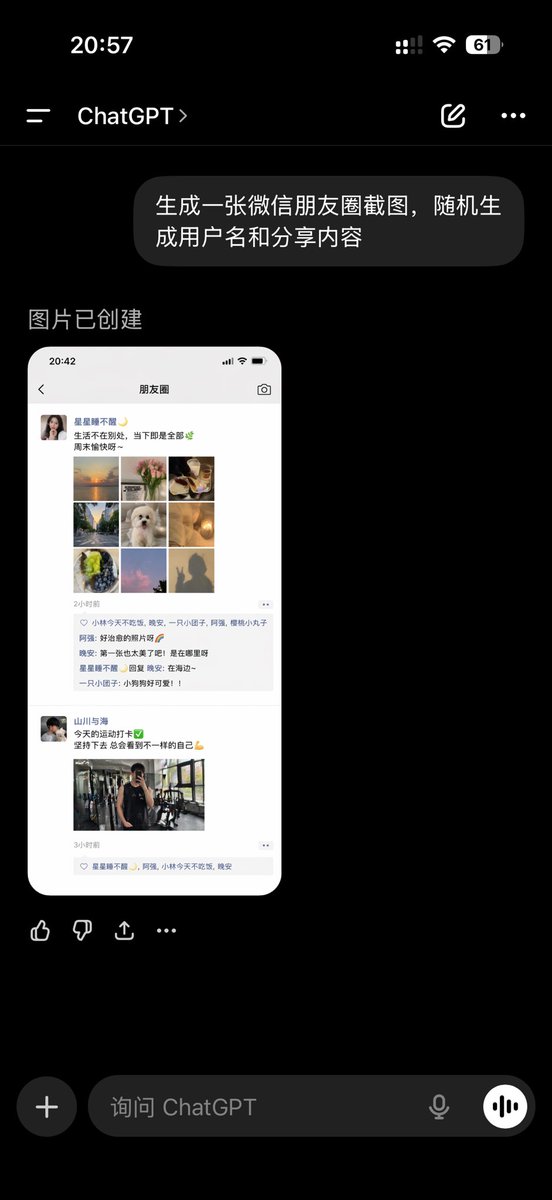
ChatGPT App Showing WeChat Moments Screenshot
A realistic Chinese ChatGPT mobile app screenshot displaying a generated WeChat Moments mockup, suitable for social media UI demonstrations and AI image generation showcases.
This is a GPT Image 2 prompt case for Product & Commercial. Use the copy-ready prompt below to generate similar visuals, and review Awesome GPT Image 2 Prompts attribution plus commercial-use rights before reuse.
Free 1K preview
Generate one preview image instantly, no sign-up required.
Free text preview doesn’t preserve reference-image consistency.
Prompt
Copy-ready prompt
A realistic dark mode mobile screenshot of the ChatGPT application, full screen on a black background, with an iPhone-style status bar. The top status bar displays the time 20:57 on the left and small cellular signal, Wi-Fi, and battery icons on the right, with the battery showing 61%. Below is the ChatGPT conversation title bar, containing a left-side menu icon, the title “ChatGPT”, an edit icon, and a three-dot menu icon. In the chat area, there is 1 user bubble message displayed, reading “Generate a WeChat Moments screenshot, randomly generate usernames and share content”, displayed as a right-aligned dark gray rounded bubble. Below this, the assistant's reply area displays the text “Image created”. Below the reply, there is 1 preview of the generated image: a long, rounded screenshot of a WeChat Moments page on a white mobile screen. Within the generated image, the top bar displays the time 20:42 and the title “Moments”. It showcases 2 independent Moments posts. The first post includes a female avatar and username “Stars Don't Wake Up”, followed by a short Chinese caption about life and the weekend, then a 3x3 collage containing 9 square images: sunset over water, flowers, exquisite food, a tree-lined avenue, a white fluffy puppy, warm lighting, green fruit or dessert, pink clouds or sky, and a silhouette photo. Below this is a timestamp “2 hours ago”, a row of 3 usernames who liked the post, and a comment section with 3 short Chinese comments. The second post includes a male avatar and username “Mountains and Seas”, followed by a short Chinese caption on the theme of fitness, with a green checkmark and bicep emojis, then 1 gym mirror selfie, followed by a timestamp “3 hours ago” and a row of likes. Outside the generated image preview, within the ChatGPT application screenshot, there is a row of 4 operation icons below the image: like, dislike, share/export, and more. At the bottom of the screen is the dark mode ChatGPT input bar, with a circular plus button on the left and placeholder text “Ask ChatGPT”, and a microphone icon and circular voice button on the right. Use realistic mobile UI proportions, clear typography, realistic Chinese application interface details, and photorealistic rendering to make it look like a genuine screenshot of the ChatGPT application showcasing an AI-generated WeChat Moments screenshot.
Best for
- - Product & Commercial visual exploration
- - Image generation and reference-image edits
- - Reusable briefs that keep source attribution visible
Change these parts
- - Subject, product, character, or scene
- - Aspect ratio, camera, lighting, and background
- - Brand, text, color, and output constraints
Recommended model and settings
- - Model: gpt-image-2
- - Input mode: Image to Image
- - Aspect ratio: source
- - Commercial status: review original source
How to use this prompt
- 1. Copy the prompt and preserve its structure for the first test.
- 2. Replace the subject, context, and publishing channel.
- 3. Change one camera, lighting, or style variable per iteration.
- 4. Inspect the output, source, text, and rights before reuse.
Limitations, source, and reuse cautions
- - Generated output is an editable draft, not factual, legal, or rights evidence.
- - Review the linked source, people, brands, logos, text, and third-party media before commercial use.
More cases in this category
Prioritized by category, input mode compatibility, quality, and lower risk.
Reuse and source notes
Use this prompt safely after previewing the case.
- 1.Copy the prompt or open it directly in Dovoo with the generation button.
- 2.Adjust variables, aspect ratio, and reference images for your own use case.
- 3.Before publishing or paid usage, verify source rights, attribution requirements, and brand or likeness risks.
Can I use this prompt commercially?
Commercial-use status is allowed. Review the original source, license, brand constraints, and legal requirements before paid usage.
Where does this case come from?
This case is imported from Awesome GPT Image 2 Prompts; keep attribution visible and check the source URL before reuse.