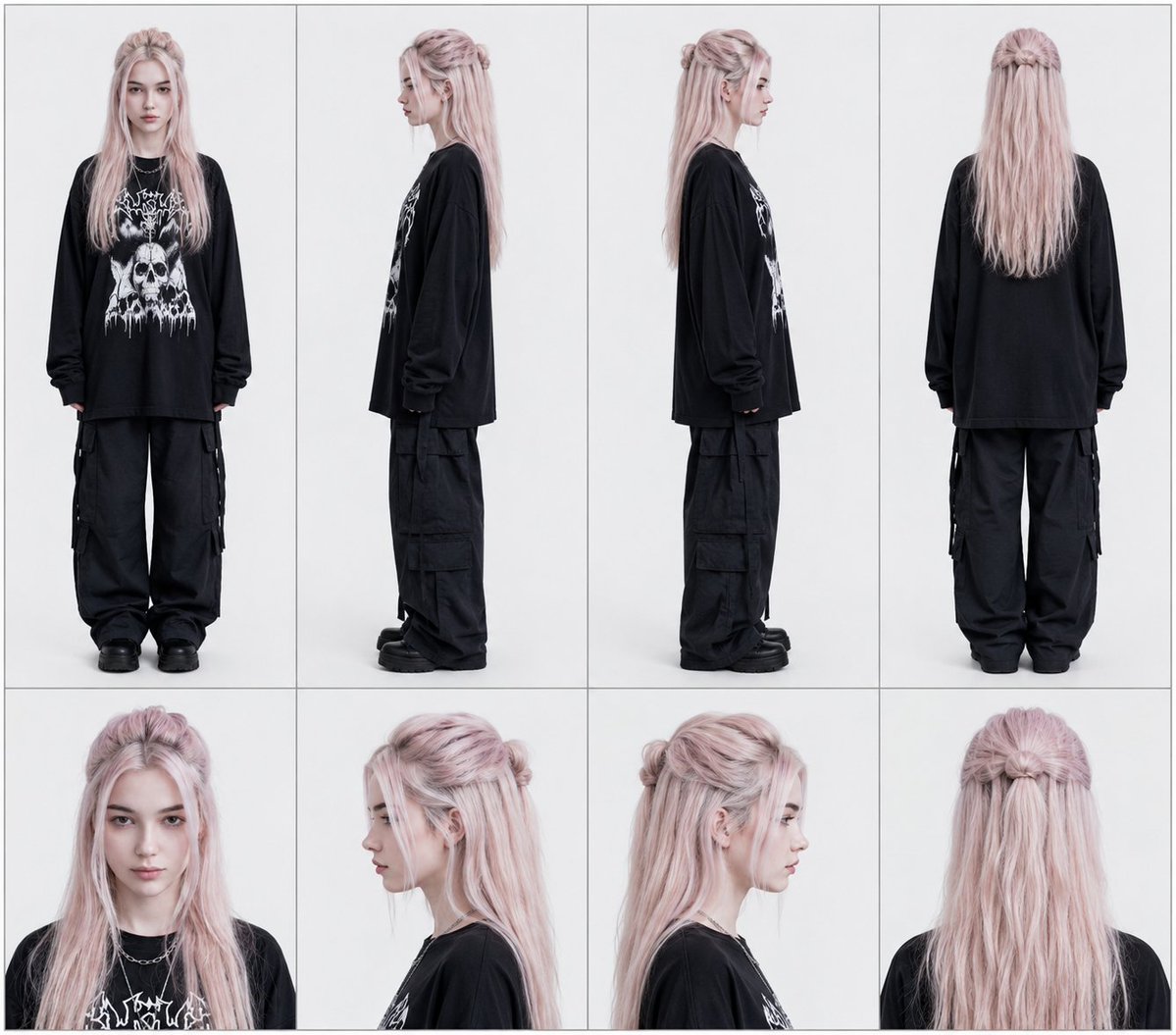
Professional Character Reference Sheet Layout
This prompt helps generate professional character reference sheets organized into clean vertical columns. It specifies multiple viewing angles, including full-body and close-up portraits, ensuring consistent character design and alignment.
This is a GPT Image 2 prompt case for 人像角色. Use the copy-ready prompt below to generate similar visuals, and review Awesome GPT Image 2 Prompts attribution plus commercial-use rights before reuse.
Prompt
Copy-ready prompt
为上传的图像创建一个专业角色参考图。将其排列为 {argument name="column count" default="four"} 个垂直列,每一列代表一个视角。每列上方为全身照,下方为对应的特写肖像。列布局(从左至右):第 1 列:正面视角(上方为全身照,下方为正面肖像);第 2 列:左侧视角(上方为向左的全身照,下方为左侧肖像);第 3 列:右侧视角(上方为向右的全身照,下方为右侧肖像);第 4 列:背面视角及下方对应的肖像。保持角色肖像周围的间距和构图均匀。线条清晰,对齐一致,面板分隔整洁。无文字。细边框。平光照明。Prompt variables
Editable argument placeholders found in the prompt, with their default values.
More cases in this category
Prioritized by category, input mode compatibility, quality, and lower risk.





Reuse and source notes
Use this prompt safely after previewing the case.
- 1.Copy the prompt or open it directly in Dovoo with the generation button.
- 2.Adjust variables, aspect ratio, and reference images for your own use case.
- 3.Before publishing or paid usage, verify source rights, attribution requirements, and brand or likeness risks.
Can I use this prompt commercially?
Commercial-use status is allowed. Review the original source, license, brand constraints, and legal requirements before paid usage.
Where does this case come from?
This case is imported from Awesome GPT Image 2 Prompts; keep attribution visible and check the source URL before reuse.