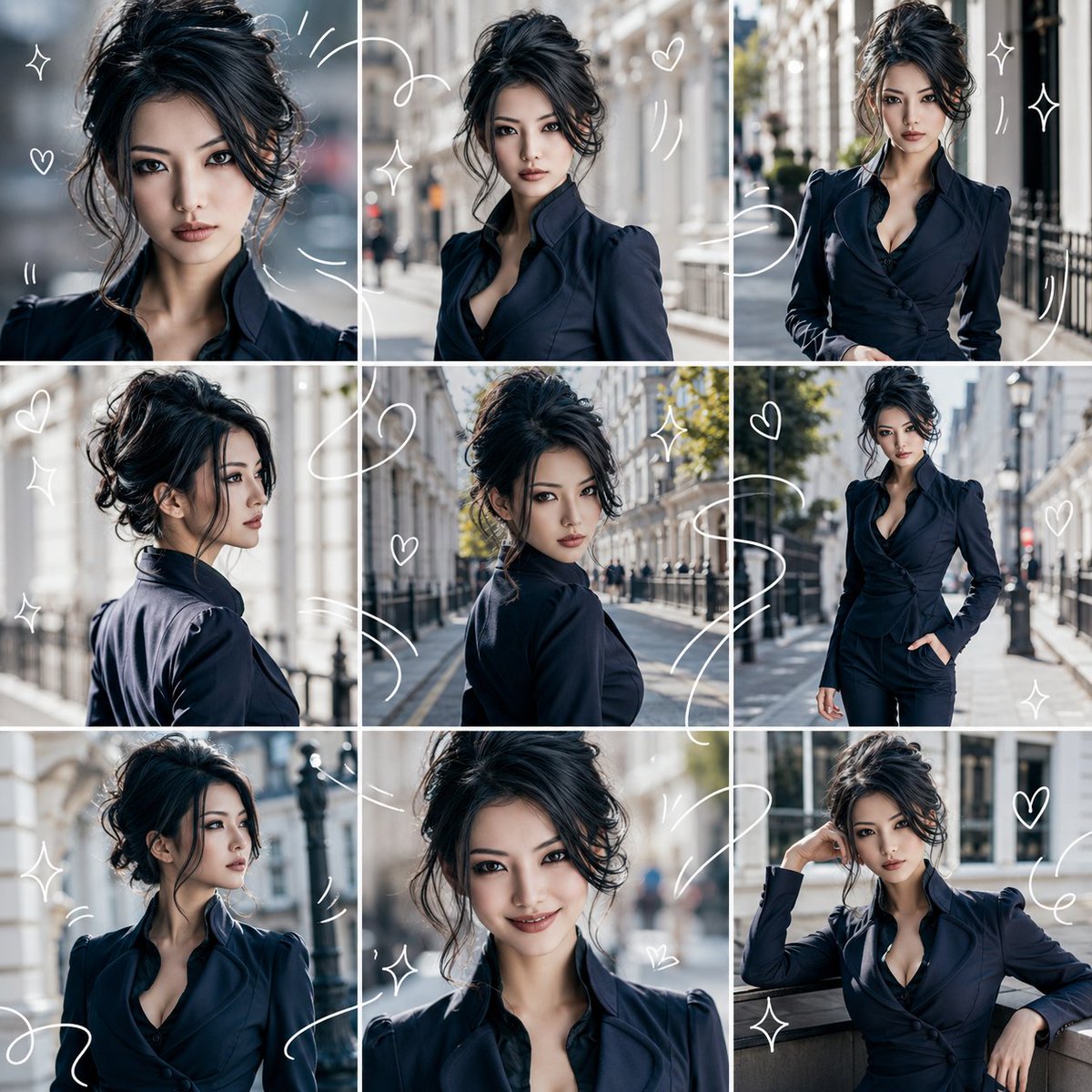
Character Consistency 9-Grid Collage
A structured prompt for creating a 3x3 collage of the same character in various poses and angles based on a reference image, maintaining visual consistency throughout.
This is a GPT Image 2 prompt case for Portrait & Character. Use the copy-ready prompt below to generate similar visuals, and review Awesome GPT Image 2 Prompts attribution plus commercial-use rights before reuse.
Free 1K preview
Generate one preview image instantly, no sign-up required.
Free text preview doesn’t preserve reference-image consistency.
Prompt
Copy-ready prompt
Please make the person/character in the attached reference image the protagonist. Whether the reference image is live-action or an illustration, naturally convert it to match the specified "{argument name="output style" default="photorealistic style"}". Maintain the main features of the reference image such as facial features, hairstyle, hair color, eyes, contour, sense of age, atmosphere, body shape, and costume, so that they appear to be the same person/character in every frame. The output should be a single image with an "{argument name="aspect ratio" default="1:1"}". Divide the entire screen into equal 3 columns x 3 rows, and ensure it is a collage of exactly 9 frames in total. Do not increase or decrease the number of frames; keep the layout organized and easy to view. Each frame should look like a different moment captured of the same person/character. Vary the angle, distance, expression, and movement with shots like close-up, bust-up, slightly pulled back composition, profile, looking back, walking, eyes looking away, natural smile, and relaxed poses. The background should be based on "{argument name="background" default="bright interior"}", with a clean and bright atmosphere. The overall impression should be "refreshing," in a light and breezy visual diary style. Overlay thin, white, hand-drawn style lines throughout. The white lines should flow and connect across the 9 frames, surrounding the person or expressing movement. Include small hearts, star-shaped sparkles, wavy lines, and motion lines. However, do not hide the face, eyes, or expressions. Elements to avoid: text, subtitles, logos, watermarks, extra people, turning into a different person, facial distortion, limb failure, cluttered backgrounds, excessively dark shadows, scribbles hiding the face, and frames other than the 9 segments.Prompt variables
Editable argument placeholders found in the prompt, with their default values.
Best for
- - Portrait & Character visual exploration
- - Image generation and reference-image edits
- - Reusable briefs that keep source attribution visible
Change these parts
- - Subject, product, character, or scene
- - Aspect ratio, camera, lighting, and background
- - Brand, text, color, and output constraints
Recommended model and settings
- - Model: gpt-image-2
- - Input mode: Image to Image
- - Aspect ratio: source
- - Commercial status: review original source
How to use this prompt
- 1. Copy the prompt and preserve its structure for the first test.
- 2. Replace the subject, context, and publishing channel.
- 3. Change one camera, lighting, or style variable per iteration.
- 4. Inspect the output, source, text, and rights before reuse.
Limitations, source, and reuse cautions
- - Generated output is an editable draft, not factual, legal, or rights evidence.
- - Review the linked source, people, brands, logos, text, and third-party media before commercial use.
More cases in this category
Prioritized by category, input mode compatibility, quality, and lower risk.


Reuse and source notes
Use this prompt safely after previewing the case.
- 1.Copy the prompt or open it directly in Dovoo with the generation button.
- 2.Adjust variables, aspect ratio, and reference images for your own use case.
- 3.Before publishing or paid usage, verify source rights, attribution requirements, and brand or likeness risks.
Can I use this prompt commercially?
Commercial-use status is allowed. Review the original source, license, brand constraints, and legal requirements before paid usage.
Where does this case come from?
This case is imported from Awesome GPT Image 2 Prompts; keep attribution visible and check the source URL before reuse.