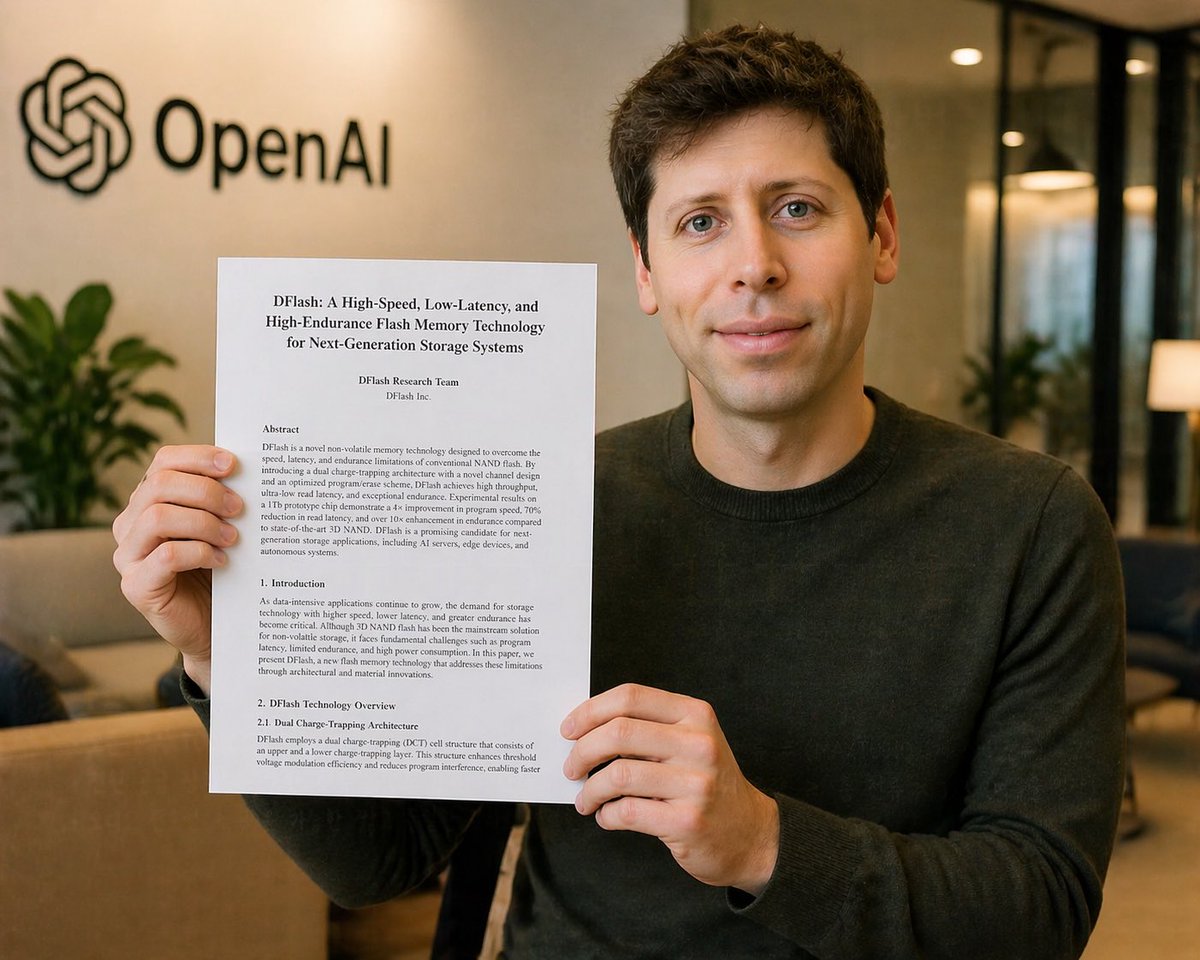
Censored Research Paper Office Portrait
This prompt generates a photorealistic office announcement-style portrait of a man holding a technical paper in front of visible company branding, useful for tech news, parody announcements, or corporate editorial imagery.
This is a GPT Image 2 prompt case for Portrait & Character. Use the copy-ready prompt below to generate similar visuals, and review Awesome GPT Image 2 Prompts attribution plus commercial-use rights before reuse.
Free 1K preview
Generate one preview image instantly, no sign-up required.
Prompt
Copy-ready prompt
A realistic corporate office photo of a young man seated indoors, holding up a printed research paper toward the camera with both hands. Show every face clearly with natural, detailed facial features. He has short dark brown hair and wears a plain dark charcoal crewneck sweater. The paper is a white letter-size document in portrait orientation, clearly visible and centered in front of his torso. The document title reads “DFlash: A High-Speed, Low-Latency, and High-Endurance Flash Memory Technology for Next-Generation Storage Systems”. Below it are the author lines “DFlash Research Team” and “DFlash Inc.” The page shows 4 visible text sections: “Abstract”, “1. Introduction”, “2. DFlash Technology Overview”, and “2.1 Dual Charge-Trapping Architecture”, set in a formal academic paper layout with dense black serif text. In the background, place a softly blurred modern office lobby with warm ambient lighting, beige walls, glass partitions, a sofa, indoor plants, and the black OpenAI logo and wordmark mounted on the wall at upper left. The composition is a medium shot, straight-on, with the subject slightly right of center so the OpenAI logo remains visible. Shallow depth of field, soft natural office lighting, polished photorealistic style, subtle warm color grading, high detail in the hands, paper, sweater texture, and interior environment. Keep the overall image clean, believable, and like a candid press or announcement photo. Use {argument name="document title" default="DFlash: A High-Speed, Low-Latency, and High-Endurance Flash Memory Technology for Next-Generation Storage Systems"} for the paper title, {argument name="company logo text" default="OpenAI"} for the wall branding, {argument name="sweater color" default="dark charcoal"} for the subject’s clothing, and {argument name="censor block color" default="medium tan"} for the face covering.Prompt variables
Editable argument placeholders found in the prompt, with their default values.
Best for
- - Portrait & Character visual exploration
- - Image generation and reference-image edits
- - Reusable briefs that keep source attribution visible
Change these parts
- - Subject, product, character, or scene
- - Aspect ratio, camera, lighting, and background
- - Brand, text, color, and output constraints
Recommended model and settings
- - Model: gpt-image-2
- - Input mode: Text to Image
- - Aspect ratio: source
- - Commercial status: review original source
How to use this prompt
- 1. Copy the prompt and preserve its structure for the first test.
- 2. Replace the subject, context, and publishing channel.
- 3. Change one camera, lighting, or style variable per iteration.
- 4. Inspect the output, source, text, and rights before reuse.
Limitations, source, and reuse cautions
- - Generated output is an editable draft, not factual, legal, or rights evidence.
- - Review the linked source, people, brands, logos, text, and third-party media before commercial use.
More cases in this category
Prioritized by category, input mode compatibility, quality, and lower risk.





Reuse and source notes
Use this prompt safely after previewing the case.
- 1.Copy the prompt or open it directly in Dovoo with the generation button.
- 2.Adjust variables, aspect ratio, and reference images for your own use case.
- 3.Before publishing or paid usage, verify source rights, attribution requirements, and brand or likeness risks.
Can I use this prompt commercially?
Commercial-use status is allowed. Review the original source, license, brand constraints, and legal requirements before paid usage.
Where does this case come from?
This case is imported from Awesome GPT Image 2 Prompts; keep attribution visible and check the source URL before reuse.