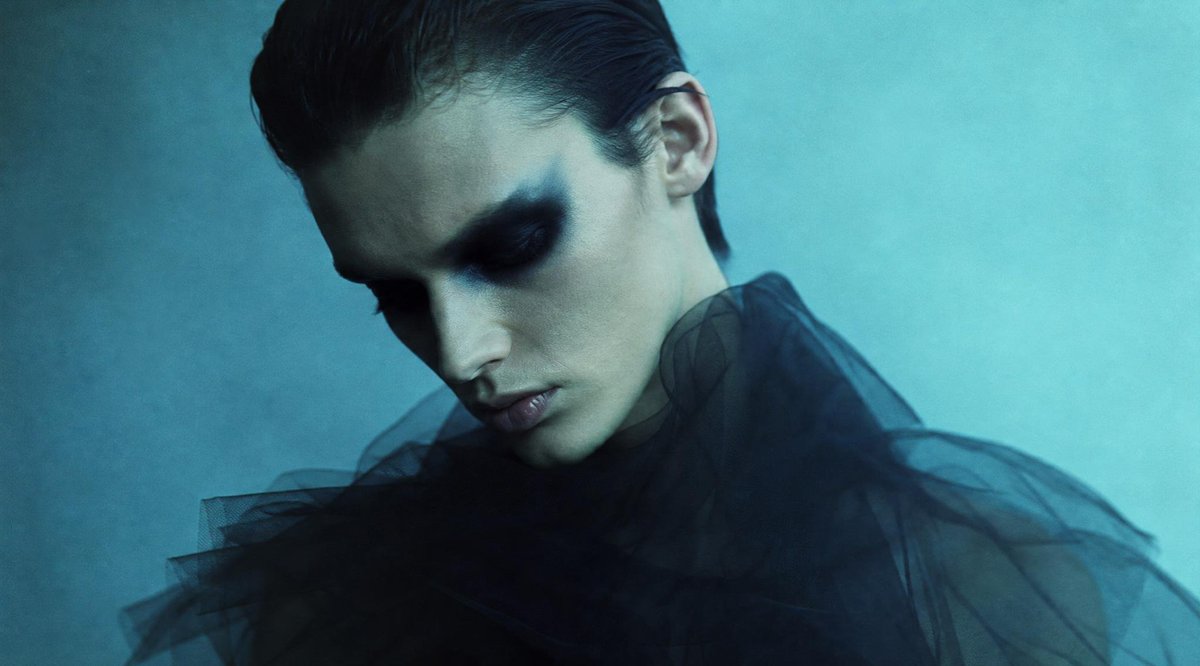
Censored Teal Fashion Portrait
Generates a moody editorial fashion portrait with a face-obscuring square censor block and dark sheer tulle styling.
Prompt
Copy-ready prompt
Create a cinematic, moody fashion portrait of {argument name="subject" default="an androgynous young adult model"} in a dark sheer tulle garment with voluminous translucent fabric around the shoulders and chest. The subject is framed in a tight upper-body crop, slightly off-center, with slicked-back {argument name="hair color" default="black"} hair visible above and around a large opaque square censor block covering the entire face. The square sits centered over the face, extending from the forehead area down to the upper chest, with a subtle vertical gradient from dark charcoal teal at the top and bottom to muted gray-green in the center. Show one ear peeking out on the right side of the block and a small amount of hairline visible at the top. Use a cool cyan-teal studio background with soft misty texture, low contrast, and filmic grain. Lighting should be dim, atmospheric, and editorial, with blue-green color grading, shallow depth of field, soft shadows, and a high-fashion magazine look. No visible text, logos, or extra objects.Prompt variables
Editable argument placeholders found in the prompt, with their default values.
Variable
subject
Default
an androgynous young adult model
Variable
hair color
Default
black
More cases in this category
Prioritized by category, input mode compatibility, quality, and lower risk.
Reuse and source notes
Use this prompt safely after previewing the case.
- 1.Copy the prompt or open it directly in Dovoo with the generation button.
- 2.Adjust variables, aspect ratio, and reference images for your own use case.
- 3.Before publishing or paid usage, verify source rights, attribution requirements, and brand or likeness risks.
Can I use this prompt commercially?
Commercial-use status is unknown. Review the original source, license, brand constraints, and legal requirements before paid usage.
Where does this case come from?
This case is imported from GPT Image 2 OpenLab gpt-image-2-prompts; keep attribution visible and check the source URL before reuse.