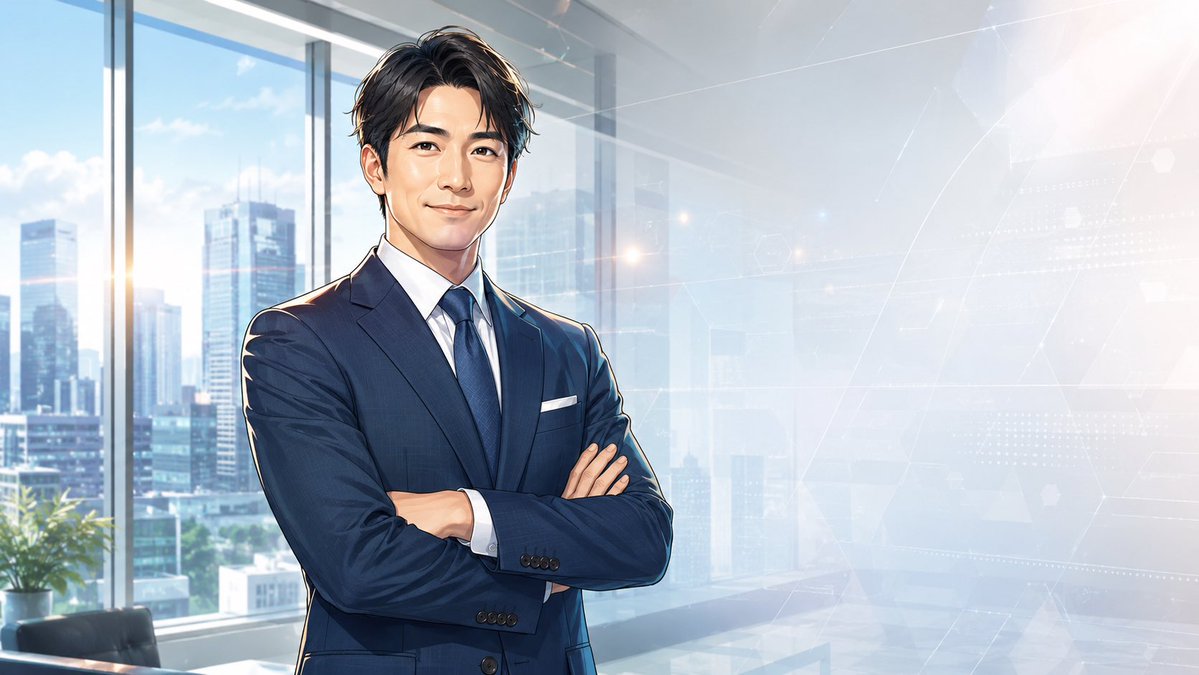
Censored Anime Businessman Portrait
Generates a professional anime-style corporate portrait with a face-obscured businessman in a bright futuristic office setting.
This is a GPT Image 2 prompt case for Portrait & Character. Use the copy-ready prompt below to generate similar visuals, and review Awesome GPT Image 2 Prompts attribution plus commercial-use rights before reuse.
Free 1K preview
Generate one preview image instantly, no sign-up required.
Prompt
Copy-ready prompt
Create a polished semi-realistic anime-style corporate portrait of {argument name="character name" default="a confident young businessman"} standing in a modern high-rise office, shown from mid-thigh to head, positioned slightly left of center with arms crossed. He wears a tailored {argument name="suit color" default="dark navy blue"} business suit, crisp white dress shirt, dark blue tie, white pocket square, and buttoned cuffs; his build is slim-athletic and professional. His hair is short, wavy, neatly styled, and {argument name="hair color" default="black with subtle blue highlights"}. Obscure the entire face with a centered flat square censor block in a smooth beige skin-tone gradient, covering forehead through chin while leaving hair, ears, neck, suit, and posture visible. The background is a bright glass-walled executive office with floor-to-ceiling windows, a sunlit modern city skyline outside, soft blue sky, faint clouds, a small potted plant and office furniture at the lower left, and a pale futuristic digital interface overlay on the right side with thin white lines, hexagons, dotted grids, and abstract network geometry. Use cinematic morning light, soft lens flare, cool blue-white color grading, high-detail anime illustration rendering, clean linework, realistic fabric folds, glossy window reflections, and a professional tech-business atmosphere. Wide 16:9 composition, leave open negative space on the right for potential text, no visible writing, no watermark.Prompt variables
Editable argument placeholders found in the prompt, with their default values.
Best for
- - Portrait & Character visual exploration
- - Image generation and reference-image edits
- - Reusable briefs that keep source attribution visible
Change these parts
- - Subject, product, character, or scene
- - Aspect ratio, camera, lighting, and background
- - Brand, text, color, and output constraints
Recommended model and settings
- - Model: gpt-image-2
- - Input mode: Text to Image
- - Aspect ratio: source
- - Commercial status: review original source
How to use this prompt
- 1. Copy the prompt and preserve its structure for the first test.
- 2. Replace the subject, context, and publishing channel.
- 3. Change one camera, lighting, or style variable per iteration.
- 4. Inspect the output, source, text, and rights before reuse.
Limitations, source, and reuse cautions
- - Generated output is an editable draft, not factual, legal, or rights evidence.
- - Review the linked source, people, brands, logos, text, and third-party media before commercial use.
More cases in this category
Prioritized by category, input mode compatibility, quality, and lower risk.


Reuse and source notes
Use this prompt safely after previewing the case.
- 1.Copy the prompt or open it directly in Dovoo with the generation button.
- 2.Adjust variables, aspect ratio, and reference images for your own use case.
- 3.Before publishing or paid usage, verify source rights, attribution requirements, and brand or likeness risks.
Can I use this prompt commercially?
Commercial-use status is allowed. Review the original source, license, brand constraints, and legal requirements before paid usage.
Where does this case come from?
This case is imported from Awesome GPT Image 2 Prompts; keep attribution visible and check the source URL before reuse.