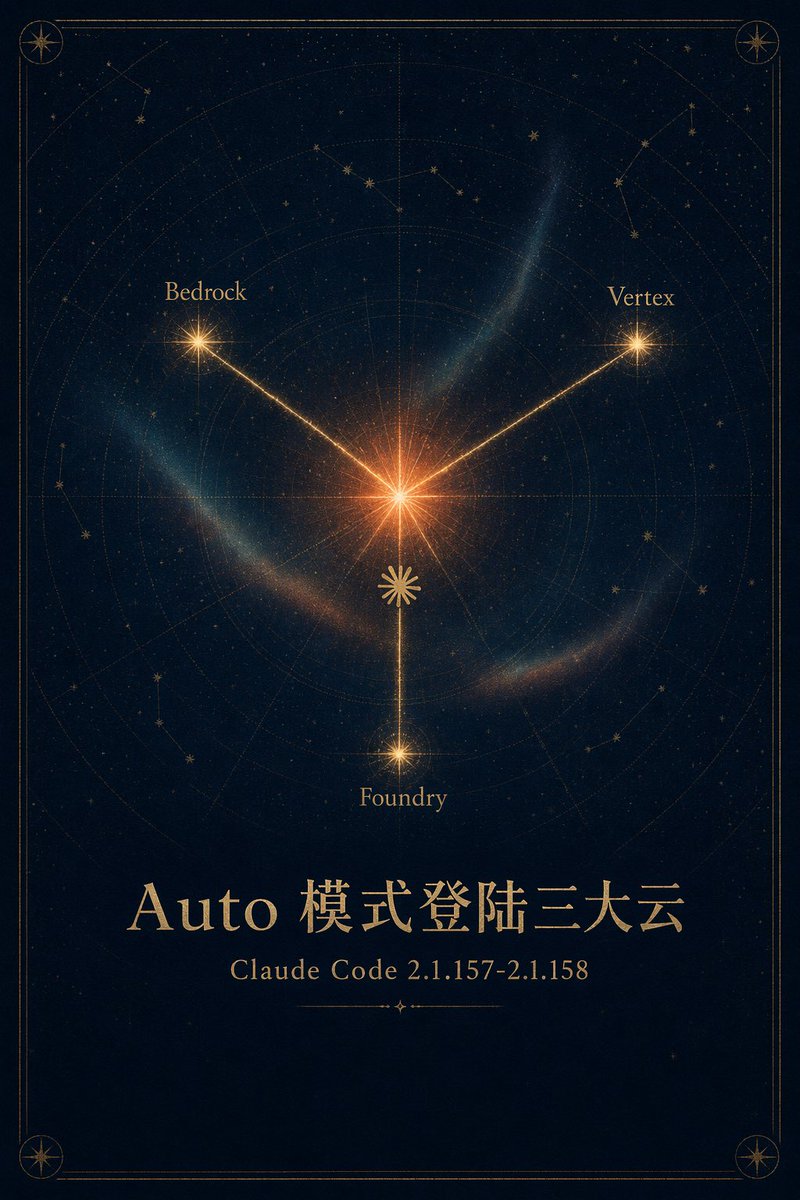
Celestial Cloud Launch Poster
Generates a premium gold-and-navy astrolabe-style announcement poster for a Claude Code Auto mode cloud launch.
This is a GPT Image 2 prompt case for Graphic & Poster. Use the copy-ready prompt below to generate similar visuals, and review Awesome GPT Image 2 Prompts attribution plus commercial-use rights before reuse.
Free 1K preview
Generate one preview image instantly, no sign-up required.
Prompt
Copy-ready prompt
Goal: Create an elegant mystical astronomy poster announcing {argument name="headline text" default="Auto mode login to the three major clouds"} with a celestial map motif and premium gold-on-navy styling.

Canvas: Vertical poster, 2:3 aspect ratio, deep midnight navy background with subtle paper grain, faint stars, and a thin double-line antique gold border with rounded corners. Add small compass-star medallions in all 4 corners.

Main illustration: Center the composition around one bright glowing orange-gold starburst slightly above the middle. From this center, draw exactly 3 luminous gold rays to 3 labeled satellite stars: upper left labeled {argument name="left cloud label" default="Bedrock"}, upper right labeled {argument name="right cloud label" default="Vertex"}, and bottom center labeled {argument name="bottom cloud label" default="Foundry"}. Each satellite point is a smaller radiant star, with the bottom star connected by a vertical ray. Place a small decorative gold rosette/sun symbol on the lower vertical ray between the center and bottom star.

Celestial chart details: Behind the rays, include faint concentric astrolabe rings, radial guide lines, dotted orbital arcs, subtle constellation line drawings, scattered tiny stars, and translucent blue-green nebula wisps curving around the center. The look should feel like an antique star atlas mixed with modern cinematic glow.

Text content: In the lower third, set a large refined serif title in metallic gold: {argument name="headline text" default="Auto mode login to the three major clouds"}. Below it, centered in smaller gold serif type, write {argument name="subtitle text" default="Claude Code 2.1.157-2.1.158"}. Under the subtitle, add a short thin ornamental divider line with a tiny diamond/star at its center.

Visual style: Sophisticated, high-end, poetic, celestial, dark academia, occult astronomical chart, luminous gold typography, subtle volumetric glow, balanced symmetry, crisp fine-line ornamentation.

Constraints: Use exactly 3 connected cloud labels and exactly 4 corner medallions. Keep the background dark and uncluttered, preserve the Chinese headline text exactly, avoid logos, people, watermarks, UI elements, or extra captions.
Prompt variables
Editable argument placeholders found in the prompt, with their default values.
Best for
- - Graphic & Poster visual exploration
- - Image generation and reference-image edits
- - Reusable briefs that keep source attribution visible
Change these parts
- - Subject, product, character, or scene
- - Aspect ratio, camera, lighting, and background
- - Brand, text, color, and output constraints
Recommended model and settings
- - Model: gpt-image-2
- - Input mode: Text to Image
- - Aspect ratio: source
- - Commercial status: review original source
How to use this prompt
- 1. Copy the prompt and preserve its structure for the first test.
- 2. Replace the subject, context, and publishing channel.
- 3. Change one camera, lighting, or style variable per iteration.
- 4. Inspect the output, source, text, and rights before reuse.
Limitations, source, and reuse cautions
- - Generated output is an editable draft, not factual, legal, or rights evidence.
- - Review the linked source, people, brands, logos, text, and third-party media before commercial use.
More cases in this category
Prioritized by category, input mode compatibility, quality, and lower risk.






Reuse and source notes
Use this prompt safely after previewing the case.
- 1.Copy the prompt or open it directly in Dovoo with the generation button.
- 2.Adjust variables, aspect ratio, and reference images for your own use case.
- 3.Before publishing or paid usage, verify source rights, attribution requirements, and brand or likeness risks.
Can I use this prompt commercially?
Commercial-use status is allowed. Review the original source, license, brand constraints, and legal requirements before paid usage.
Where does this case come from?
This case is imported from Awesome GPT Image 2 Prompts; keep attribution visible and check the source URL before reuse.