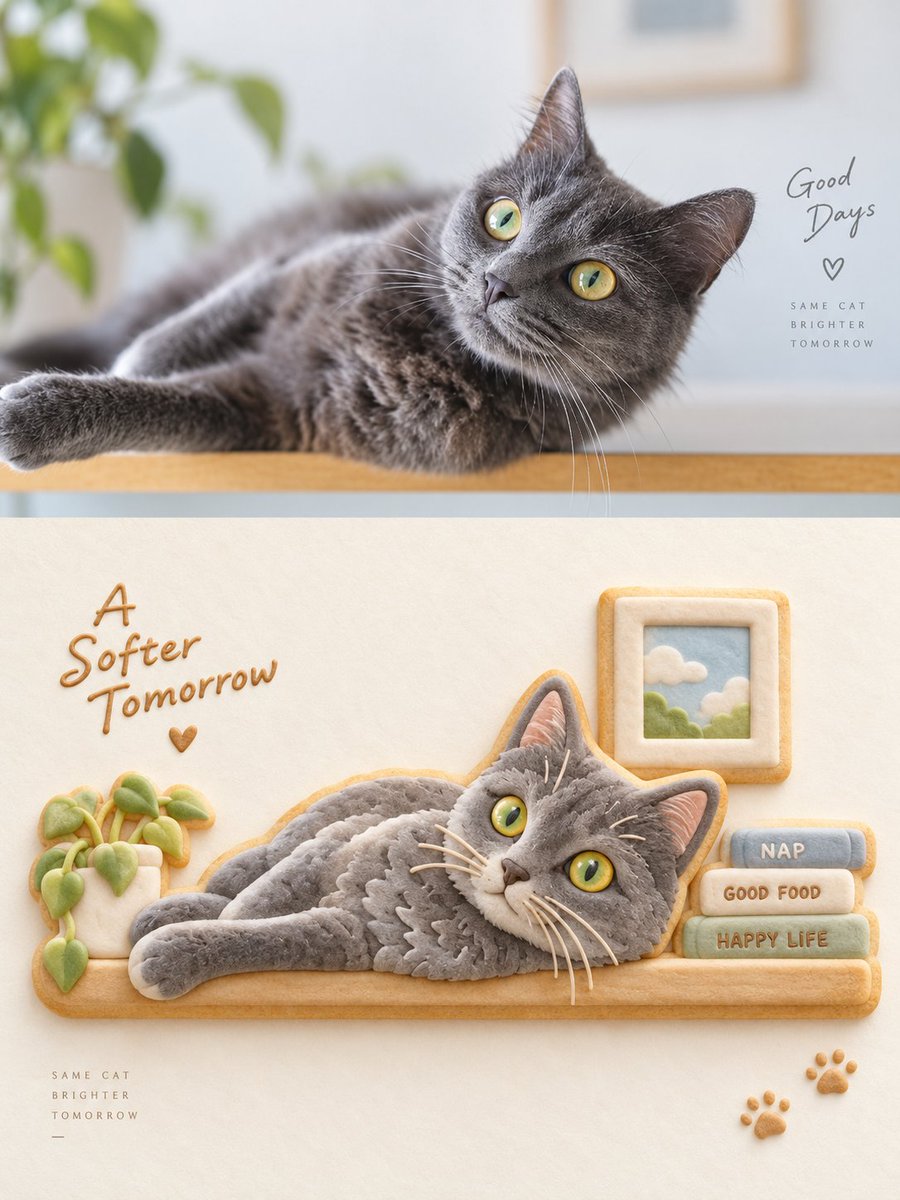
Grey Cat Photo vs Cookie Art Diptych
A split-screen composition contrasting a realistic photo of a grey British Shorthair with a whimsical recreation of the same scene using decorated sugar cookies.
This is a GPT Image 2 prompt case for Portrait & Character. Use the copy-ready prompt below to generate similar visuals, and review Awesome GPT Image 2 Prompts attribution plus commercial-use rights before reuse.
Free 1K preview
Generate one preview image instantly, no sign-up required.
Prompt
Copy-ready prompt
Create a vertical diptych image comparing a realistic photograph with an artistic cookie illustration. The top half features a close-up, high-resolution photograph of a grey British Shorthair cat lying down on a wooden surface, looking up and to the right with bright yellow-green eyes. The background is soft-focus white with blurred green plant leaves in the upper left corner. In the top right corner, overlay handwritten-style text reading "Good Days" followed by a small heart symbol and smaller sans-serif text below it: "SAME CAT BRIGHTER TOMORROW".

The bottom half displays a creative illustration where the same cat pose is recreated using decorated sugar cookies on a textured cream-colored paper background. The central element is a large, irregularly shaped cookie cutout of the reclining cat, covered in smooth grey royal icing with detailed texture lines mimicking fur, white whiskers, and painted yellow eyes. To the left of the cat-cookie is a small potted plant made of green and beige icing. Above the cat's head is a square cookie frame containing a blue sky and cloud design. To the right are three stacked rectangular cookies labeled "NAP", "GOOD FOOD", and "HAPPY LIFE" in brown icing. Above these elements, write "A Softer Tomorrow" in brown cursive script with a small heart. In the bottom left corner, repeat the small text "SAME CAT BRIGHTER TOMORROW". In the bottom right corner, add two small paw-print cookies.
Best for
- - Portrait & Character visual exploration
- - Image generation and reference-image edits
- - Reusable briefs that keep source attribution visible
Change these parts
- - Subject, product, character, or scene
- - Aspect ratio, camera, lighting, and background
- - Brand, text, color, and output constraints
Recommended model and settings
- - Model: gpt-image-2
- - Input mode: Text to Image
- - Aspect ratio: source
- - Commercial status: review original source
How to use this prompt
- 1. Copy the prompt and preserve its structure for the first test.
- 2. Replace the subject, context, and publishing channel.
- 3. Change one camera, lighting, or style variable per iteration.
- 4. Inspect the output, source, text, and rights before reuse.
Limitations, source, and reuse cautions
- - Generated output is an editable draft, not factual, legal, or rights evidence.
- - Review the linked source, people, brands, logos, text, and third-party media before commercial use.
More cases in this category
Prioritized by category, input mode compatibility, quality, and lower risk.



Reuse and source notes
Use this prompt safely after previewing the case.
- 1.Copy the prompt or open it directly in Dovoo with the generation button.
- 2.Adjust variables, aspect ratio, and reference images for your own use case.
- 3.Before publishing or paid usage, verify source rights, attribution requirements, and brand or likeness risks.
Can I use this prompt commercially?
Commercial-use status is allowed. Review the original source, license, brand constraints, and legal requirements before paid usage.
Where does this case come from?
This case is imported from Awesome GPT Image 2 Prompts; keep attribution visible and check the source URL before reuse.